xIn 4 Software
A Symetrix xIn 4 can be added to the site view.
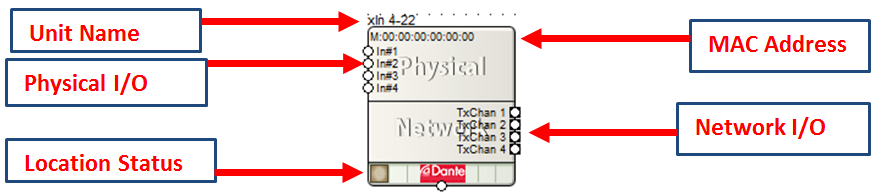
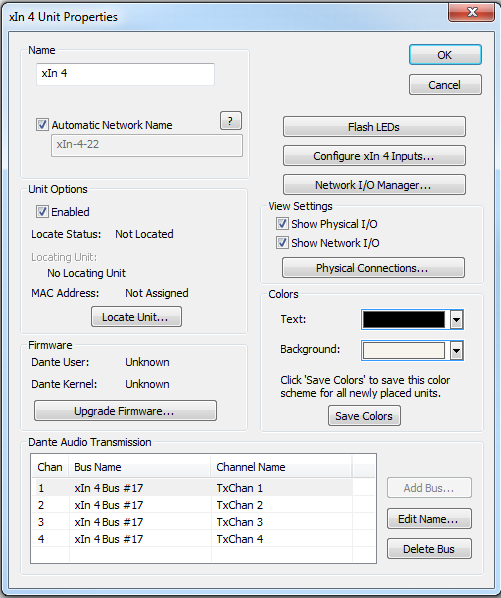
All of the following features are managed in the Unit Properties dialog. To access the Unit Properties, right-click on the unit module in the Site View and choose “Unit Properties...”
-
Name - It is recommended to assign a unique unit name for each unit in the design based on the unit's purpose or location. Composer will always append a unique numeric identifier to this name.
-
Network Name - When Automatic Network Name is checked, the network name is auto-generated from the unit name. Network names cannot contain special characters or spaces and must be unique.
-
Enabled - When the enabled box is checked, the unit must be physically present on the network for a Push of the site file to the hardware. When the enabled box is unchecked, a X will appear on the unit module in the Site View, and the unit will not be required to be physically present for the Push of the site file.
-
Locate Unit...- Opens the 'Locate Hardware' dialog box to select the unit to connect to.
-
Upgrade Firmware...- Opens the Upgrade Firmware/Hardware Settings dialog.
-
Flash LEDs- Flashes the front panel LEDs of the unit.
-
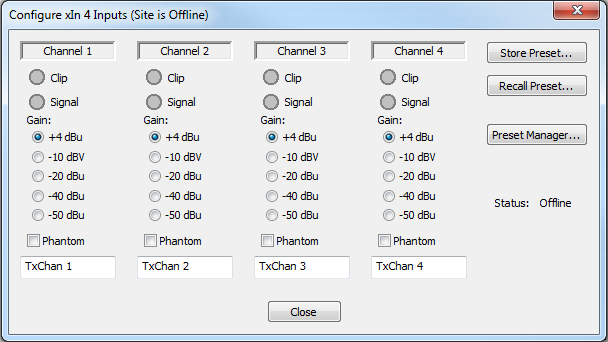
Configure xIn 4 Inputs -Configure the gain, phantom power, presets, and channel label settings of the Analog Inputs.
-
-Store Preset...- Store the current state of the inputs to a preset.
-
Recall Preset- Recalls presets 1-1000.
-
Preset Manager...- Opens the Presets Manager.
-
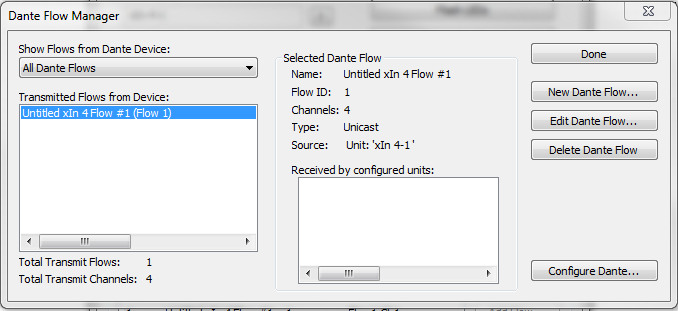
Network I/O Manager -Opens the Network I/O Manager dialog.
-
View Settings- When either Show Physical I/O or Show Network I/O check box is checked, the unit module in the Site View will show the corresponding connections.
-
Physical Connections...- Opens the Edit Physical Connections dialog.
- Colors-The text color and background color for the unit module can be customized. To save custom color settings made here as defaults for future units, click the Save Colors button.
Ultimo Limitations
- Ultimo devices cannot be used in redundant mode. There is no secondary Dante port, the units are PoE, and the Ultimo chip does not support it.
- Minimum latency is 1 mS.