Dialers
Introduction
The Dialer modules provide a way to generate Dual-tone, Multi-Frequency (DTMF) signals for dialing phone numbers. They are intended to be used in conjunction with a telephone hybrid or other telephone interface device.
Three different dialer modules are available: Manual Dialer, Speed-dial 10 and Speed-dial 20. All three modules provide a manual 12-key touch-pad like you would find on a standard telephone. The Speed-dial 10 and 20 modules add 10 and 20 speed dial settings, which can dial complete numbers with the push of a single button.
NOTE: The DTMF signals these modules generate conform to North American standards. They may not work in all regions, so please verify proper operation.
Outputs
Each module has a main audio output labeled 'Output'. The DTMF is sent out here at a fixed level of -6dBFS. There is also a control output labeled 'Dialing'. This is a Boolean control signal that is 100% when DTMF is being output and 0% otherwise. It is intended to be used to mute other signals during dialing.
Controls, all versions
-
12-key Keypad. There are (12) momentary buttons that produce the indicated tone. The tone is output for as long as the button is held down. Very short button presses will be extended to 70ms to ensure reliable operation.
-
Dialing LED. This LED lights when DTMF is being output.
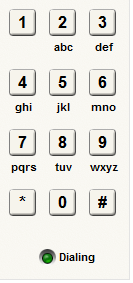
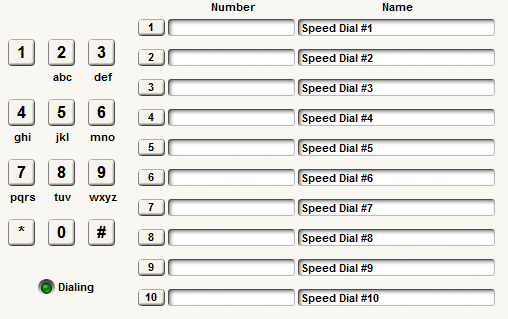
Manual Dialer Speed Dialer 10
Controls, speed versions dial only
-
*Speed-dial Activation buttons. The momentary buttons labeled 1-10 or 1-20 generate the indicated dialing string (phone number). While speed dial numbers are being executed, keypad button pushes are ignored. *
-
Speed-dial Number text box. Enter the desired dialing string (phone number) in this field. (See below of a list of allowed characters.) Dialing strings are limited to (51) characters including pauses and non-dialing formatting characters.
-
*Speed-dial Name text field. Enter a name for the speed dial to assist remembering what each number represents. Individual name length isn't limited per se, but the total number of characters for all names is limited to (200) or (400) for the (10) and (20) speed-dial modules respectively. Keeping each name under (20) characters ensures that this limit will not be exceeded. *
Speed dial allowable characters
The following characters are allowed in the speed-dial Number text box:
-
Digits 0-9
-
* (asterisk or star symbol)
-
(pound symbol)
-
Letters A-D (for the extra DTMF values sometimes found on military phones, test equipment, etc.)
-
, (comma, generates a pause of 1 second)
-
Non-dialing characters used for formatting: dash parenthesis, plus period, and space. These characters have no affect on the DTMF output, but may be useful in making numbers more readable.
Comments on interfacing with a telephone system hybrid
The best way to interface with a phone system is through the use of the Symetrix THI-101 (Telephone Headset Interface), or making use of the modular Symetrix ATI Card which contains two RJ11 telephone input jacks. A variety of 3rd party manufacturers have telephone hybrids available, which may be employed, or already present at the installation. In each case, the audio output from the device, or module would be summed, or mixed with the other audio you want to send down the phone line (e.g. microphones) and connected to the hybrid's audio input.
When dialing, it is a good practice to mute all signals other than the DTMF. (In fact, typical phone handsets mute their microphones when a keypad button is pushed.) The presence of other sounds may compromise the ability of downstream equipment to interpret and respond to the DTMF signals. The 'r;Dialing' control output is intended to facilitate this. It can be assigned to control a mute button for other audio sources, e.g. local microphones.
The DTMF signal level on the phone line is supposed to be between -8.5 and +1dBm for proper dialing. Typically a hybrid will have a variable gain stage to directly affect this level. Due to external gain stages is it difficult to recommend the appropriate signal level coming from the Symetrix DSP. However, if a unity gain path is maintained from module output to hybrid input, the -6 dBFS peak output level should be appropriate for typical telephone hybrids we've tested. In all cases, it is a good idea to verify signal levels with meters on the hybrid itself. Adjust the dialing level for a strong level (near peak) on the hybrid's meters.
Miscellaneous notes
-
Speed dials use a 70 ms tone followed by a 50 ms pause (inter-digit gap). This is slightly slower than the maximum allowed rate in the North American specification to allow for broader compatibility.
-
A comma character (,) produces a pause of one second. Multiple commas can be used to generate longer pauses.
-
After a speed dial button is pushed, the indicated dialing string (phone number) will be sent out. If another speed dial button is pushed during the sequence, that push will be held off until the first sequence is finished, then it will be immediately executed. If multiple speed dials are 'r;queued up', they will be executed in ascending numerical order (not the order in which they were pushed).
-
During speed dials, the manual dialing buttons are ignored.
-
For the manual dial buttons, the module attempts to hold each tone for at least 70 ms, extending shorter pushes as necessary. However, if buttons are pushed very quickly (e.g. via remote control), it may not always be possible to enforce this minimum duration, so some pushes may be shortened or skipped. It is up to the remote control system to make sure tones are held for a reasonable minimum duration. We recommend at least a 70 ms tone duration followed by a 50 ms gap.
-
For the manual dial buttons, if more than one button is pushed simultaneously (e.g. via remote control), the lowest numbered button will take precedence; (the order is 0,1,2,3,4,5,6,7,8,9,*,#).