Device
Overview
The Device API is a global variable table that allows the script access to various constants (and psuedo-constants) maintained by the main Device Firmware when online, or Composer when offline.
This is especially helpful for TCP/UDP communications to allow Intelligent Modules to be associated with a given 3rd party Dante device.
Device.
| Type | Comment | |
| Device.Offline | Bool | True if running offline in Composer |
Device.Offline
Returns a Bool “true “ if the script is running while Composer is Offline. Returns Bool “false” if the script is running while Composer is Online.
print(Device.Offline) >> false
This is very commonly used to do different things if online or offline
if Device.Offline then
--Do some stuff when Offline
else
--Do different stuff when Online
end
Device.LocalUnit
The Device.LocalUnit API returns information about the device on which the script is executing.
| Availability | Type | Comment | |
| Device.LocalUnit.ControlIP | 8.0 | String | Dotted IP address of network adapter used for control. |
| Device.LocalUnit.AudioIP | 8.0 | String | Dotted IP address of network adapter used for network audio. |
| Device.LocalUnit.Name | 8.0 | String | Network Name of the device running the script. |
| Device.LocalUnit.Type | 8.0 | Integer | Hardware type enumeration of the device running the script. |
| Device.LocalUnit.TypeName | 8.0 | String | Hardware type name of the device running the script. |
| Device.LocalUnit.InterfaceVersion | 9.0 | String | The dotted version number of Composer that is executing the IM offline or pushed the IM online, e.g. “9.0.0.19” |
| Device.LocalUnit.FirmwareVersion | 9.0 | String | The dotted version number of the firmware that is executing the IM online, i.e. “9.0.0.19”. The field is blank offline. |
| Device.LocalUnit.TimerResolution | 9.0 | Float | The minimum timer period available in milliseconds. |
Device.LocalUnit.ControlIP
Returns the dotted IP address of the network adapter used for control. When Online, this will be the actual Control IP address of the device on which the script is executing.
print(Device.LocalUnit.ControlIP) >> 192.168.0.10
This will be zero when Online before the IP address of the IP unit has resolved. The script can (and should) look for it being zero as an indicator the device has not completed booting yet as even if there is no network connection, it will eventually get a link local address.
When Composer is Offline, it will return the IP address of the network adapter designated for Control in the Intelligent Module Options window.
Device.LocalUnit.AudioIP
Returns the dotted IP address of the network adapter used for network audio. When Online, this will be the actual Audio Network IP address of the device on which the script is executing.
print(Device.LocalUnit.AudioIP) >> 169.254.1.21
This will be zero when Online before the IP address of the IP unit has resolved. The script can (and should) look for it being zero as an indicator the device has not completed booting yet as even if there is no network connection, it will eventually get a link local address.
When Composer is Offline, it will return the IP address of the network adapter designated for Network Audio in the Intelligent Module Options window.
Device.LocalUnit.Name
Returns the Name of the device on which the script is executing. This behaves the same when running Offline or Online.
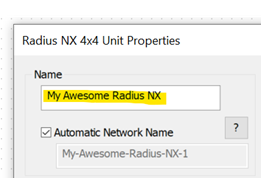
print(Device.LocalUnit.Name) >> My Awesome Radius NX-1
This name will be unique for all devices in your Site. This is done by taking the user device name (editable in the Unit Properties dialog) and appending a Composer supplied enumeration to the end. In the case of the example above, “-1” is added.
Device.LocalUnit.Type
Returns an enumeration for the type of device on which the script is executing. This behaves the same when running Offline or Online.
print(Device.LocalUnit.Name) >> 113
Below is a list of the enumeration codes for all Symetrix devices that support Intelligent Modules:
-
Invalid = 0
-
Edge = 36
-
Solus NX 4x4 = 40
-
Solus NX 8x8 = 41
-
Solus NX 16x16 = 42
-
Radius 12x8 = 43
-
Radius 12x8 AEC = 46
-
Radius 12x8 EX = 64
-
Prism 4x4 = 71
-
Prism 8x8 = 72
-
Prism 12x12 = 73
-
Prism 16x16 = 74
-
Prism 0x0 = 104
-
Radius NX 12x8 = 110
-
Radius NX 4x4 = 113
-
Server D100 = 157
Device.LocalUnit.TypeName
Returns the name of the type of device on which the script is executing. This behaves the same when running Offline or Online. This will be the same for all devices of the same type.
print(Device.LocalUnit.TypeName) >> Radius NX 4x4
Device.LocalUnit.InterfaceVersion
Returns the dotted version number of Composer that is executing the IM offline or pushed the IM online.
print(Device.LocalUnit.InterfaceVersion) >> 9.0.0.19
Device.LocalUnit.FirmwareVersion
Returns the dotted version number of the firmware that is executing the IM online. The field is blank offline.
print(Device.LocalUnit.FirmwareVersion) >> 9.0.0.19
Device.LocalUnit.TimerResolution
Returns an float representing the minimum timer period available in milliseconds.
Radius NX, Edge and Prism class devices, are updated at a maximum of 4 Hz so the smallest allowable timer period is 0.25 seconds or 250 ms.
Server D100, is updated at a maximum of 1 Hz so the smallest allowable timer period is 0.1 seconds or 100 ms.
When running an IM offline, the value is the expected version for the firmware of the unit type the IM as placed in.
print(Device.LocalUnit.TimerResolution) >> 100
This is typically used to set the timer period.
Device.RemoteUnit
The Device.RemoteUnit API returns information about the associated User Library Dante Device and thus should only be used with these types of Intelligent Modules. If used in a script for a Stand Alone Intelligent Module, Device.RemoteUnit will return nil, thus any of the API calls will cause an error. To learn more about these two types of Intelligent Modules, see Creating Custom Intelligent Modules .
| Type | Comment | |
| Device.RemoteUnit.IP | String | Dotted IP address of Dante unit’s control interface, if known. |
| Device.RemoteUnit.Name | String | Name of the Dante unit being controlled. |
| Device.RemoteUnit.Type | Integer | Hardware type enumeration of Dante unit being controlled. |
| Device.RemoteUnit.TypeName | String | Hardware type name of Dante unit being controlled. |
| Device.RemoteUnit.DanteIP | String | Dotted IP address of Dante unit’s audio interface. |
| Device.RemoteUnit.DanteMAC | String | MAC address of Dante unit in the form of XX:XX:XX:XX:XX. |
| Device.RemoteUnit.DanteName | String | Dante name of Dante unit being controlled. |
| Device.RemoteUnit.DanteModel | String | Model name of Dante unit being controlled. |
| Device.RemoteUnit.DanteMfg | String | Manufacturer name of Dante unit being controlled. |
Device.RemoteUnit.IP
Returns the dotted IP address of the network adapter used for control of the associated Dante Device if known. When Online, this will be the actual Control IP address of the associated Dante Device.
print(Device.RemoteUnit.IP) >> 192.168.0.10
Note this is not known for most remote devices and the control IP needs to be determined through other means and entered manually by the user for use by the script. In this case the API will return “0.0.0.0”.
Device.RemoteUnit.Name
Returns the Network Name of the associated Dante Device. This behaves the same when running Offline or Online. This will be unique for all devices in your Site.
print(Device.RemoteUnit.Name) >> My Cool Dante Mic
This corresponds to the Network Name assigned in Composer which can be set automatically or manually from the Unit Properties dialog.
Device.RemoteUnit.Type
Returns an enumeration for the type of the associated Dante Devices. This behaves the same when running Offline or Online.
print(Device.RemoteUnit.Type) >> 94
A single code is used for all User Library Dante devices: 94. So all devices should return this code.
Device.RemoteUnit.TypeName
Returns the name of the type of the associated Dante Device. This behaves the same when running Offline or Online. This will be the same for all devices of the same type.
print(Device.RemoteUnit.TypeName) >> Audio-Technica-ATND971
Device.RemoteUnit.DanteIP
Returns the dotted IP address of the network adapter used for the Dante network of the associated Dante Device. This behaves the same when running Offline or Online.
print(Device.RemoteUnit.DanteIP) >> 169.254.1.21
Device.RemoteUnit.DanteMAC
Returns the MAC address of the network adapter used for the Dante network of the associated Dante Device. This behaves the same when running Offline or Online.
print(Device.RemoteUnit.DanteMAC) >> 12:34:56:78:90
Device.RemoteUnit.DanteName
Returns the Dante Name of the associated Dante Device. This behaves the same when running Offline or Online. This will be unique for all devices in your Site.
print(Device.RemoteUnit.DanteName) >> My Cool Dante Mic
This is the name assigned in Dante Controller.
Device.RemoteUnit.DanteModel
Returns the Dante Model Name of the associated Dante Device. This behaves the same when running Offline or Online. This will be the same for all products of the same model.
print(Device.RemoteUnit.DanteModel) >> ATND971
This is the Model Name found on the Status tab in Dante Controller.
Device.RemoteUnit.DanteMfg
Returns the Dante Manufacturer Name of the associated Dante Device. This behaves the same when running Offline or Online. This will be the same for all products with the same manufacturer.
print(Device.RemoteUnit.DanteMfg) >> Audio-Technica
This is the Manufacturer Name found on the Status tab in Dante Controller.
Usage Examples
The following examples illustrate how these can be used:
Example 1 – Check and make sure it is a good IP before using
Because the IP address may not be valid yet, you should check before using it.
--state
validIP = false
function TimerClick ()
--Check if IP was previously marked as valid
if validIP ~= true then
--If not yet valid, check if IP is Valid
if Device.LocalUnit.ControlIP ~= "0.0.0.0" then
--If valid, mark it as so for future use
validIP = true
end
--if not valid, try again next time timer fires
else
--do communications using the validated IP address
end
end
MyTimer = Timer.New()
MyTimer.EventHandler = TimerClick
MyTimer:Start(.5)