2 Line Analog Telephone Interface Card
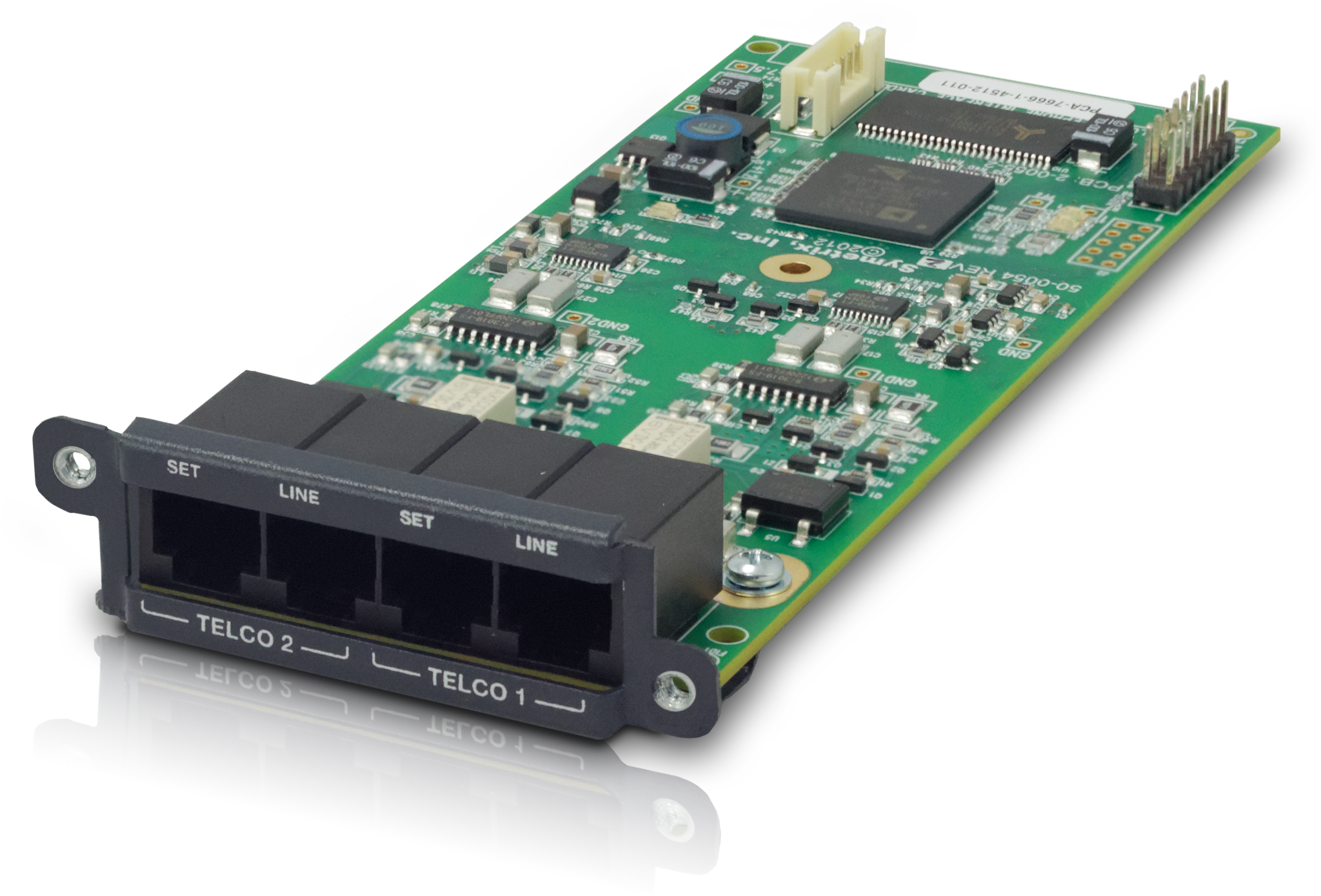
The 2 Line Analog Telephone Interface Card integrates a complete set of PSTN telephony functions into Composer-based conferencing systems. Use up to four cards per Edge frame and one per Radius AEC or Radius NX. Telco connections are provided on two RJ11 ports for easy connection. A variety of control options including PSTN telephones, SymVue and third-party control devices allow intuitive end-user operation and design management. The 2 Line Analog Telephone Interface Card is suitable for a multitude of applications including conferencing, paging, remote monitoring, and broadcast.
Features:
- Integrates analog telephone lines into Composer-based conferencing systems. Use up to four cards per Edge frame, one per Radius AEC or Radius NX.
- Standard PSTN telephony functions include:
- Detect and answer incoming calls
- DTMF tone dialing
- Speed-dialing
- Redial
- Do not disturb
- DTMF decoding
- Caller ID reception
- Call progress detection
- Continuous line status and fault monitoring
- Standard RJ11 ports with parallel “set” connections per line for a physical handset, dialer, or ADA compliant visual or audible device connection.
- Field swappable by certified technicians.
- Also suitable for typical audio applications such as paging, broadcast feeds and remote system monitoring.
Specifications
Telco "Line" Connector: RJ11. Format: POTS (Plain Old Telephone Service) or analog extension from a PBX.
Telco "Set" Connector: RJ11. Format: POTS (Plain Old Telephone Service) or analog extension from a PBX. Note: Relay bridged to Line port with option in software to isolate based on hook status.
Frequency Response: 250Hz to 3.3 kHz ±1.0 dB
THD+N: <0.3%
Signal to Noise Ratio: > 62 dB
LEC Tail Time: 32 mS
Null: 55 dB nominal.
Compliance: G.165, G.168 compliant.
Tx Level: -10.0 dBm RMS average; +3.2 dBm maximum.
Rx Level: -10.0 dBm RMS average; +3.2 dBm maximum.
Transhybrid Loss: > 48 dB with LEC enabled.
Ringer Equivalency Number: 0.0 dB
Mechanical Data
Shipping Weight: 1 lbs. (0.45 kg)
Certifications or Compliance: EN 55103-1, EN 55103-2, FCC Part 15, FCC Part 68, RoHS, FCC 47 CFR Part 68, ACTA TIA-968-B, TIA-1096, IC CS-03 Part I, DC-01(E)
A&E Specifications
This device shall provide two analog telephone interface inputs to an EDGE frame, Radius AEC or Radius NX with standard PSTN telephony functions. Up to four of these devices may be installed in a single EDGE frame for up to eight channels of local input, or one device may be installed into a single Radius AEC or Radius NX for up to two channels of local input. Levels, mutes, inversions and formats shall be controllable via software. Audio inputs shall be access via rear panel RJ11 (6P6C) connectors.
Audio conversion shall be 24-bit, 48 kHz. The dynamic range shall not be lower than 115 dB, A-weighted with a maximum input level of +23 dBu.
The device shall comply with CE, FCC Part 15 emissions limits, and FCC Part 68. The device shall be RoHS compliant. The mounting plate shall be constructed of cold rolled steel, and mount into a Symetrix Radius AEC, Radius NX or EDGE frame I/O card slot. The device shall be a Symetrix 2 Line Analog Telephone Interface Card.
This device is in compliance with the Federal Communications Commission’s (FCC) Rules and Regulations 47 CFR Part 68, and the Administrative Council on Terminal Attachments (ACTA) – adopted technical criteria, TIA-968-B – Telephone Terminal Equipment, Technical Requirements For Connection of Terminal Equipment To The Telephone Network, August 2009 and TIA-1096.
This device meets the Industry Canada technical specifications CS-03 Part I for terminal equipment and related access arrangements intended for direct connection to analogue wireline facilities and DC-01(E) for the declaration of conformity and registration of terminal equipment.
External Connections
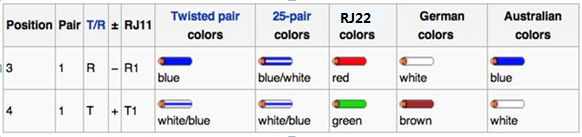
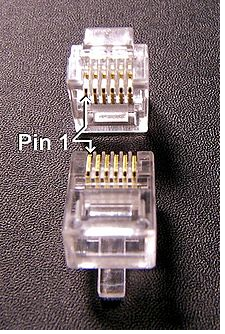 Connect the 'Telco 1' 'Line' port to the local POTS wall jack using a standard telephone cord terminated with RJ11 (6P6C) connectors. Optionally, connect a standard analog telephone, dialer, audible and/or visual ringing device, to the 'Telco 1' 'Set' port of the 2 Line Analog Telephone Interface Card (also referred to as the ATI card). Repeat instructions for 'Telco 2' port use.
.png)
GUI
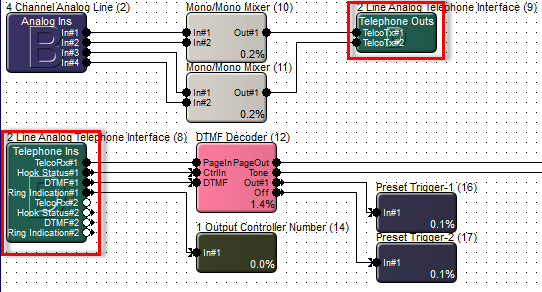
'Telephone Ins' Module
TelcoRx - a mix of PSTN call progress signals (dial tone, busy tone) as well as synthesized signals, (ring, connect/disconnect, and page tones) and the call audio from the telephone microphone.
Hook Status - A control signal output indicating whether the telephone is on the hook (hung up) or off the hook. The signal is High when the phone is off the hook.
DTMF - For passing DTMF (Dual-Tone Multi-Frequency) tones to the Symetrix DTMF Decoder Module.
Ring Indication - A control signal output indicating whether the telephone line connected to the Line input of the card is receiving a call. If the telephone is ringing into the DSP module this control signal will be measured High.
TelcoRx#1 and TelcoRx#2 Labels - User editable field for both of the input channels.
Meter - (The Telco # 1 or Telco #2 Receive meter). This meter is calibrated in dBFS from -72dB to +0dB. The meter will indicate the level of incoming signal on the Line input, including, Ring, Dial, DTMF tones, and the far end caller.
Dial Tone - This gain fader and it's associated mute key relate to the dial tone which is typically heard on a telephone when the receiver is picked up. The signal can be adjusted or muted here.
Ring Tones - This gain fader and it's associated mute key relate to the ring tones which will sound when the Line input is receiving a call. The signal can be adjusted or muted here.
DTMF - This control adjusts the level of the DTMF tones being fed to the local sound system. It does not affect the level of DTMF tones sent back through the phone line. DTMF (Dual-Tone Multi-Frequency) tones are used to dial numbers through the PSTN.
Dialer
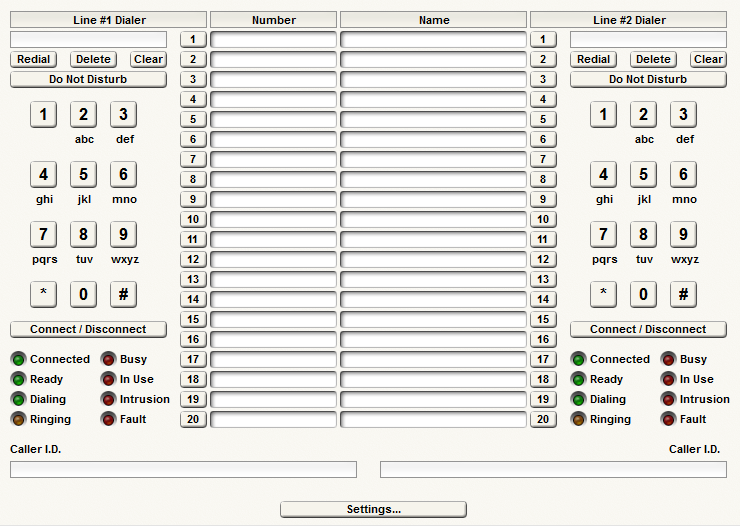
Redial - Press this button to redial the last number.
Delete - Press this button to clear the last digit dialed.
Clear - Clears the last phone number entered.
Do Not Disturb - Press this button to mute the ringer for the incoming call.
Keypad - Similar to a telephone handset, this section will allow the user to input alpha-numeric characters to place a call.
Connect/Disconnect - This button is pressed to connect the system with the current incoming call. It is analogous to picking up the telephone when someone is calling in. It can be pressed first to sound the dial tone prior to dialing the phone number, or the number can be dialed first and then the button pressed to initiate the call. When pressed during a call, the connection will dropped, analogous to hanging up the telephone.
Connected LED - This LED will illuminate when the phone call has been answered either on the receiving or transmitting end.
Ready LED - This LED will illuminate when the system is ready to receive or place phone calls.
Dialing LED - This LED will illuminate when a number is dialed.
Ringing LED - This LED will illuminate when the outgoing call receives a ringing signal.
Busy LED - This LED will illuminate when the outgoing call receives a busy signal.
In Use LED - This LED will illuminate when the line is in use.
Intrusion LED - This LED will illuminate when another party has picked up a receiver on the same line.
Fault LED - This LED will illuminate when the ATI Line input jack is empty or when the telephone line is deemed to be in an open loop state. This LED also indicates a fault when there is a signal less than 3 V, current less than 4 mA, and for a time duration of at least 1.5 seconds. These thresholds are in place to avoid the fault indication for a normally operating line cycling through it's open circuit disconnect.
Speed Dial - The 20 fields available in the Speed Dial area enable the user to enter custom numbers for speed dialing. The speed dial button can be controlled with Symetrix Control Numbers and also placed onto Control Screens. The character (,) will cause a one second pause in the dialing scheme to permit the speed dial to ring through to a certain extension in a phone tree. Other special characters used for formatting; dash, parenthesis, plus, period, and space have no affect on the DTMF output but may be useful in making the numbers more readable.
Caller ID - Displays the number of the incoming call.
Settings
The Settings button is found at the bottom of the 'Telephone Ins' module GUI.
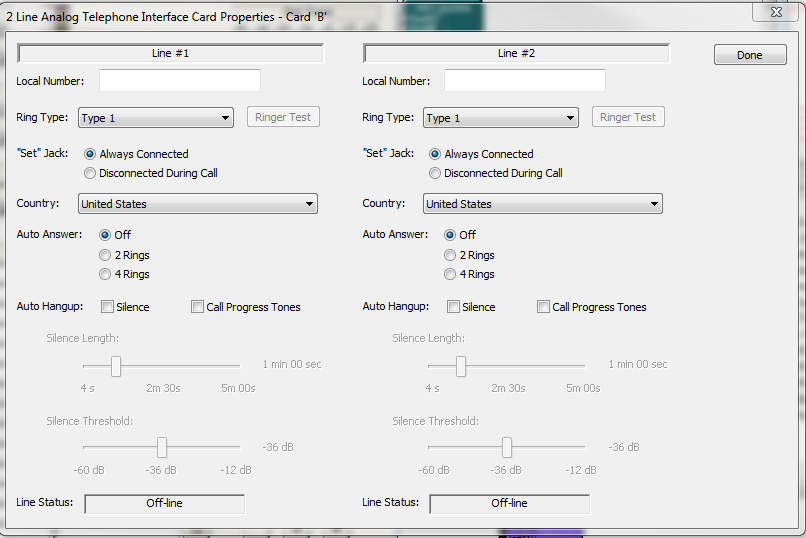
Local - Listing of the local number that the card is using to call out from. This is the number of the local telephone line.
Ring Type - A selection to choose which type of ringer will be heard in the system. The options are; Off, 1, 2, 3, 4.
Ringer Test - This button sounds the currently selected Ringer.
Set Jack - The selections; Always Connected vs. Disconnected During Call, determines whether the SET port is bridged in a 'Y" fashion or isolated automatically based upon the hook status.
Country - Select the country that is being called here. It will automatically dial the country code first.
*All countries outside of the United States and Canada are still in Beta.**
Auto Answer - An incoming call will be automatically connected after 2 or 4 rings.
Auto Hangup - Configures the Line to automatically disconnect the current call when the input is below the silence threshold for a specified duration. Loop drop auto hangup is always enabled. The Call Progress Tones option detects the appropriate tones based on country selection and will auto hangup when the signal is present (i.e. busy signal).
Line Status - Reports the following statuses: 'Reset', 'Ready', 'Outgoing Call', 'Ringing', 'Ring Silence', 'Incoming Call', 'Disconnect', 'In Use', and 'No Line'.
Note: The Settings button from the ATI card module cannot be exported to SymVue.
'Telephone Outs' Module
Telco Transmit #1 and Telco Transmit #2 input jacks are available for the transmission of audio from the Edge, Radius AEC or Radius NX unit back to the telephone line / far end caller.
Note: Other signals required for a telephone to work (such as DTMF tones) are passed to the phone line. The ATI card is designed to work like a standard telephone system.
TelcoTx#1 and TelcoTx#2 Label - User editable fields for both output channels.
Meter - Calibrated in dBFS from -72dBFS to +0dBFS.
Mute - Mutes the output signal.
Limit LED - The LED illuminates when the channel signal limit has been reached.