xIn 12


Specifications
System
Sampling Rate: 48 kHz, ± 100 ppm
Frequency Response (A/D/A): 20 Hz – 20 kHz, ± 0.5 dB
Dynamic Range (A/D/A): > 114 dB, A-weighted
Channel Separation (A/D/A): > 108 dB @ 1 kHz, +24 dBu
THD+Noise: < -85 dB (unweighted); 1 kHz @ +22 dBu with 0 dB gain
Latency (A/D/A): 0.88 mS, inputs routed to outputs
Processors: 1 x Analog Devices SHARC 21489 @ 400 MHz SIMD
Raw processing capacity: 400 MIPS, 1.6 GFLOPS
Dante Cable: Standard CAT6, maximum device-to-device length = 100 meters
Analog Inputs
Number of Inputs: Twelve (12) switchable balanced mic or line level
Connectors: 3.81 mm terminal blocks
Nominal Input Level: +4 dBu with 20 dB of headroom
Maximum Input Level: +23 dBu
Mic Pre-amp Gain: 0, 11.8, 24, 44 or 54 dB switchable with ± 24 dB trim
Mic Pre-amp EIN: < -127dB with 150 ohm source impedance
CMRR: > 76 dB @ 1 kHz, unity gain
Input Impedance: 8k Ohms balanced, 4k Ohms unbalanced
Phantom Power (per input): +48 VDC @ 10 mA maximum
Dynamic Range: > 115 dB, A-weighted
THD + Noise: < -94 dB, unweighted; 1 kHz @ +22 dBu with 0 dB gain
Latency: 0.28 mS
Mechanical Data
Space Required
1U (WDH: 18.91 in x 9.5 in x 1.72 in / 48.02 cm x 24.13 cm x 4.37 cm). Depth does not include connector allowance.
Allow at least 3 inches additional clearance for rear panel connections. Additional depth may be required depending upon your specific wiring and connections.
Electrical
100-240 VAC, 50/60 Hz, 45 Watts maximum universal input.
No line voltage switching required.
Ventilation
Maximum recommended ambient operating temperature is 30 C / 86 F. Ensure that the left and right equipment sides are unobstructed (5.08cm, 2 in minimum clearance). The ventilation should not be impeded by covering the ventilation openings with items such as news papers, tablecloths,curtains, etc.
Certifications or Compliance
Safety: UL 60065, cUL 60065, IEC 60065
EMC: EN 55103-1, EN 55103-2, FCC Part 15
Environmental: RoHS
Shipping Weight
13 lbs. (5.9 kg)
A&E Specifications
The device shall provide twelve analog mic/line inputs that are adjustable from line to mic level with coarse gain, fine trim and phantom power. Levels, phantom powers, signal inversions and mutes shall be controllable via software. Audio connections shall be accessed via rear panel 3.81 mm terminal block connectors.
Network audio expansion shall be provided by the Dante protocol with a capacity of 128 (64x64) channels. Primary and Secondary Dante network audio connections shall be provided for redundant network implementation. Connectors shall be gigabit RJ45 utilizing CAT6 cable.
A designer software application shall be provided that operates on a Windows computer, with network interface installed, running Windows® 7 or higher operating system. Computer connection for configuration shall be via the associated host/parent DSP's rear panel Ethernet connector. All PC Configuration connections must be done through host/parent DSP unit. All internal processing shall be digital (DSP). Audio intended for processing by DSP modules will need to be transmitted to the host/parent DSP through Dante Buses.
Audio conversion shall be 24-bit, 48 kHz and internal processing shall be 32-bit or 40-bit floating point, 48 kHz. The dynamic range shall not be lower than 115 dB, A-weighted with a maximum input level of +23 dBu and maximum output level of +24 dBu.
The device shall have an IEC power input socket for 120-240 VAC. The device shall meet UL/CSA and CE safety requirements and comply with CE and FCC Part 15 emissions limits. The device shall be RoHS compliant. The chassis shall be constructed of cold rolled steel and moulded plastic, and mount into a standard 19” 1U EIA rack. The device shall be aSymetrix Symetrix xIn 12.
Front Panel
| Item | Description | Comments |
|---|---|---|
| Signal Level LEDs | Twelve (12) bi-color LEDs | Illuminates green to indicate signal present > -48 dBu, amber between +0 dBu (-20 dBFS) and +23 dBu (-2 dBFS) and red to indicate clipping > +24 dBu (> -1 dBFS). All signal level LEDs will briefly flash amber on configuration load (on boot or when Composer pushes to hardware). |
| Power | Bi-color LED | Flashes green until the unit fully boots. If it remains flashing indefinitely, this may indicate a firmware or hardware problem. Solid green when operating on the main power input. The Power LED flashes green/amber to indicate a fan failure. |
| (Dante) Primary | Bi-color LED | Bi-color LED is off when nothing is connected, green when connected and all subscriptions are working, amber when some subscriptions working, and red when no subscriptions working. If a name conflict is detected, both the Primary and Secondary Dante LEDs will flash red. A name conflict means that 2 units were found on the network with the same name. |
| (Dante) Secondary | Bi-color LED | Bi-color LED is off when nothing is connected, green when connected and all subscriptions are working, amber when some subscriptions working, and red when no subscriptions working. If a name conflict is detected, both the Primary and Secondary Dante LEDs will flash red. A name conflict means that 2 units were found on the network with the same name. |
Rear Panel
| Item | Description | Comments |
|---|---|---|
| Power | Detachable IEC Power Cable | 100-240VAC, 50-60Hz, 25 W maximum |
| (Dante) Primary | Bi-color LED | 1000 Base-T Ethernet port provides (128) [64X64] channels of Dante network audio. Both ports are ports of the same internal switch to permit daisy chaining up to (10) units or may be switched for independent use in redundant operation. |
| (Dante) Secondary | Bi-color LED | 1000 Base-T Ethernet port provides (128) [64X64] channels of Dante network audio. Both ports are ports of the same internal switch to permit daisy chaining up to (10) units or may be switched for independent use in redundant operation. |
| Analog Mic/Line Inputs | Thirty-six (36) position 3.81 mm terminal blocks | Twelve (12) balanced analog audio inputs individually software-adjustable from line to mic level with coarse gain, fine trim, phantom power, invert and mute. Reference levels of; -50dBu, -40dBu, -20dBu, -10dBV and +4dBu, phantom power and mute are available. |
Hardware Connections
Power (Main): Connect the IEC connector end of the supplied AC cord to the receptacle on the rear of the Radius. Connect the AC connector end of the supplied AC cord to an AC power source that is of the correct voltage and frequency (100-240 VAC, 50-60 Hz). Use only the power cord and connector specified for the product and your operating locale.
 Dante (Primary): If using Dante network audio, connect the primary jack to directly to another Radius, 3rd party device, or Dante compatible switch using a standard straight-through CAT6 cable terminated with RJ45 connectors. For complete information on Dante network audio, network topologies, setup and configuration, refer to the Dante networking topics.
 Dante (Secondary): If using Dante network audio and daisy chaining Radius units locally, or utilizing a redundant Dante network configuration, connect the primary jack to directly to another Radius or Dante compatible switch using a standard straight-through CAT6 cable terminated with RJ45 connectors. For complete information on Dante network audio, network topologies, setup and configuration, refer to the Dante networking topics.
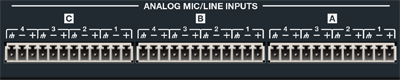 Analog Mic/Line Inputs: Using standard mic/line cables terminated on one end with terminal block connectors and appropriate connectors for your mic/line sources on the other end, connect the terminal block ends into the Analog Mic/Line Inputs on Radius and the opposite ends into your source devices' outputs. Refer to the Audio Wiring Reference for more information.
NOTE: Wiring the inputs to an unbalanced cable will typically result in an input level that is 6 dB lower than the input level achieved using a balanced cable. If wiring to an unbalanced source, you may need to adjust the input level. Refer to the xIn 12 Software topic.