Navigation
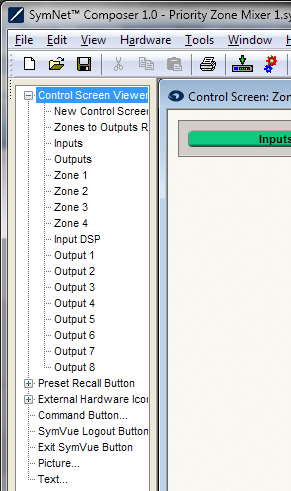 Chances are, one Control Panel will not accommodate all the controls you’d like to use - or that more than one panel will be employed for organizational purposes. Thus, when creating Control Screens in Composer one can place link buttons on one screen to navigate to another. Notice that when a Control Screen is open, the toolkit contents change. At the top of the Control Screen Toolkit is the Control Screen Viewer control. Expand this tree to see a list of the available Control Screens in the design, or create a new one by choosing Blank Control Screen.
By double-clicking any of these viewer buttons or by clicking and dragging one into your Control Screen design, a link button is added which, when in user mode, will take one to the related screen when clicked. These buttons are then exported with the screen into the SymVue Panel and act the same way. Multiple buttons can be placed on a single Panel, and of course the same button could be placed on multiple Panels; it all depends on the designer thinks the project should flow and what makes the most ergonomic sense. For instance, each Panel could have a Viewer button that would navigate back to the initial or main Panel so that when on Panel five, one would not have to go back through all previous Panels just to get to the home Panel.