ARC-2e Installation
Overview
The ARC-2e Adaptive Remote Control Wall Panel taps into the full power of the system with twenty-four menus with up to sixteen enumerations each, that address multiple functions or initiate complex logic-based control events.
Programming may include: Gain, preset triggering, source selection, room combining, and volume control.
Intuitive Navigation: Pressing the menu button navigates through the menu names. The menu button is also acts as a preset trigger when a preset list is scrolled. The up/down arrow buttons adjust parameter settings and scroll through preset lists. Holding the menu button and using the up/down arrow keys moves forward or backward through the menus.
Programmable Setup: Menu brightness in "active" and "inactive" states are set independently, so the display will "sleep" in light-sensitive environments like theaters. If the ARC-2e goes idle, it can scroll a message and return to the top of its menu tree. Upper and lower parameter limits help contain the range of adjustment and a button press lockout will prevent tampering.
The menu-driven ARC-2e Adaptive Remote Control Wall Panel controls up to 24 parameters in a system.
Features
- 8-character backlit display supports up to thirty-one scrolling characters.
- Instant user feedback for control assignments, default settings, and actions.
- Three buttons navigate menus, change values, and enable or disable the remote control.
- All control assignments, including item labeling, parameter limits and firmware version upgrades are handled by software included with the DSP hardware.
- Standard with a white plastic faceplate, ARC-2e mounts into a single gang electrical box (US).
Specifications
Processor: Atmel ATmega 128
Field-Upgradeable Firmware: Yes
Number of Menus: 24
Enumerations per Menu: 16
Menu Range Limits: Yes
Maximum Characters per Menu Name: 31
Maximum Number of Strings*: 255
Maximum Operating Voltage: 30 VDC
* A “string” is equal to eight characters.
ARC-2e Anatomy
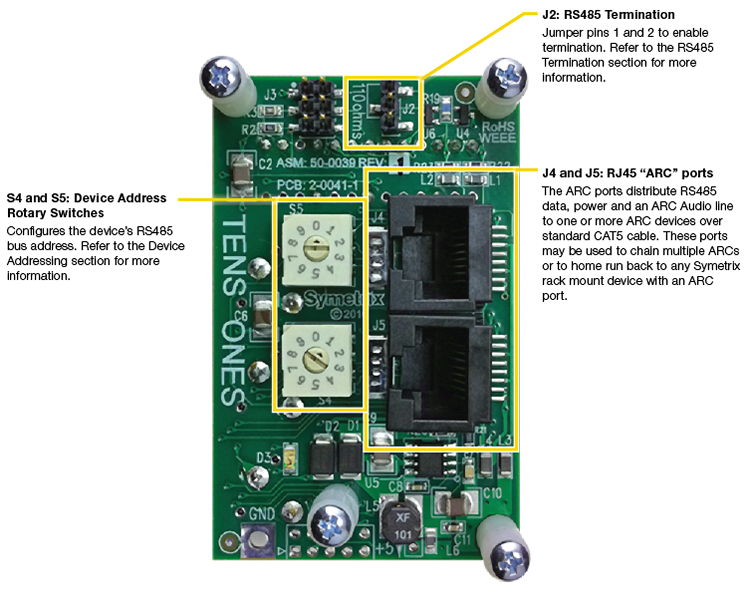
All of the configuration and connection options are on the rear of the ARC-2e. The anatomy of an ARC-2e is outlined below:
System Connection
ARCs connect to the system via an RS-485 bus. This is typically via a single CAT5 cable that carries both RS-485 data and power. For full information, refer to the ARC Network Design topic.
RS-485 Termination
The ARC-2e features an RS-485 termination jumper. Jumper J2 at the top right of the ARC-2e board enables and disables termination. Jumping pins 1 and 2 = terminated. For maximum signal integrity, it is advisable to terminate the last ARC device in the chain if the total length of the chain is over 200 feet.
Note: Never terminate a single RS-485 bus at more than two devices.
Device Addressing
Every RS-485 device connected to the same RS-485 bus must be uniquely identified. The ARC-2e use two rotary switches (S4 and S5) to designate one of 100 device addresses. S4 determines the device's ones address and S5 determines the device's tens address. For example: To set an ARC-2e to device address 24, you would place S4 in the 4 position and S5 in the 2 position.
If the remote has had its RS-485 address changed, be sure to power cycle the remote. The recommended way to power cycle the remote is to actually power cycle the DSP, as yanking the ARC cable out may cause voltage spikes and other issues.
Before performing a power cycle, always be sure that the amplifiers hooked up to the units outputs are powered off.