Security Operation
During SymVue export, the user configures the appearance of a Login Panel that will appear when the user tries to navigate to a password-protected Panel where the administrator password has not yet been entered. Unlike all other SymVue Panels, this Panel is not represented by a Control Screen in Composer. Instead, it is fabricated at the time of export from data supplied in the SymVue Export Wizard. The user does not see the login Panel graphically displayed unless they preview the entire SymVue file at any time during the export process.
The Panel Security Page of the export wizard allows selecting which Control Screens, when exported to SymVue, will require a password to access. A checkbox next to each Control Screen in the tree allows enabling/disabling password protection for that Control Screen. A master "Enable Panel Security" checkbox allows enabling/disabling password protection to all exported Control Screens.
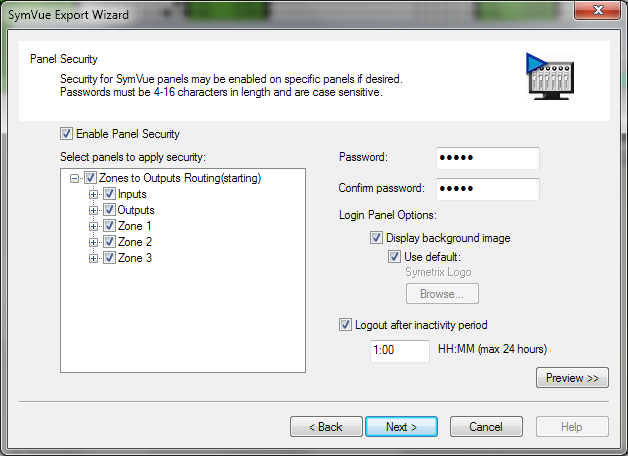
The user can set an option to have SymVue automatically logout the operator after a specified period of operator inactivity on the SymVue interface. The duration of the inactivity can be set from 1 minute to 24 hours.
If the requested Panel is password protected, and the password has not yet been entered, the requested Panel will not be displayed. Instead, SymVue redirects the navigation to display the Login Panel.
When the Login Panel appears, the operator can enter the password using the on-screen keyboard or with an attached keyboard. When the user enters a password, they can click the "OK" button or press Enter on the keyboard. If the password is a match, navigation continues to the requested page. If it does not, navigation returns to the Panel displayed prior to the Login Panel. A 'Cancel' button allows returning to the previous Panel.
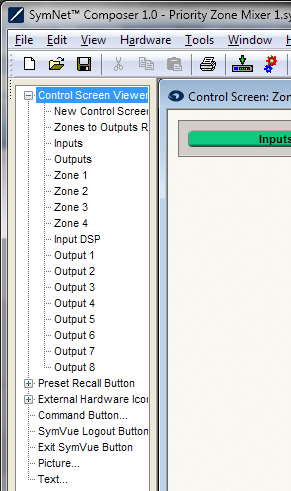 Users who use password protection on Panels may need to access to a security logout button. Since all Panels are generated from Control Screen layouts in Composer, users are able to add a button to Control Screens which will force a logout. The SymVue Logout button will appear as an option in the list of Control Screen Viewer buttons which may be placed in a Control Screen being designed in the control screen editor. A logout button is very similar in operation to a Control Screen Viewer button in that SymVue uses it as a Panel navigation button.
If the design isn’t password protected, the Logout button does nothing. Otherwise, it will send the user to the Login screen. After logging in again, the user is taken to the Home Panel.