British EQ
This module combines several popular filters most often found together on popular British mixing consoles.
Mono, Dual-Mono and stereo versions of the British EQ are available. The stereo module processes both inputs with identical filters. The british EQ consists of three parametric bands sandwiched between a hi and lo shelf. In addition, a rumble (high pass) filter is also provided.
Both mono and stereo versions have the following controls:
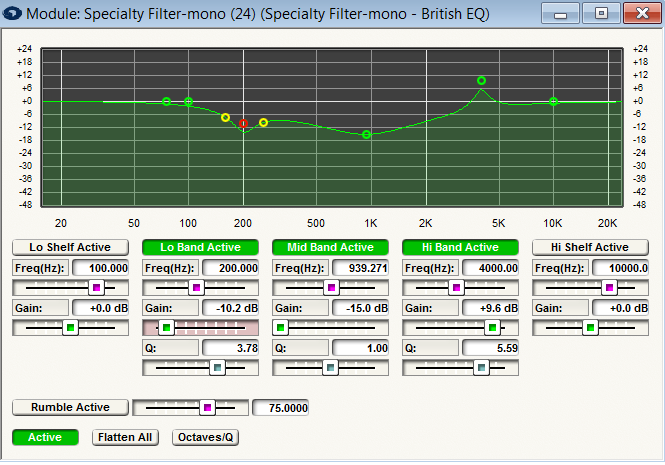
- Frequency. The center frequency of the equalizer band/filter.
- Gain. The amount of gain or attenuation (boost or cut) applied at the center frequency.
- Width (Q). The bandwidth of the peak or dip applied to the signal, measured in fractions of an octave.
- Width (Oct). The bandwidth of the peak or dip applied to the signal, expressed as the Q factor. Q is a dimensionless (unitless) quantity also used to describe bandwidth.
- Bypass All. A switch that bypasses the equalizer, leaving the settings as they are. This is equivalent to disabling every band of the equalizer.
- Flatten All. A switch that resets (destructively) all of the gain controls in the equalizer to 0dB. This is a momentary button.
- Octaves/Q. This switch changes the units used by the Width controls between fractional octaves and Q.
- Lo Shelf, Lo Band, Mid Band, Hi Band, and Hi Shelf Bypass. One button for each band/filter is provided to selectively enable or disable a given parametric band, or filter. If a band/filter is disabled, it has no effect on the signal, regardless of the other settings for this band/filter. Adjusting the gain of a band/filter or clicking on it in the graph will automatically enable a band/filter.
- Rumble Frequency. The frequency of the rumble filter (20 - 200Hz). The rumble filter is an 18dB/octave filter.
- Rumble Bypass. Enable or disable the rumble filter. If the rumble filter is disabled, it has no effect on the signal, regardless of the frequency setting. Clicking on the rumble filter in the graph will automatically enable it.
A graph is provided so you can view the frequency response of the filter. You can modify the frequency centers and gain either by using the sliders or by clicking and dragging on the graph. Drag the green box horizontally to adjust the frequency of the filter or vertically to adjust the amount of boost.