Compressor/Limiters
Compressor
A compressor reduces the dynamic range of signals above a user determined threshold. Signal levels below the threshold remain unchanged.
Sidechain. A mono compressor has a signal input and a sidechain input labeled "Side". A stereo compressor has two signal inputs and one sidechain input labeled "Side". The "Side" input is used to allow a signal other than the input to control the compressor. Using this feature, you can do frequency-selective compression (de-essers), use the compressor as a ducker, etc. If nothing is connected to the "Side" input, then the input signal is effective shorted to the "side" input (standard operation).
Mono vs. Stereo. The controls for Mono, Dual-Mono and stereo compressor/limiters are identical. The input and output meters for the stereo version show (2) channels vs. (1) for the mono version. For the stereo version, the compression is controlled by the loudest of the two inputs. Both outputs are affected identically. Dual-Mono compressors act independently, but have one graphic view of the modules parameter controls.
Ctrl Output. The mono and stereo single band compressor modules have a single control signal output. The control signal reflects the dynamic gain reduction being applied by the module and changes in real time. This control signal can be used to easily create linked multi-channel dynamics. See Creating Multi-channel Dynamic Modules for more information.
Ctrl Hi and Ctrl Lo Outputs. The mono and stereo split band compressor modules have two control signal outputs. The control signals reflect the dynamic gain reduction being applied by the module and change in real time. These control signals can be used to easily create linked multi-channel dynamics. See Creating Multi-channel Dynamic Modules for more information.
NOTE: The control signal(s) represent the gain reduction of the compressor(s) but does not include the make-up gain. In other words, making changes to the make-up gain setting has no affect on the control signal output.
The Symetrix single band compressor has the following controls:
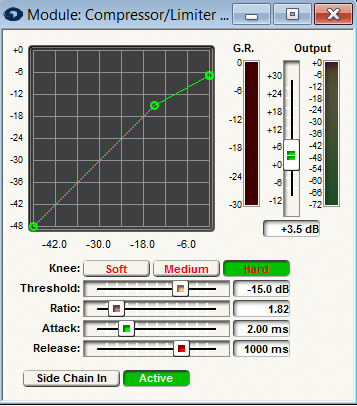
- Threshold. The signal level above which the compressor/limiter begins reducing the gain. Visually, the point at the knee (bend) in the input/output curve. For peak stopping, set the threshold just below the peak level where you want the signal to stop climbing. For dynamic range reduction, pick a threshold settings that results in a few dB of gain reduction indication with the signal levels that you are interested in.
- Knee. The knee setting determines the compression ratio during the transition from linear (below threshold) to compressor operation. A soft knee makes this change gradually, while a hard knee makes an abrupt transition. A soft knee curve may require several dB of gain reduction before the actual compression ratio has reached the set value. For general compression, use the soft or medium settings. For limiting, use the medium or hard settings.
- Ratio. The ratio determines the degree of output change for an above threshold change in the input. Generally ratios under 10:1 are considered compression while those above 10:1 are considered limiting.
- Attack. The speed with which the compressor/limiter begins the gain reduction process. Attack times that are too fast, strip transients of their edges, dulling the sound. Remember that momentary (brief) clipping is inaudible. Faster attack times allow shorter transients to initiate gain reduction. On the other hand, too long attack times can allow short transients to pass unchanged, which may defeat the purpose that the compressor was intended for.
- Release. The release time determines the moment-to-moment gain change in the compressor. Fast release times raise the subjective level, while slow release times are more useful for keeping levels under control.
- Side Chain In. When pressed, the compressor uses the side chain input to control the compression. When not pressed, the input signal is used to control the compression (standard operation). If nothing is connected to the Side input and the Side Chain In is pressed, no compression will occur. The compressor is effectively bypassed.
- Active. Activates the compressor onto the gain of the audio signal input according to the module settings.
- Output fader. A fader provided to control the output gain of the module. If the compressor is reducing the signal level significantly, a boost in the output gain may be required to maintain perceived volume. This is commonly called make-up gain. Split compressors have separate faders for each band.
The Symetrix Split Compressors also have the following additional control:
- Split Frequency. The frequency that separates the two sections of a split-compressor/limiter. This control is only available on Split compressor/limiter modules.
Single Band vs. Split-band compressors
In a single-band compressor, the sidechain (portion of the compressor circuitry that derives the gain control signal for the gain control block) receives a full band signal from the input stage. Whenever the input signal is loud enough to cross the compressor's Threshold settings, the sidechain generates a control signal that reduces the gain of the control block. The loudest source in the mix ultimately owns the compressor.
In music, typically this is the bass, although it could be the vocals or any other signal. The loudest source determines the amount of gain reduction. If the source is the bass (and it often is), then the envelop of the bass signal is superimposed on everything else. Often this is called sucking and breathing.
One way to minimize envelope distortion (sucking and breathing) is to lengthen the release time (the time required for the compressors gain to recover after an above-threshold transient) to some multiple of the period of the lowest frequency of interest. Unfortunately, this means that short high-frequency transients are subjected to the same release time, which tends to punch holes in the program material. Yes, you can lengthen the attack time, so that the compressor is less likely to respond to short-duration overloads, but that is at risk of allowing short duration overloads to pass through largely unchanged.
A Split-band compressor is really two-in-one. An adjustable crossover network splits the input signal into two frequency bands, then separate compressors operate on each band separately and finally the compressor outputs are mixed together and sent to the output.
As long as the crossover frequency has been set to minimize the bass content in the high-frequency side, the bass signals can cause significant amounts of gain reduction without affecting the high-frequency compressor at all. Radio stations typically slice and dice the audio into (8) separate bands. They dynamically modify each band separately and then recombine them to make the stations signature sound.
Limiters
A Limiter reduces the dynamic range of signals by strictly limiting the maximum allowed output level. Signals below the output limit remain unchanged while those above it are attenuated so as to maintain the specified maximum level. It is useful for protecting loudspeakers and other equipment. It can be thought of as a compressor with an infinite ratio, hard knee and a very fast attack time. The Symetrix limiter modules operate on peak levels. Because the limiter modules use less DSP than the compressor/limiter modules they are a good choice for multi-channel speaker protection.
Mono, Dual-Mono vs. Stereo. The controls for Mono vs. Stereo limiters are identical. The input and output meters for the Stereo version show (2) channels vs. (1) for the Mono version. For the Stereo version, the limiting is controlled by the input which is at the highest level. Both outputs are affected identically.
Ctrl Output. The limiter modules have a single control signal output. The control signal reflects the dynamic gain reduction being applied by the module and changes in real time. This control signal can be used to create linked multi-channel dynamics modules. See Creating Multi-channel Dynamics Modules for more information (see "Look-Ahead" below regarding a precaution). It may also be useful as a way of monitoring what the limiter is doing.
Look-ahead. In order to react to fast peaks more smoothly, this module is delayed (32) samples from the input. Take care when using the limiter's control output as a VCA input as described in Creating Multi-channel Dynamic Modules. The other channels will not benefit from the (32) sample look-ahead (unless you explicitly add delay modules) so they may not have the same performance for fast transients.
The Symetrix limiter has the following controls:
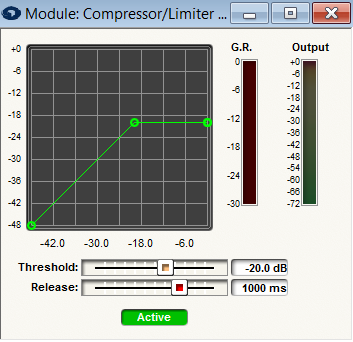
- Threshold. The signal level above which the limiter begins reducing the gain. Visually, the point at the knee (bend) in the input/output curve. For loudspeaker protection, set the threshold just below the peak level that would cause damage.
- Release. The release time determines how fast the module recovers from a peak that exceeds the threshold. Fast release times raise the subjective signal loudness, while slow release times may sound more smooth.
- Meters. A peak detecting meter showing the output signal level is provided. A meter labeled 'G.R.' indicates the amount of gain reduction that the limiter is currently applying. Stereo limiters have separate output meters for each channel.