ARC-FP Programming
Common Between Continuous and Enumerated Menus
First, make sure you have assigned one or more parameters or presets to the ARC-FP as detailed in the Assigning Parameters to ARCs and Presets Manager. Then open the Remote Control Manager from the Tools Menu and double-click on the ARC-FP device in the RS-485 Remote Control section to bring up the Edit ARC-FP dialog. Note that all units' ARC-FPs receive the exact same programming, so only one device is listed in the Remote Control Manager.
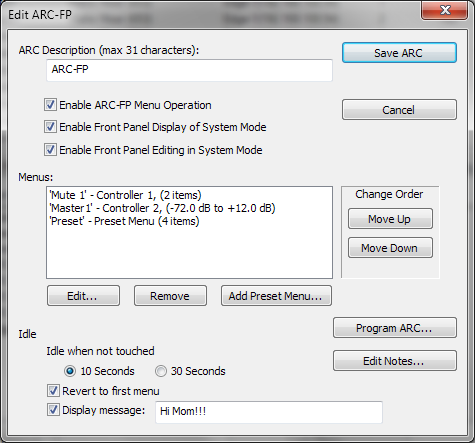
- ARC Description - Give your ARC a descriptive name to help you remember its main purpose or location, for example.
- Enable ARC-FP Menu Operation - Check this option to allow ARC-FP operation. If this item is unchecked, ARC-FP mode will not be available regardless of the programming downloaded to it.
- Enable Front Panel Display of System Mode - Check this option to allow viewing of unit data in System Mode. Refer to Front Panel UI for more information.
- Enable Front Panel Editing in System Mode - Check this option to allow editing of System Mode parameters that can be edited. Refer to Front Panel UI for more information.
- Menus - The ARC may have up to 24 menus which can be continuous or enumerated. Enumerated menus may have up to 16 items each.
- Edit... - Edits the selected menu.
- Remove - Deletes the selected menu.
- Add Preset Menu... - Creates a new Preset Menu.
- Change Order - Use the Move Up and Move Down buttons to reposition the currently selected Menu.
- Idle when not touched - Determines the amount of time required to pass before the ARC enters an Idle state.
- Revert to first menu - When this option is checked, the ARC will return to the first Menu in the list when entering an idle state.
- Display message - Sets a message to be displayed while the ARC is in an idle state.
- Program ARC... - Programs the ARC currently being edited.
- Edit Notes... - Opens the Notes dialog box allowing you to enter or edit notes for the ARC currently being edited.
ARC Menus
ARCs may have Continuous, Enumerated or Preset Recall menus. Continuous menus operate just like a fader or a knob. Enumerated menus allow the installer to not only restrict the user to specific levels or values, but also to name each level or value. Preset Recall menus recall presets, up to 16 in each menu and multiple Preset Menus are allowed. Following are the options for each menu type.
The Edit ARC Menu dialog houses all options for both Continuous and Enumerated menus. They have several common options and some type specific ones.
Common Between Continuous and Enumerated Menus
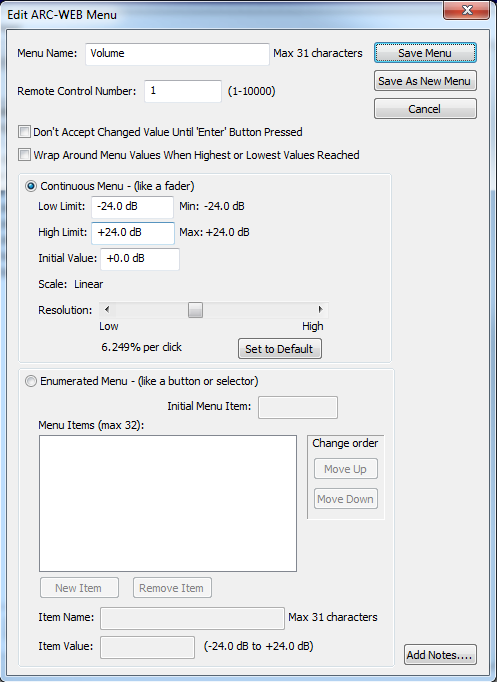
- Menu Name - Give your menu a friendly or descriptive name. This name will appear on the ARC's display.
- Remote Controller Number - The Control Number the menu controls. If Control Number 2 is assigned to a gain fader, then the Menu addressing Control Number 2 will adjust that gain fader.
- Don't accept changed value until 'Menu' button pressed - When this option is checked, adjusted values will not be sent to the system and take affect until the Menu button is pressed. This is typically used for source selections and presets.
- Wrap around menu values when highest or lowest values reached - This option determines whether or not the Menu wraps "end-to-end" or stops at its first or last items/values. You would typically want this disabled for a volume menu.
- Save Menu - Saves the menu currently being edited and commits any changes.
- Save As New Menu - Saves the Menu with current edits as a new Menu. Remember to give the menu a unique name before clicking this button.
- Cancel - Aborts the editing of the menu and throws away any changes made.
- Edit Notes... - Opens the Notes dialog box allowing you to enter or edit notes for the ARC Menu currently being edited.
Continuous Menu
- Low/High Limits - Specify an Lower and Upper Limits to restrict the user's range of control.
- Initial Value - Sets the value displayed for the Menu on ARC power-up until the ARC syncs with the system.
- Scale - This is a static readout showing the scale of the parameter being addressed. It can be a helpful guide for setting resolution, below.
- Resolution - Sets the amount of adjustment per up or down click. For volumes, typically steps of 1.5 to 3.0 dB per click are pleasing to the ear. You can return the resolution to the default by clicking the Set to Default button.
Enumerated Menu
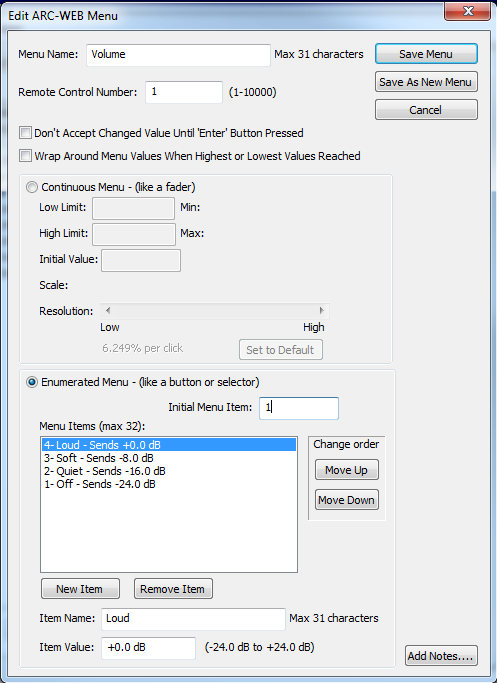
- Initial Menu Item - Sets the Menu Item displayed for the Menu on ARC power-up until the ARC syncs with the system.
- Menu Items - List of items or enumerations in the Menu currently being edited.
- New Item - Adds an item to the Menu Items list.
- Remove Item - Deletes the currently selected Menu Item.
- Item Name - Give your Menu Item a friendly or descriptive name. This name will appear on the ARC's display.
- Item Value - Specifies the value (or position) of the Menu Item.
- Change order - Use the Up and Down buttons to reposition the currently selected Menu Item.
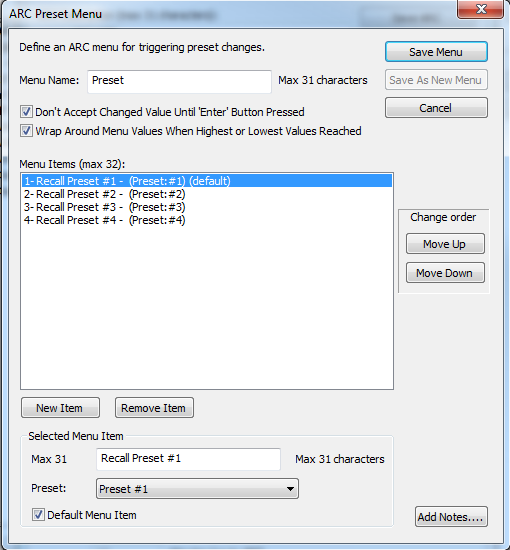
Preset Menu
- Menu Name - Give your menu a friendly or descriptive name. This name will appear on the ARC's display.
- Don't accept changed value until 'Menu' button pressed - When this option is checked, adjusted values will not be sent to the system and take affect until the Menu button is pressed. This is typically used for source selections and presets.
- Wrap around menu values when highest or lowest values reached - This option determines whether or not the Menu wraps "end-to-end" or stops at its first or last items/values. You would typically want this disabled for a volume menu.
- Save Menu - Saves the menu currently being edited and commits any changes.
- Save As New Menu - Saves the Menu with current edits as a new Menu. Remember to give the menu a unique name before clicking this button.
- Cancel - Aborts the editing of the menu and throws away any changes made.
- Menu Items - List of items or enumerations in the Menu currently being edited.
- Change order - Use the Up and Down buttons to reposition the currently selected Menu Item.
- New Item - Adds an item to the Menu Items list.
- Remove Item - Deletes the currently selected Menu Item.
- Item Name - Give your Menu Item a friendly or descriptive name. This name will appear on the ARC's display.
- Preset - Specifies the Preset number of the Menu Item.
- Default Menu Item - Sets the Menu Item displayed for the Menu on ARC power-up until the ARC syncs with the system.
- Edit Notes... - Opens the Notes dialog box allowing you to enter or edit notes for the ARC Menu currently being edited.