Output Selectors
The output selectors route a single input to exactly one output. (2), (4), (8), and (16) output version both mono and stereo are provided. When the output selection changes, a quick fade out and simultaneous fade in occur to ensure a smooth transition without any clicks or pops.
Mono and stereo versions have the same controls. The only difference is that with the stereo versions, a stereo pair input is routed to one of several stereo pairs of outputs.
Controls:
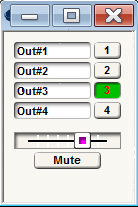
- Output buttons. One button per output is provided. Pushing the button routes the input to the corresponding output and "un-routes" it from any other outputs. Only one button can be pushed at a time.
- Output slider. This control can also be used to select the output. It is provided primarily for remote control. If you are controlling an output selector from an ARC, analog pot/switch, or other remote controller, assign the remote number or device to this slider rather than the individual input buttons. Every Symetrix Control Number has a scale of 65535 and the Control Number assigned to the input slider is no exception. 65535 will need to be divided by the number of input selections in order to find the value associated with each selection.
4 input or output %:
-
1% = 0
-
17% = 11141
-
51% = 33422
-
85% = 55704
8 input or Output %:
-
1% = 0
-
8% = 5242
-
22% = 14417
-
36% = 23592
-
51% = 33422
-
65% = 42597
-
79% = 51772
-
93% = 60947
16 input values
-
1% = 655.35
-
6.7% = 4390.85
-
13.3% = 8716.16
-
20.0% = 13,107
-
26.7% = 17,497.85
-
33.3% = 21823.16
-
40.0% = 26,214
-
46.7% = 30,604.85
-
53.3% = 34,930.16
-
60.0% = 39,321
-
66.7% = 43,711.85
-
73.3% = 48,037.16
-
80.0% = 52,428
-
86.7% = 56,818.85
-
93.3% = 61,144.16
-
100% = 65,535
-
Mute. This button smoothly mutes the output of the selector, effectively selecting a silent audio source.