Duckers
A ducker lowers the gain in its signal path in response to a signal connected to its side chain, or control input. A typical ducker application is lowering the volume of background/foreground music to make way for paging. For the background music/paging application, put the ducker in series with the music signal path. Drive the side chain input with the paging signal. The music and paging signals can be mixed using the Side Chain Mix control. There are stereo, mono and dial duckers available in the Composer Toolbox.
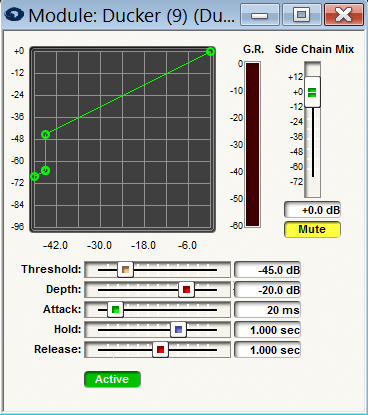
The duckers have the following controls:
Ctrl Output - This module has a control signal output. The control signal reflects the dynamic gain reduction being applied by the module and changes in real time. This control signal can be used to easily create linked multi-channel dynamics modules. See Creating Multi-channel Dynamics Modules for more information.
*Threshold -*The signal level that the side chain signal must exceed to cause gain reduction in the signal path.
Depth - Once the side chain signal exceeds the threshold setting, reduce the gain by this amount.
Attack - The side chain signal must exceed threshold by at least the amount of attack time for gain reduction to occur.
Hold - Once gain reduction has occurred, maintain that condition for the setting of the Hold control.
Release - Once the hold time has expired, use the Release control setting to adjust the time required to return the gain in the audio signal path to unit.
Meter - A gain reduction meter labeled "G.R." is provided so that the effect of the ducker can be observed.
Side Chain Mix -Mix the side chain input into the outputs of the Ducker. The Side Chain Mix is muted by default.