General Notes
Connections
Units are equipped with an Ethernet port and one or more RS-232 ports. Either port may be used to control the unit. Ethernet is generally preferred because of the simplified set-up and higher data rates.
RS-232 Port Configuration
Connect your RS-232 based remote control to the RS-232 port. For testing purposes, a terminal emulation program such as HyperTerminal, TeraTerm, or puTTY can be run on a PC instead. Typically this connection requires a "straight through" cable, but a null-modem cable may be required depending on the manufacturer. In general, if the genders of the two connectors you are trying to connect are the same, a "null modem" cable is required. Set up the controller for baud: 57600, data bits: 8, stop bits: 1, parity: NONE. No handshaking or flow control is used.
The commands Set Baud**, Set Quiet Mode and Set Echo affect the RS-232 port. Composer determines the start-up values of these settings, though this can be changed during a session. The unit's default settings (Baud 57600, Quiet Mode ON, Echo OFF) are typical for most applications. These commands are documented for reference here.
Ethernet Port Configuration
Generally, no special configuration is required for the Ethernet port. The Ethernet port on the unit may be used for both the Composer control application and for remote control.
Take note of the unit's IP address (listed in the System Manager), as you will need to send all commands to this address.
The commands Set Quiet Mode and Set Echo affect the Ethernet port. Composer determines the start-up values of these settings, though this can be changed during a session. The units default settings (Quiet Mode ON, Echo OFF) are typical for most applications. These commands are documented for reference here.
Ethernet Control
The Ethernet protocol uses the same RS-232 command protocol over an Ethernet network. Both TCP/IP and UDP can be used to control the system. TCP/IP control functionality was added in Composer 2.0. TCP/IP control does not use any of the options or escape sequences found in Telnet. Up to six TCP/IP telnet sessions can be active at one time.
If a seventh TCP/IP connection is initiated, the least recently used session will be automatically closed. Sessions may also be closed manually with the Q! command described later in this document. Control systems should avoid closing and re-opening TCP connections if possible. Keeping a single TCP session open to send multiple commands through will result in much better performance than opening and closing a session for each command.
To control the system with Ethernet, command strings are sent as the payload of a UDP/IP or a TCP packet. The following rules should be observed in sending commands:
-
Commands should be sent to UDP or TCP port number 48631 of the Symetrix Edge or Radius unit's IP address. The IP address may be found using the Connection Wizard or on some units' front panel displays.
-
Commands should be formatted exactly as defined in this document and include a carriage return that terminates the command.
-
Command strings may or may not include a zero termination character.
-
Commands should not be broken up across multiple packets.
-
If high reliability communications are required, responses to commands should be analyzed for success.
Responses to commands will exhibit the following behavior:
-
Responses to each command issued are returned in a single packet unless the response is larger than a single packet can hold. Responses will not have any single carriage return- terminated line broken up across packets unless there is no carriage return in the data of the response.
-
Responses are returned only to the IP address and source port number that sent the packet. Other connections will see responses if the particular control numbers are "push" enabled.
-
Responses follow the configuration of the port, just as if it were an RS-232 port. For example, echo mode and quiet mode are kept independently for the RS-232 port, the UDP port and the TCP port.
-
Responses do not include a zero-termination character.
-
All transmissions originating from units will either be responses to commands or pushed data.
Each command sent to a Symetrix unit contains information in the Ethernet packet header as to who sent the command, and hence, where a response will be sent. This source information is saved when a packet is received by a Symetrix unit. For UDP, all responses go to the last received IP address and port and this IP address and port number are saved in non-volatile memory across power cycles. For TCP, the control system must re-initiate the TCP connection after a power cycle.
Until the first command is received, responses will not know where they are supposed to be sent. This normally is not an issue as communication from the Symetrix unit is generally a response to a command. However, if the Symetrix unit is set up to push control data, it will also be pushed out the TCP and UDP ports. If no valid packets have ever been received by a Symetrix unit and no TCP/IP connections are active, pushed data will not be sent out the Ethernet port. If a Symetrix unit and a TCP connection is active, then pushed data will be transmitted over TCP. If valid packets have been received over UDP by a Symetrix unit, then pushed data will be transmitted over UDP.
Pushing of data can be controlled independently for RS-232 and Ethernet ports.
Note: The RS-232 serial port and the Ethernet port are essentially independent. They maintain separate settings for quiet and echo modes. Commands sent to one port are not echoed out the other, and responses are sent only to the port from which the command was received. Hence, the two ports will not necessarily send out the same data. One exception to this is push data and strings, which are sent out both RS-232 and Ethernet ports in parallel.
RS-485 Control
RS-485 control is generally done using one or more of the Symetrix ARC (Adaptive Remote Controller) units. Further discussion of RS-485 and the ARCs can be found on the Symetrix web site.
Site Identifier
By default, any control data sent to a Symetrix unit (via ARC, RS-232, UDP/IP, or TCP/IP) will be re-broadcast over Ethernet by the unit that receives the command to all units that are connected via Ethernet. This ensures that multiple Symetrix units with the same Site Identifier that are using the same control numbers will also receive and interpret the command and respond to the command appropriately (i.e., adjust faders, button states, etc).
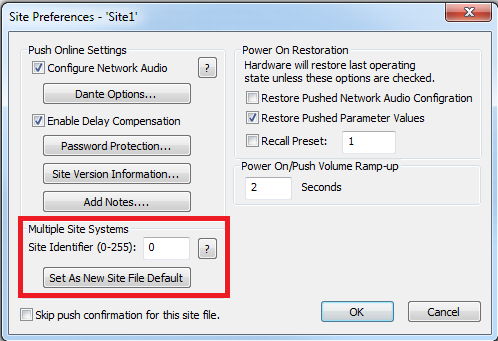
When the system consists of multiple independent site files on the same network and you do not want control data for common control numbers to be shared between these different site files, each site file must have a unique site identifier set in Composer. Unique Site Identifiers in the site file inform other systems with different site identifiers on the same network to ignore the re-broadcasted commands.
Using unique Site Identifiers for different site files on the same network does not require any change in how the systems are controlled from a third-party control system. The third-party control system continues to send commands to the Symetrix device to be controlled and that device re-broadcasts that command along with the additional information of the site identifier onto the network. Symetrix units with Site Identifiers that are different from the site identifier in the re-broadcasted command will simply ignore the re-broadcasted command.
To set the identifier, within Composer, navigate to Tools > Site Preferences and change the site identifier as shown in the following figure.