Creating Multi-channel Dynamic Modules
Using control signals and VCA modules, linked multi-channel dynamics modules can be created, e.g. an LCR compressor or a (5) channel ducker. A single dynamics module is used to create a control signal. This control signal then fees a multi-channel VCA module that controls all linked audio channels. The figure below show the proper hook-up for this scenario.
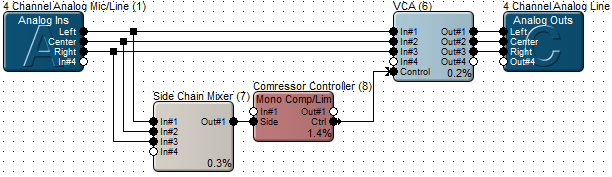
The mono Side Chain Mixer allows choosing which signals will control the compressor. One signal, or a mix of any of the three at an arbitrary level can be used as a control signal. The dynamics parameters (attack time, release time, etc.) are set in the Compressor Controller module. The VCA module does the actual gain changes for all three signals identically. The compressor's make-up gain setting has no effect. Instead, apply makeup gain using the VCAs Max Gain Parameter.
Setting the VCA Max Gain
The proper value of the VCAs maximum gain parameter depends on the type of dynamics module being used. The following list indicates the correct setting for each type:
-
Compressors: Set Max Gain like you would set the make-up gain on the compressor.
-
AGCs: Set Max Gain to +36dB.
-
Expanders/Gates/Duckers: Set Max Gain to 0dB.
-
SPL Computer: Set Max Gain equal to the Maximum Gain setting inside the SPL computer module.