Symetrix Controller Receiver v2.0
Crestron Certified Integrated Partner Module: Controller Receiver v2.0
Models: Symetrix Integrator Series; 722, 760, 761, 780, 788. Jupiter Series; J4, J8, J12. Symetrix; 8x8 DSP, Express Cobra DSP, Solus DSP, Edge DSP, Radius DSP.
Device Type: Audio Mixer, DSP.
General Information
The Certified Crestron Module Symetrix Controller Receiver is used to receive serial string data from the Symetrix DSP and to transmit analog data to the Crestron system. It will accept a Symetrix Control Number and it's value between (0) and (65,535) and can translate this into analog data to be used by Crestron system for displaying audio levels on a gauge drawn on the touch-panel using VTProe(Crestron's touch-panel graphics design software). Symetrix Controller Receiver is a SIMPL+ module which will need to be added, saved and compiled in theUser+directory and brought into your SIMPL Program.
Category
Audio Mixer, DSP
Version
2.0
Summary
The Symetrix Controller Receiver Crestron module is a SIMPL+ module that is used to read meter feedback for push enabled Symetrix Control Numbers.
General Notes
Once a Symetrix Control Number is assigned to a meter and Push is enabled for the Control Number the Symetrix DSP will transmit string data every time the Control Number's level changes. The Symetrix system will also push this information after a refresh command is sent (PUR), or a power cycle for push enabled controllers. Be sure that a gauge is drawn in the touch-panel file and have it associated with a Crestron Analog Join Number. The Analog Join will be represented on the Analog Signal Tab of the touch-panel in the SIMPL Program. Associate the Analog Join with the Controller Receiver module, by placing variables in the right places. This Analog Join will transmit meter data to the Symetrix Controller Receiver module.
Crestron Hardware Required
2 or 3 Series Crestron Processor. RS-232, or UDP card required.
Setup of Crestron Hardware
RS-232. Baud Rate; 38400 to 115200 - Configurable through Symetrix Software Application.
8 Bit, Non-Parity, Stop Bit; 1, Flow Control; None.
Crestron Cable Type. CNSP-121
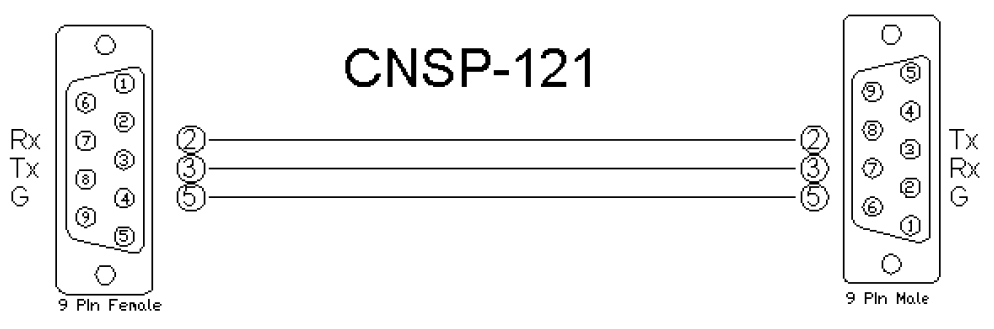
UDP/IP. Port:** 48631**.
Note:It is very important to notice that when Controlling Edge and Radius with the 3rd Party Control Protocol via Ethernet one must use UDP. The UDP Control Port Number has changed to48631. Legacy Symetrix units, those which are programmed with Symetrix Designer used and continue to use port 48630. This is not the case with the DSP which are programmed using Composer; Edge and Radius. Edge and Radius use UDP port48631to communicate when using the 3rd Party Control Protocol.
Application Notes
Although the majority of the gain stage faders available in Symetrix Composer's DSP modules posses an 84dB scale; -72dBu to +12dBu. The majority of the meters; input/output, and meter modules are on a 72dB scale and are calibrated in dBFS (Full Scale).
It is highly recommended, especially in applications which are already heavy on processing power and communication back and forth, that the PUT (Push Threshold) command be used. Be sure to notice the calibration of the meter and know how it relates to your scale of 65535 counts in a Symetrix Control Number before implementing the PUT commands.
After the Symetrix Control Number associated with the meter has been Push enabled; either through Composer, or by using a PUE command, you may want to limit how often the Symetrix piece transmits pushed meter data. You wouldn't necessarily want to have a string received every time the level changed by 1/65,535th of a degree. The PUT command can be used to set a Threshold below which a change in level will not be transmitted.
For Example; If the Symetrix Control Number #1 is assigned to a meter, the integrator could send PUT 1 910. 910.2 = 65,535/72 in order to limit the pushed meter data to only being transmitted when the signal changes by more than 1dB. This value of (910) count value is only appropriate for an 72dB meter.
There are 910 counts on the Symetrix 3rd Party Control Protocol Scale for 72dBFS meter moving in1dB increments. If the user only wanted to see meter movements after the level had changed by 3dB on this same meter, then you could send PUT 1 2731.
It is not necessary to have more than a single Controller Receiver module per meter type. If there are multiple meters required in the Crestron project and they are all operating on the same scale it would only be necessary to include (1) Controller Receiver module into the project. Extra lines for the placement of the touch-panel variable as well as the field for entering the additional Control Numbers to be read can be added to the module in SIMPL Windows by using the ALT+ key.
Pushed Data without Echo enabled will be transmitted from the Symetrix DSP in the following format: #00001=65535. In this example Control #1 is fully active at the top of it's scale. The Crestron module, Symetrix Controller Receiver will break up this string and for any Control Number (value after the #) in the string, the module will transmit the various analog values transmitted (value after =).
Module Graphic
Control
analog variable. Signal Type: Analog. Place the variable in the fields to the right of the module. These variable statements will correspond to the location of the Crestron Analog Join Numbers that are present in the touch-panel module.
Parameters
*ccnums. Signal Type: Variable to be entered by the integrator. Enter in these available fields the Symetrix Control Number that is associated with the meter. This will be the Control Number which is going to be pushing meter data and due to be analyzed by the module. *
Feedback
From_Symetrix_COM. Signal Type: Serial. The Serial String returned information from the processor.
Testing
Symetrix OS. Symetrix Designer v10.06, Symetrix Composer v1.1, Jupiter Software v 2.0.1.12, Integrator Series 761 Software v2.01.
SIMPL OS. 4.01
Crestron DB. 35.00.004.00
Sample Program. Symetrix 761 Demo for MC3 and TPS6