Manage Control's Presets
In addition to updating entire presets using the update button in the Presets Manager, a given control may be updated in multiple presets at once.
Right-click on a specific control and choose the “Manage ‘\
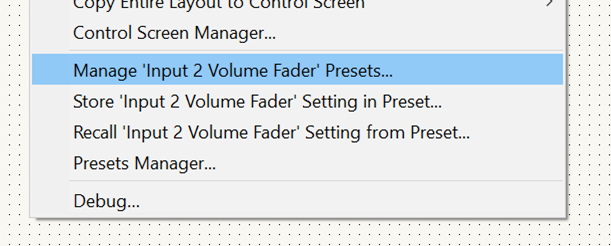
Selecting it opens the “Manage Control’s Presets” dialog.
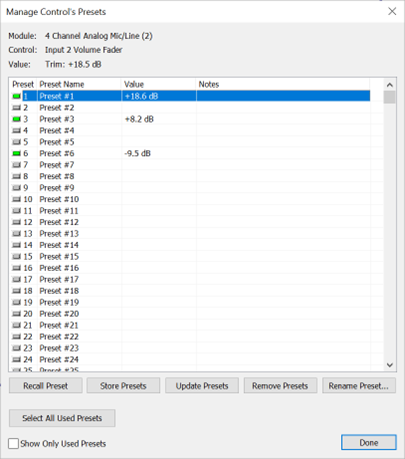
At the top pf the dialog, the current control, its module, and current value are shown. Beneath that is a list of all presets. A check box on the bottom allows filtering out presets which have no assignments for the control. This setting is saved within the session.
For each preset, its number, name, preset value and preset notes are shown. The list is not sortable. An icon to the left shows if the preset contains a value for the selected control.
Multiple presets may be selected at once. Below the list are buttons which act on the selected preset(s).
- “Recall Preset” allows only one selected preset and it must have a value for the control stored.
- “Store Presets” allows multiple presets selected and add a preset for the current value or updates the preset if it already exists.
- “Update Presets” updates the control values of the selected presets with the current control value. It will not add a new preset for the control. Presets which aren’t already assigned are ignored. At least one existing preset must be selected.
- “Remove Presets” removes the current control only from the selected presets.. At least one existing preset must be selected.
- “Rename Preset” allows renaming of a single preset, regardless of is there is a preset value for the control for that preset. Only one preset can be selected.
- “Select All Used Presets” automatically selects all presets which have a value for the current control. This allows quick updating or removing of all assigned presets for the control.
Since presets can be recalled and stored more easily than the previous walking menu items, those menu items are replaced with menu items to recall or store to a user entered preset.
Selecting “Store \
Selecting “Recall \
The previous “Presets manager…” menu item is preserved.
Note that Composer V2.5 and earlier use matrix modules that contain a special kind of matrix button which is no longer used. Files created with V2.5 or earlier may still have matrix modules with this control. It is incompatible with these new features. If one of these controls is selected, the right-click menu and available dialogs launched from the menu will be the same as with 8.4.