Symetrix 4 Channel Analog Input
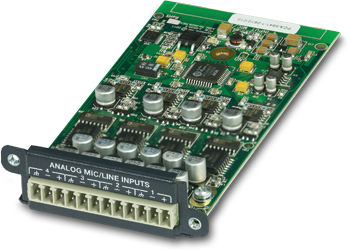 A single Edge frame has four configurable card slots, providing up to 16 channels of local IO. The 4 Channel Analog Input card provides four channels of mic/line input with +48 volts phantom power, 54 dB of gain and 24 dB of trim. The inputs are electronically balanced and provided on plug-in barrier strip connectors. Control of each input includes gain with metering, trim, mute and signal inversion.
Features:
- Mic/line input card. Up to 4 cards per frame.
- +48 volts phantom power.
- 54 dB of mic pre-amp gain.
- Extended dynamic range of 115 dB.
- Field swappable by certified technicians.
Specifications
Number of Inputs: Four (4) switchable balanced mic or line level.
Connectors: 3.81 mm terminal blocks.
Nominal Input Level: +4 dBu with 20 dB of headroom.
Maximum Input Level: +23 dBu.
Mic Pre-amp Gain: 0, 11.8, 24, 44 or 54 dB switchable with ± 24 dB trim.
Mic Pre-amp EIN: < -127dB with 150 ohm source impedance.
CMRR: > 76 dB @ 1 kHz, unity gain.
Input Impedance: 8k Ohms balanced, 4k Ohms unbalanced.
Phantom Power (per input): +48 VDC @ 10 mA maximum.
Dynamic Range: > 115 dB, A-weighted.
THD + Noise: < -94 dB, unweighted; 1 kHz @ +22 dBu with 0 dB gain.
Latency: 0.28 mS
Mechanical Data
Shipping Weight: 1 lbs. (0.45 kg)
Certifications or Compliance: EN 55103-1, EN 55103-2, FCC Part 15, RoHS.
A&E Specifications
The device shall provide four analog mic/line inputs to an EDGE frame that are adjustable from line to mic level with coarse gain, fine trim and phantom power. Up to four of these devices may be installed in a single EDGE frame for up to sixteen channels of local input. Levels, phantom powers, signal inversions and mutes shall be controllable via software. Audio inputs shall be accessed via rear panel 3.81 mm terminal block connectors.
Audio conversion shall be 24-bit, 48 kHz. The dynamic range shall not be lower than 115 dB, A-weighted with a maximum input level of +23 dBu.
The device shall comply with CE and FCC Part 15 emissions limits. The device shall be RoHS compliant. The mounting plate shall be constructed of cold rolled steel, and mount into a Symetrix EDGE frame I/O card slot. The device shall be aSymetrix Symetrix EDGE 4 Channel Analog Input Card.
Connections
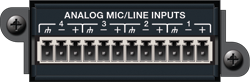 Using standard mic/line cables terminated on one end with terminal block connectors and appropriate connectors for your mic/line sources on the other end, connect the terminal block ends into the Analog Mic/Line Inputs on the card and the opposite ends into your source devices' outputs. Refer to the Audio Wiring Reference for more information.
NOTE: Wiring the inputs to an unbalanced cable will typically result in an input level that is 6 dB lower than the input level achieved using a balanced cable. If wiring to an unbalanced source, you may need to adjust the input level. Refer to Composer Controls in the following section.
Composer Controls
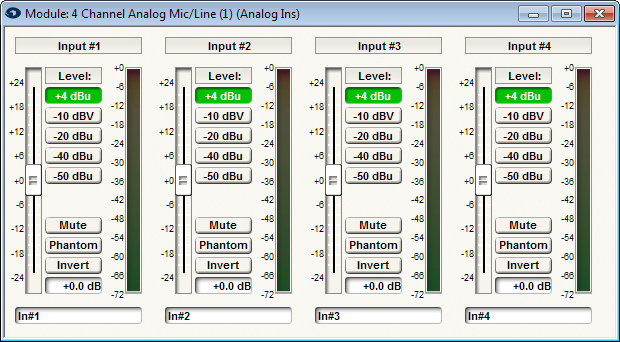
Channel Name (static label): Displays the input channel number.
Trim (fader): Adjusts the gain of the signal in the digital domain. This gain stage is after the microphone preamplifier (Level buttons) and the analog-to-digital converter. It provides fine gain control between +/- 24 dB in 0.1 dB steps and can be used to optimize signal levels and dynamic range.
Level (+4 dBu, -10 dBV, -20 dBu, -40 dBu, -50 dBu radio buttons): Determines the gain applied by the microphone preamplifier stage. Set this according to the nominal level of your source. The input stage is designed around a nominal input level of +4 dBu balanced with 20 dB of headroom. In other words, a signal of +24 dBu balanced will generate 0 dBFS. The level buttons apply 0, 11.8, 24, 44, and 54 dB of gain respectively so that signals arriving at the inputs at the specified levels will all be the same +4 dBu level following the microphone preamplifier.
Mute (button): When depressed, this channel will be muted. The muting happens in the digital domain after the analog to digital converter.
Phantom (button): When depressed, turns on +48 VDC phantom power for the channel.
Invert (button): When depressed, inverts the polarity of the signal on the channel. The inversion is equivalent to reversing the hot and cold wires on a balanced signal or pressing the so-called "phase" button found on many analog mixing consoles.
Trim Display (readout): Shows a numeric readout of the Trim fader's current position. Double-clicking in this field allows direct text entry of values.
Channel Label (user-editable field): Double-clicking in this field allows direct text entry of a user-specified label for the channel.
Meter (bar graph): Shows the level output from the Analog Ins module (post Level, Trim and Mute).