Dual Mono Modules
A dual mono module essentially consists of two independent mono modules that are physically grouped together. The major benefit of dual mono modules is DSP efficiency. The dual mono modules use only about half as much DSP power as two separate equivalent mono modules. This makes them useful in any design where DSP resources are scarce. Many designs need to do similar processing on multiple channels of audio, and dual mono modules provide an intuitive manner to implement this. Stereo modules can be used for this application, but this requires the same settings to be used for each channel. Dual mono modules, in contrast allow for fully independent settings and operation.
Where available, dual mono modules are listed as a separate items in the Toolkit. They can be added to the design as any other module is added, by double-clicking or dragging the module into the Design View. Most filters, EQs, dynamics and input selectors have dual mono versions of the modules.
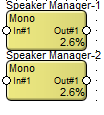 In the design, the dual mono modules appear as a connected pair of modules, one just below the other. They are selected and moved as a pair.
Module Properties such as name and color are adjusted for the entire module together. To distinguish the two sub-modules, a -1, or -2 is appended to the names. When opening the module to adjust its controls, the sub-module view which is opened is determined by which of the sub-modules (-1 or -2) was clicked upon.
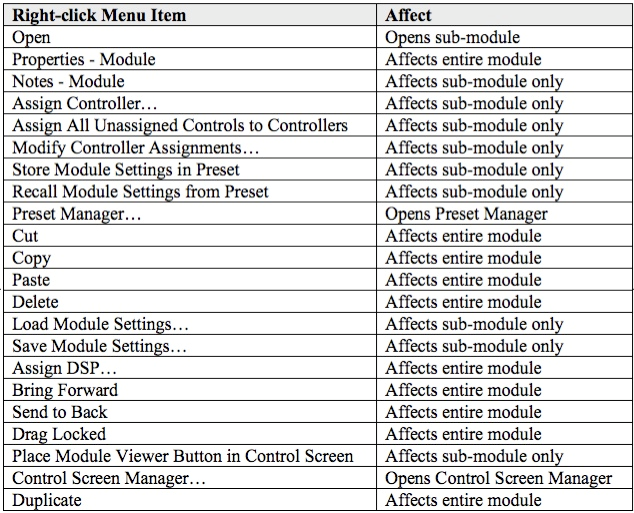
The table below gives more detail on the way various right-click operations function. For each item in the right-click menu, the chart shows if that operation affects the entire module, or just the selected sub-module.