Control Server Software
****Note Control Server firmware cannot be downgraded from 7.2 to previous firmware versions**\
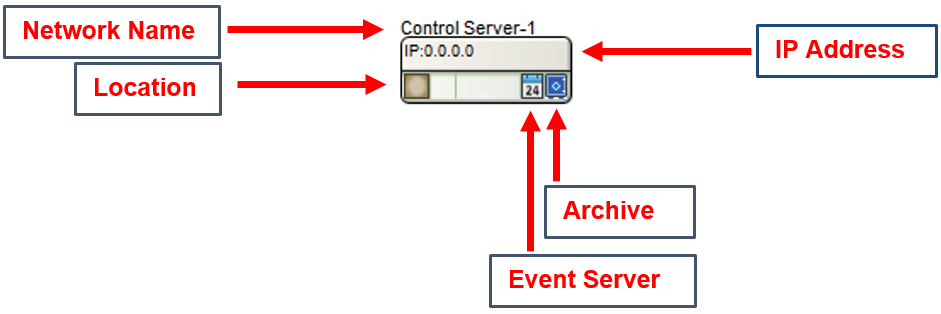
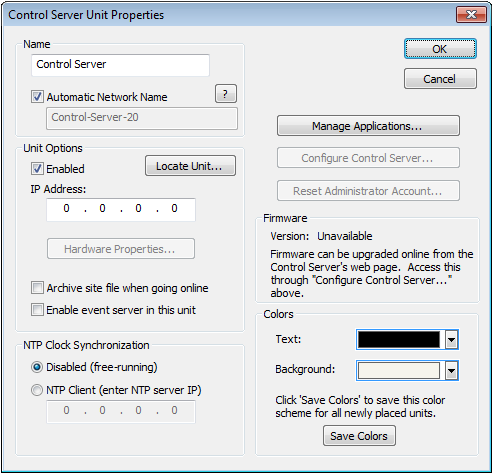
All of the following features, except for the Location Status, are managed in the Unit Properties dialog. To access the Unit Properties, right-click on the unit module in the Site View and choose “Unit Properties...”
-
Name- It is recommended to assign a unique unit name for each unit in the design based on the unit's purpose or location. Composer will always append a unique numeric identifier to this name.
-
Network Name- When Automatic Network Name is checked, the network name is auto-generated from the unit name. Network names cannot contain special characters or spaces and must be unique.
-
Enabled- When the enabled box is checked, the unit must be physically present on the network for a Push of the site file to the hardware. When the enabled box is unchecked, a X will appear on the unit module in the Site View, and the unit will not be required to be physically present for the Push of the site file.
-
IP Address- If the unit is assigned to a static IP address, it can entered in the IP Address field and if the unit can located on the network at this address, a green check indicating the unit has been located should appear in the lower left corner of the unit module on the Site View. If the unit’s IP address is unknown, run the location process and the IP address field will be filled in once the unit has located and link to the unit module on the Site View.
-
Hardware Properties...- When the unit is located, this button opens the Hardware Properties dialog. More on this dialog can be found here.
-
Archive site file when going on-line- If this box is checked, this unit will receive an archived version of the Site File for later retrieval. Multiple units can receive the archived Site File for additional security should a hardware failure occur. It should be noted that archiving the site file into multiple Composer hardware units will increase Push time significantly. Symetrix recommends turning this feature on for multiple units during the final commissioning stage.
NOTE: Composer will try and enforce an archiving unit if no unit in the site file has this option enabled.
-
Enable event server in this unit- If this box is checked, this unit will act as the event server for all events that have been setup in Event Scheduler.
-
NTP Clock Synchronization- The unit’s internal clock has two modes of operation: Disabled means the unit’s clock is free running and internally derived. NTP Client allows the unit to sync to an NTP server and receive network time.
-
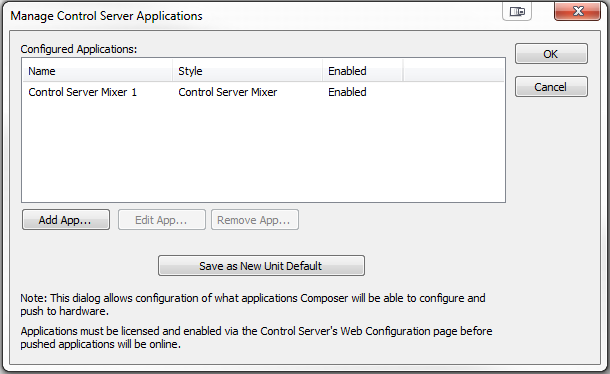
Manage Applications- Opens the Manage Control Server Applications dialog. This dialog allows configuration of what applications Composer will be able to configure and push to hardware. Applications must be licensed and enabled via the Control Server's Web Configuration page before pushed applications will be online.
-
Configure Control Server...- Launches the PC's default web browser, directing it to the Control Server Web Interface.
-
Reset Administrator Account...- Resets the Control Server's Administrator account username, password, and auto logout time.
- Colors -The text color and background color for the unit module can be customized. To save custom color settings made here as defaults for future units, click the Save Colors button.