Standard Combiners
Controls
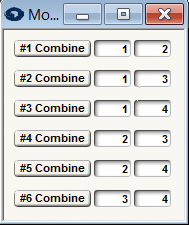 The controls for a room combiner consist of push buttons to indicate that a pair of rooms is combined and text boxes to specify the pair. The number of available buttons depends on the size of the module. They range from one combine button for a two-room combiner up to (32). In general, use the text boxes to set-up the room pairs that can be physically combined. By default, Symetrix offers useful combinations, but if these don't match your physical set up, they can easily be changed by clicking in the text box and entering a new room number. If a pair of rooms should function as one, turn on the "#n Combine" button. If the rooms should function independently, turn off the button. You can automate these buttons using remote controls, so that a contact closure can be used to automatically combine or separate two rooms.
Indirect Combining
If rooms 1 and 2 are combined and rooms 2 and 3 are combined, then it stands to reason that rooms 1 and 3 must also be combined. This is referred to as indirect combining. Symetrix room combiner modules treat indirectly combined rooms just as if they were directly combined. You do not need to explicitly (directly) combine rooms.
Standard vs. Automix Combiners
Standard combiners are designed to be used in systems that don't employ automixers and that need only one mono input per room. Automix Combiners are designed to be used in systems that use automixers in each room. They can combine individual automixers into a single large automixer or cause them to act independently.
Note: Automixer combiners can also be used in applications where rooms employ stereo audio. Simply use the "Chain" input for left and the "Mix" input for right. The Chain and Master signals are control signals and are not intended to be listened to. do not route these to your speaker system!
For proper operation, all linked automixers must be set for the same response time and slope.
Automix Connections
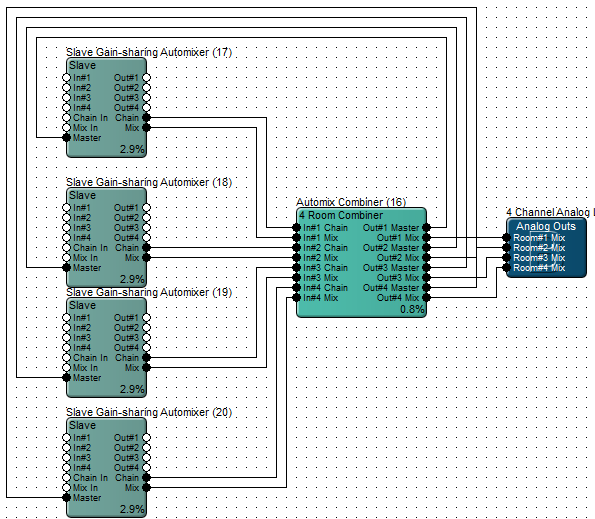
When using an Automix combiner, use only Slave Automixer modules and make sure the Stand Alone button is not pressed. Connect each automixer's Chain output to the room combiner's Chain input. Connect each automixer's mix output to the room combiner's mix input. Connect the room combiner's Master output back around to each automixer's Master input. (not the chain input as you might expect). Send the room combiner's Mix outputs to the various room's PA system.
The figure below shows the correct connections for a 4-room set-up: