Application Preferences
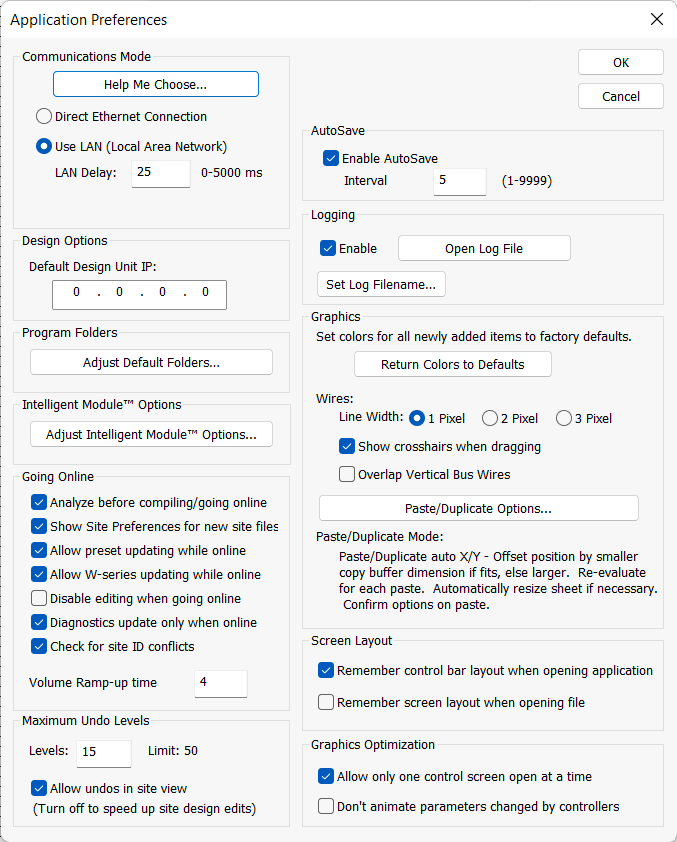
The Application Preferences dialog configures options global to the Composer software.
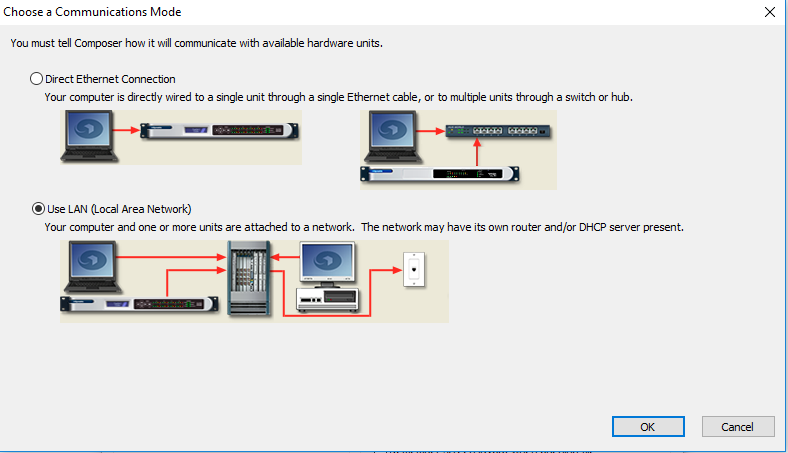
- Communications Mode - Specifies the method used to connect your PC to the hardware. Select the option that matches your network topology. The Help Me Choose... button opens the following helpful diagrams:
 - Default Design Unit IP - Specifies the IP address to use for the first new unit dropped into a Site File useful if you typically design single unit systems using the same IP address. Subsequent units added to a design receive an IP address of 0.0.0.0 in order to avoid any network conflicts.
- Adjust Default Folders... - Opens a dialog that allows you to specify the default file paths for Site Files, Super-modules, RS-485 Devices, SymVue Exports, and Settings Files.
- Analyze before compiling/going on-line - Checking this option will perform an Analyze function when compiling or going on-line in order to check for design errors.
- Show Site Preferences for new site files - Checking this option will cause the Site Preferences dialog to show when going on-line with a new site.
- Allow preset updating while on-line -Checking this box will enable downloading presets without going off-line.
- Allow W-series updating while online - Checking this box allows changes to be made to W-series while online without requiring a repush.
- Disabled Editing when going on-line - Checking this box will switch off Edit Mode automatically when going on-line from a Push or a Pull.
- Diagnostics update only when online - Checking this box will only update the diagnostics in the Diagnostic module for the units in the site file while on-line.
- Check for site ID conflicts - Checking this box will warn of site ID conflicts on the network when pushing the site.
- Volume Ramp-up time - This time setting (0-20 sec.) is used for restoring audio output after a Push to Hardware, Mute All Outputs or Firmware Upgrade operation.
- Maximum Undo Levels - Sets the number of undo operations available. A larger number provides a greater level of safety, but uses more memory and may slow the program down.
- Allow undos in site view - Determines whether or not undo operations are allowed in the Site View. Disabling this option in very large Site Files can greatly speed up the program. Remember to save often when disabling this option as there will be no undo for accidentally deleting a unit, for example.
- Enable Autosave and Interval - Enables an automatic save operation in the background at the specified interval to provide a greater level of safety should the operating system or program crash. Note that Autosave does not save over your original file, but makes a backup that is automatically restored when re-launching Composer after a crash.
- Enable Logging, Open Log File, Set Log Filename... - This set of options Enables logging to the location chosen by the Set Log Filename... button. The log file may be viewed by clicking the Open Log File button.
- Return Colors to Defaults - Selecting this function reverses any color changes you may have made in your design and returns them to Composer's default settings.
- Wire Line Width - Select either 1 Pixel, 2 Pixel, or 3 Pixel. This is the wire thickness that appears both on screen and in print.
- Show crosshairs when dragging - Shows/hides the crosshairs when dragging or drawing lines.
- Overlap Vertical Bus Wires - Checking this option will allow vertical lines to 'stack', instead of merging. Horizontal lines are unaffected.
- Paste/Duplicate Options...
- Remember control bar layout when opening application - Checking this option will re-open Composer with the same control bar layout as when Composer was last closed.
- Restore screen layout when opening file - Checking this option will re-open any windows that were open in the same positions as when you last closed the Site File.
- Allow only one control screen open at a time - Multiple control screens open at the same time can have an impact on GUI speed. Checking this option causes old control screens to automatically close when a new one is opened.
- Don't animate parameters changed by controllers - When this option is enabled, the GUI does not have to continually poll the currently viewed parameters for updates. This may speed up program when on-line with a large system or navigating complex Control Screens.
- Default Design Unit IP - Specifies the IP address to use for the first new unit dropped into a Site File useful if you typically design single unit systems using the same IP address. Subsequent units added to a design receive an IP address of 0.0.0.0 in order to avoid any network conflicts.
- Adjust Default Folders... - Opens a dialog that allows you to specify the default file paths for Site Files, Super-modules, RS-485 Devices, SymVue Exports, and Settings Files.
- Analyze before compiling/going on-line - Checking this option will perform an Analyze function when compiling or going on-line in order to check for design errors.
- Show Site Preferences for new site files - Checking this option will cause the Site Preferences dialog to show when going on-line with a new site.
- Allow preset updating while on-line -Checking this box will enable downloading presets without going off-line.
- Allow W-series updating while online - Checking this box allows changes to be made to W-series while online without requiring a repush.
- Disabled Editing when going on-line - Checking this box will switch off Edit Mode automatically when going on-line from a Push or a Pull.
- Diagnostics update only when online - Checking this box will only update the diagnostics in the Diagnostic module for the units in the site file while on-line.
- Check for site ID conflicts - Checking this box will warn of site ID conflicts on the network when pushing the site.
- Volume Ramp-up time - This time setting (0-20 sec.) is used for restoring audio output after a Push to Hardware, Mute All Outputs or Firmware Upgrade operation.
- Maximum Undo Levels - Sets the number of undo operations available. A larger number provides a greater level of safety, but uses more memory and may slow the program down.
- Allow undos in site view - Determines whether or not undo operations are allowed in the Site View. Disabling this option in very large Site Files can greatly speed up the program. Remember to save often when disabling this option as there will be no undo for accidentally deleting a unit, for example.
- Enable Autosave and Interval - Enables an automatic save operation in the background at the specified interval to provide a greater level of safety should the operating system or program crash. Note that Autosave does not save over your original file, but makes a backup that is automatically restored when re-launching Composer after a crash.
- Enable Logging, Open Log File, Set Log Filename... - This set of options Enables logging to the location chosen by the Set Log Filename... button. The log file may be viewed by clicking the Open Log File button.
- Return Colors to Defaults - Selecting this function reverses any color changes you may have made in your design and returns them to Composer's default settings.
- Wire Line Width - Select either 1 Pixel, 2 Pixel, or 3 Pixel. This is the wire thickness that appears both on screen and in print.
- Show crosshairs when dragging - Shows/hides the crosshairs when dragging or drawing lines.
- Overlap Vertical Bus Wires - Checking this option will allow vertical lines to 'stack', instead of merging. Horizontal lines are unaffected.
- Paste/Duplicate Options...
- Remember control bar layout when opening application - Checking this option will re-open Composer with the same control bar layout as when Composer was last closed.
- Restore screen layout when opening file - Checking this option will re-open any windows that were open in the same positions as when you last closed the Site File.
- Allow only one control screen open at a time - Multiple control screens open at the same time can have an impact on GUI speed. Checking this option causes old control screens to automatically close when a new one is opened.
- Don't animate parameters changed by controllers - When this option is enabled, the GUI does not have to continually poll the currently viewed parameters for updates. This may speed up program when on-line with a large system or navigating complex Control Screens.