Video Stream
The video stream is used to display static images from a URL with a regular refresh rate. It is like the picture object on Control Views with the “Image Type” property set to URL. It is designed to be used for displaying video thumbnails from video devices. For example, it is used in the Visionary Solutions Intelligent Modules provided by Symetrix.

It has the following properties.
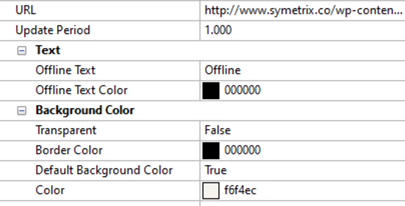
-
URL - Specifies the URL for the image. Ensure this URL is reachable by the Symetrix hardware. Both HTTP and HTTPS URLs are supported. If the image is not shown on a T-5, ensure the time is set correctly on the T-5 hardware. This is required for an HTTPS based image to display correctly.
-
Update Period - Specifies the number of seconds between image updates.
-
Text
-
Offline Text - Specifies the status text to display if the image is not available.
-
Offline Text Color - Specifies the color of the status text that is displayed if the image is not available.
-
Background Color
-
Transparent - Specifies if the Video Stream background is transparent
-
Border Color - Specifies the Video Stream border color.
-
Default Background (only shown if Transparent is False) - Specifies if the Video Stream should have the same background color as the Control View. When set to true, it automatically sets the Color property below it to the appropriate color. Alternately, this will be set to False if the Color property is manually changed.
-
Color (only shown if Transparent is False) - Specifies the Video Stream background color. If the Default Background property is set to true, this will be automatically set to the color of the Control View. Changing this will then change the Default Background property to False.