LED
LEDs are used to display binary status for a control. On/Off , Play/Stop and Connected/Disconnected are just a few examples of state that be communicated by an LED. They also have an associated label.
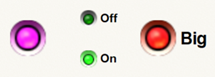
They have the following properties:
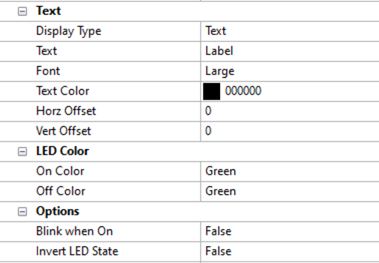
-
Text
-
Display Type - Specifies to use text or symbols to label the LED. When choosing Symbols, a system font or custom set of images may be used.
-
Text (only shown for Text Display Type) - Enter the text to display. Leave blank to hide the label.
-
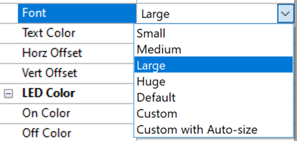
Font (only shown for Text Display Type) - Specifies to use a predefined, automatic or custom font for displayed text.
-
Text Color (only shown for Text Display Type) - Specifies the Text color to use
-
Symbol (only shown for Symbol Display Type) - Select the Symbol to use
-
Horz Offset - Specifies the number of pixels to shift the text or symbol horizontally within the LED’s label. Negative numbers shift it left; positive numbers shift it right.
-
Vert Offset - Specifies the number of pixels to shift the text or symbol vertically within the LED’s Label. Negative numbers shift it up; positive numbers shift it down.
-
LED Color
-
On Color - Specifies the LED color when enabled
-
Off Color - Specifies the LED color when enabled
-
Options
-
Blink when On - Specifies if the LED should blink when enabled
-
Invert LED State - Specifies if the LED should display the Off state when enabled and the On state when disabled