Loudspeaker Manager
Introduction
The Loudspeaker Management modules pull together several features that are frequently require for room optimization. Previously, designers needed to put together several Symetrix modules to achieve this feature set. Now, a single module provides the following features; (8) bands of parametric EQ, a programmable high pass filter with up to 48dB/octave slope, a programmable low pass filter with up to 48dB/octave, slope delay up to 500 milliseconds, gain, polarity inversion, and mute.
Signal Flow
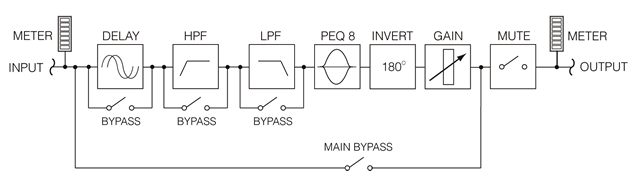
A block diagram for the module is shown below. For the Stereo, identical processing shown in the module graph is applied to both channels. For Dual-Mono modules, only (1) graph and controls view is permitted at a time, but each channel will have a separate GUI. Close the (1) module view that you're in and return to click on the 2nd module of the Dual-Mono pair and you will see a fresh set of control settings for the 2nd module.
Controls
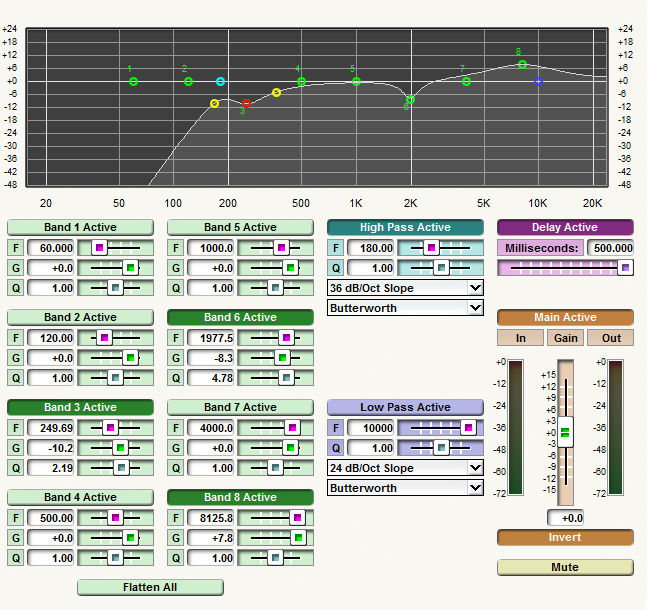
The module's controls are grouped according to function. Each group is color-coded to visually identify it. The module has the following controls:
Parametric EQ Controls
-
Band N Active button. Engaging this button activates, or enables that particular band of parametric EQ. When the Band # Active button is disengaged, it is bypassed. it has no effect on the signal, regardless of other settings for this band. Adjusting the gain of a band, or clicking on it in the graph will automatically enable a band.
-
F (frequency). Controls the center frequency of the parametric EQ band. Adjust using the slider or click in the text entry box to specify a numberical value. This parameter can also be adjusted from the graph.
-
G (gain). Controls the amount of gain or attenuation (boost or cut) applied at the center frequency of the parametric EQ band. Adjust using the slider or click in the text entry box to specify a numerical value. This parameter can also be adjusted from the graph.
-
Q (resonance). This parameter controls the resonance of the parametric EQ band. This factor is inversely proportional to the filter bandwidth. Adjust using the slider, or click in the text entry box to specify a numerical value. A 'r;Q' of 1.0 corresponds to a bandwidth of one octave. A 'r;Q' of 2.0 corresponds to a bandwidth of 0ne-half octave. This parameter can also be adjusted from the graph.
Highpass Filter Controls
-
Highpass Active button. Activates the Highpass filter according to the designated settings and inserts it into the audio signal path.
-
F (frequency). Controls the cut-off frequency of the highpass filter. Adjust using the slider or click in the text entry box to specify a numerical value. This parameter can also be adjusted from the graph. (Note: Assuming Q is set to 1.0, this frequency is the 3dB down point of the filter.)
-
Q (resonance). This control adjusts the frequency response near the cut-off point. The default resonance value of 1.0 yields "standard" filters that match the other filter and crossover modules in Symetrix. Increasing the resonance causes the filter response to peak before rolling off. Decreasing it caused this filter to droop. The effect is more pronounced with steeper filters. (Note: Technically speaking the Q value of each biquad is multiplied by the resonance factor.)
-
Slope (6, 12, 18, 24, 30, 36, 42, 48; pull-down menu). This setting controls the slope in dB/octave for the filter. With Linkwitz-Riley filters, only "even order" (12, 24, 36, 48) filters are available.
-
Filter type (Butterworth, Bessel, and Linkwitz-Riley pull-down menu). Each of these filter types creates a slightly different response. See the Crossovers section for more information.
Delay Controls
-
Delay Active button. Activates the specified delay in the module and inserts it into the audio signal path.
-
Milliseconds (delay time). Specifies the delay time of the module in milliseconds. This adjustable in 1-sample (~4.167 millisecond) intervals from 0 to 500 milliseconds. Adjust using the slider, or click in the text entry box to specify a numerical value. Manually entered values will be rounded to the nearest sample.
Output Controls
-
Main Active button. Engaging this button puts the functions of the EQ in the path of the audio signal in order to affect it with the designated settings.
-
*Gain fader. Specifies the gain applied to the signal at the output. This can be used to compensate for adjustments made by the EQ section. Adjust using the slider, or click in the text entry box to specify a numerical value. *
-
*Input meter. This is a peak responding meter that monitors the signal level at the module input. For the stereo module, two meters are shown. *
-
Output meter. This is a peak-responding meter that monitors the signal level at the module output. For the stereo module, two meters are shown.
-
Invert button. Engaging this button inverts the polarity of the signal. This is sometimes also referred to as "180° of phase", or "polarity".
-
Mute button. Engaging this button mutes the output of the module. This overrides all other settings including 'r;Main Active', i.e. the output will be muted even if 'r;Main Active' is disengaged.