Signal Generators
Composer has noise (pink and white) generators as well as tone (sine, square, sawtooth, or triangle) generators. Pink noise has equal energy per unit bandwidth. Viewed on a constant-bandwidth spectrum analyzer (RTA), it has a flat frequency spectrum. White noise has equal energy per unit Hertz. Due to the physiological shape of the ear canal (Cochlea) and the way that our ears evaluate the loudness of sounds, white noise sounds like it has more high frequency energy than low frequency energy. Viewed on a constant bandwidth spectrum analyzer, white noise has a spectrum that increases in amplitude at 3dB/octave.
These noise and tone generators are a little bit different from traditional test instruments. They are meant to go in line (series) with a signal. When the generator is de-Activated, the input connects to the output and signal is allowed to pass without having a tone, or noise injected. When the generator is Active, then it's signal appears at the output. This lets you insert the generator for testing, without having to use one of the selector modules to insert it. All of the generators have output level controls, and the tone generators have frequency controls as well.
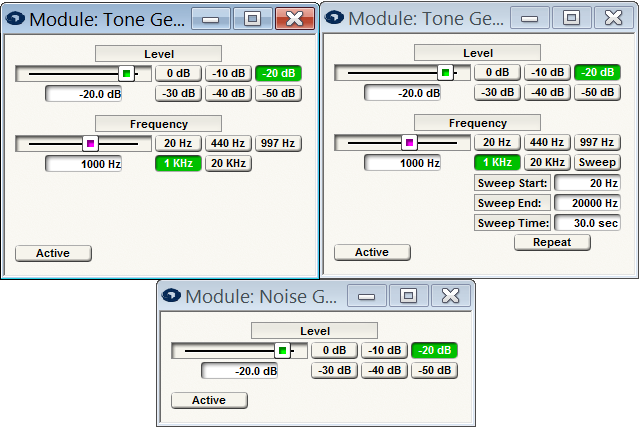
Sine generator
The sine tone generator can provide a constant or swept frequency sine wave output. The controls are:
-
Level. Adjusts the peak output level in dBFS. Adjust using the slider or click in the text entry box to specify a numerical value. You can also use one of the six buttons to choose a preset level.
-
Frequency. Controls the frequency of the tone generator. Adjust using the slider or click in the text entry box specify a numerical value in Hz. You can also use one of the five buttons to choose a preset frequency. In sweep mode, the frequency slider moves to indicate the current frequency.
-
Sweep Button. Puts the tone generator in sweep mode. The sweep controls discussed below affect the sweep. Pressing the button while a sweep is progress stops the sweep at the current frequency.
Note: the sweep button only works when "On-Line"
-
Sweep Start. Sets the starting frequency of the sweep in Hz.
-
Sweep End. Sets the ending frequency sweep in Hz.
Note: for a downward sweep, make Sweep Start large than the Sweep End.
- Sweep Time. Controls the time to complete the sweep in seconds.
Note: Adjusting any of the above three sweep parameters while a sweep is in progress will cause the sweep to start over.
-
Repeat Button. When turned on, this causes the sweep to restart immediately after it finishes. When off, the tone generator will remain at the Sweep End frequency when the sweep finishes.
-
Active. Pressing this button interrupts the input signal to the output and turns on the sine wave generator. If no input is present, and the Active button is disengaged, this effectively mutes the tone generator.