Symetrix Gain Increment Decrement
Crestron Certified Integrated Partner Module: Symetrix Gain Increment Decrement
Models: Symetrix Integrator Series; 722, 760, 761, 780, 788. Jupiter Series; J4, J8, J12. Symetrix; 8x8 DSP, Express Cobra DSP, Solus DSP, Edge DSP, Radius DSP.
Device Type: Audio Mixer, DSP.
General Information
The Certified Crestron Module Symetrix Gain Increment Decrement is used to control any parameter which has a Symetrix Control Number assigned to it. The module increases, or decreases the value of the Control Number by a specified amount depending on the number of button pushes. It is a step up, or step down gain module which makes use of the CC (Controller Change) command.
Category
Mixer
Version
2.0
Summary
The Symetrix Gain Increment Decrement Crestron module is used to raise and lower the range of any Symetrix Controller in steps. It is an alternative to drawing a slider on the touch-panel and implementing the Fader module to accomplish gain adjustments.
General Notes
This module combines Increment and Decrement functionality into one module. Once a Symetrix Control Number is assigned the value of this control can be changed by using this module in a Crestron control system. The value of the Symetrix Controller is between 0 and 65,535. It is worth noting how many counts of the 65,535 are necessary to achieve the gain adjustment that is desired. The Symetrix 3rd Party Control Protocol makes use of a CC (Controller Change) commands. This is different from a CS (Controller Set) command in that it doesn't just tell the Control Number what value to go to, it tells the Control Number to increase, or decrease its value from where it is currently by a designated amount. The format of the string isCC(Controller Change),0/1(for DEC/INC)#(Control Number),Value(Value between 0-65535). For Example, raising Symetrix Control #1 by 3dB on an 84dB scale would be:CC 1 1 2341. The command to lower the same Controller by 1dB on the same scale would be:CC 0 1 781.
Crestron Hardware Required
2 or 3 Series Crestron Processor. RS-232, or UDP card required
Setup of Crestron Hardware
RS-232. Baud Rate; 38400 to 115200 - Configurable through Symetrix Software Application.
8 Bit, Non-Parity, Stop Bit; 1, Flow Control; None.
Crestron Cable Type. CNSP-121
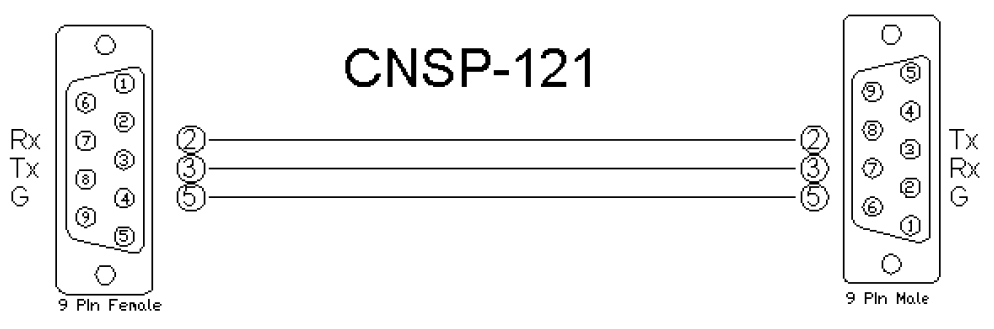
UDP/IP. Port:** 48631**.
Note:It is very important to notice that when Controlling Edge and Radius with the 3rd Party Control Protocol via Ethernet one must use UDP. The UDP Control Port Number has changed to48631. Legacy Symetrix units, those which are programmed with Symetrix Designer used and continue to use port 48630. This is not the case with the DSP which are programmed using Composer; Edge and Radius. Edge and Radius use UDP port48631to communicate when using the 3rd Party Control Protocol.
Application Notes
Please notice the scale that you are working with once the Symetrix Control Number is assigned. All Symetrix Control Numbers have a potential value of between (0) and (65,535). To allow the user to adjust the gain stage with precise dB increments, be sure to find out how many counts of the 65,535 are equal to (1) decibel. The majority of Symetrix audio faders have a scale of 84dB that they are working with. The following calculation can be used when controlling the typical Symetrix gain stage, in order to find out how many counts are associated with a desired dB amount. 1dB = 65,535 counts/84dB = 781 counts.
Module Graphic
Control
Increment. Signal Type: Digital. This is the location where the integrator will place the touch-panel variable associated with the Increase Volume button.
Decrement. Signal Type: Digital. This is the location where the integrator will place the touch-panel variable associated with the Decrease Volume button.
Symetrix TX. Signal Type: Serial. This the transmission from the Crestron module(s) and project of the serial string.
Parameters
Control_Number. Signal Type: Variable to be entered by the integrator. This will be the Symetrix Control Number.
Amount_in_dB. Signal Type: Variable to be entered by the integrator. This is the amount in dB that the gain stage will move up and down with the module's button presses. It is acceptable to put any number from (1) to (84).
Feedback
N/A.*There is not any feed back necessarily coming from the Symetrix device into this module. If you need to see level, perhaps placing a meter for the gain level would be sufficient. Please see Symetrix Controller Receiver. *
*In order to have the buttons actually appear to engage on the touch panel, put the same variable that is the button press into the feedback portion of the touch-panel module in SIMPL. This will give the buttons the appearance of going into their active state for the moment when pressed. *
Testing
Symetrix OS. Symetrix Designer v10.06, Symetrix Composer v1.1, Jupiter Software v 2.0.1.12, Integrator Series 761 Software v2.01.
SIMPL OS. 4.01
Crestron DB. 35.00.004.00
Sample Program. Symetrix 761 Demo for MC3 and TPS6