DTMF Decoders
There are 1, 2, 4, 8, 12 output versions of the DTMF Decoder modules. These modules provide a way to trigger logic events (most often, presets) on a Symetrix system using DTMF tone sequences from a phone system. The primary application for this is to interface Symetrix with a phone system for paging.
Module I/O
Inputs
PageIn The audio signal from the phone system, or other paging source connects here. This signal contains the page audio and DTMF signals. It is the signal straight from the phone system/paging interface). The module monitors this input for DTMF tones, or sequences of tones that match one of the strings stored inside of it. The module monitors continuously if the Control Input (CtrlIn) is disabled. If the Control Input is enabled, it only monitors while the Control Input is high and ceases to monitor when the Control Input goes low.
CtrlIn The Control Input can optionally be wired to an analog control inputs of a DSP device or Control I/O, which can then be interfaced with the on/off hook control signal supplied by the phone interface. When enabled using the Control Input Enable button, DTMF detection will be halted unless the input is high. If it goes low, any partially detected DTMF sequences will be canceled and any active outputs will be turned off immediately. Furthermore, it will cancel pages generated by the Test buttons.
DTMF A DTMF coded signal can be placed on this control input from the Symetrix ATI or VoIP card, or other DTMF tone source in the DSP. This is not an input for analog audio, but for the DTMF coded signal.
Outputs
PageOut: The paging signal is output here. This output is only active after a successful DTMF decode. This is to prevent DTMF tones being sent to any zones that may be live.
Tone: Confirmation tones are sent out of this output. This output would typically be wired back to the phone system, so that a paging user can know when the DTMF sequence was accepted and the system is ready for his/her page. Using a mixer, or summer to combine the PageOut and Tone outputs. The tone output can be routed to the zones in order to function as a pre-announce tone for the audience.
Out#nn: Out#nn goes high when it's corresponding DTMF tone, or sequence of tones is detected. The output remains high for the duration of the Hold Time.
Off: The Off output can optionally be used to trigger a "reset" preset. After a page and its requisite routing takes place, it may be desirable to reset the routing to a known state. The Off output goes low when any of the Out#nn outputs are high. It then goes high after the Hold Time expires or the Control Input goes low.
Controls
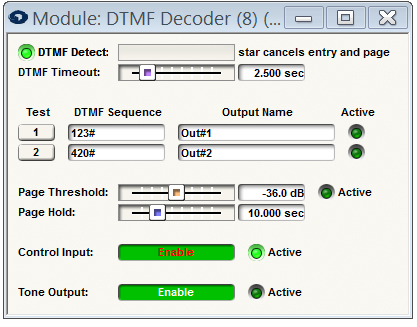
DTMF Detect (LED and readout): The DTMF Detect LED lights to show the module is currently attempting to recognize incoming DTMF tones. The DTMF Detect readout displays the detected string as it is decoded, useful for troubleshooting.
Note: the asterisk (star) key is reserved for a cancel function. When the star DTMF is detected, the module will cancel any current string detection and/or cancel the currently active page (active control input). The DTMF Detect bar cannot be exported to SymVue.
DTMF Timeout: This is a time out adjustment for the DTMF Sequence detection, most useful when the Control Input is not utilized. A range of 0.5 to 10 seconds is provided. If a user starts to key in a DTMF Sequence, but fails to complete the sequence, the module will give up trying to recognize the sequence after this time out period has passed. The module will then begin listening for a new DTMF Sequence.
Test: For testing purposes, pressing one of these momentary buttons will simulate the recognition of its respective DTMF Sequence causing the corresponding Active LED to light and its Output to go high. These buttons may also be directly assigned to contact closures for integration with a paging station.
DTMF Sequence: This is the string to be recognized. It may only contain the digits 0-9, A, B, C, D, and #. It is suggested that the # key to be reserved for an enter function. This is an effective way to signal the end of the string and also helps prevent detection of partial strings. As mentioned previously, * is reserved for a cancel function. DTMF strings are limited to (12) characters.
Output Name: User-editable text label to give the DTMF sequence a user-friendly and descriptive name.
(Output) Active LED: LED shows the current state of the Control input. On = high. These LEDs may be assigned control numbers in order to accommodate additional logic, or monitoring applications.
Page Threshold: Audio level setting to determine when the Page Input is finished. In order for the Off output to go high, three conditions must be met: 1. Page Input drops below the Page Threshold, 2. Hold Time has expired and 3. (optional) Control Input goes low.
(Page) Active LED: LED shows the current state of the Page Input. On = high. This LED may be assigned control numbers in order to accommodate additional logic, or monitoring applications.
Page Hold: This is the length of time the module should keep the last detected DTMF Sequence's Output held high. After the Page Input drops below the Page Threshold AND the Hold Time expires, the Active DTMF Sequence's Output is returned to low and the Off output is made high. If the Control Input goes low, the Hold Time expires immediately.
Control Input (Enable and Active LED): The Enable button enables the use of Control Input function. The Active LED will light when the Control Input is high and be dim when the Control Input is low.
Tone Output (Enable and Active LED): The Enable button enables the use of the Confirmation/Pre-announce function. The tone will emit when a DTMF sequence was detected successfully. This can be used as a confirmation tone to the paging user, as a pre-announce tone to the zones, or both. The Active LED will light when the Tone Output is outputting signal and be dim when off.
Example Implementation
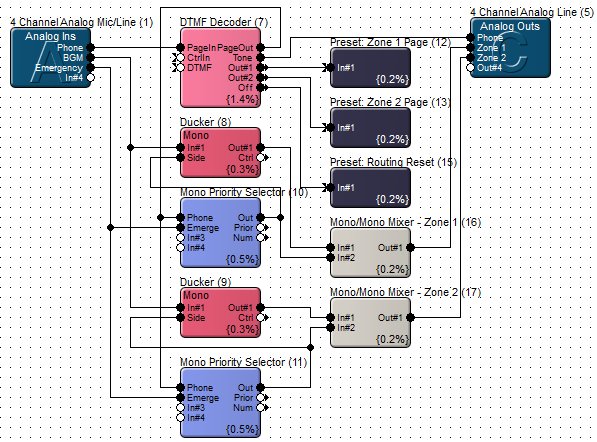
The following design shows a simple two zone implementation. The DTMF Decoder module triggers a set of presets which in turn activate the Phone input on the appropriate Mono Priority Selector module.