Diagnostics

Double-click on the Diagnostics module in Design View or right-click the module and select Open. The Connected LED will be lit green when the unit is connected. The module continues to run whether the unit is connected or not. Some of the items may not be shown for all DSPs. A Radius NX and Server D100 Diagnostics view are shown for example.
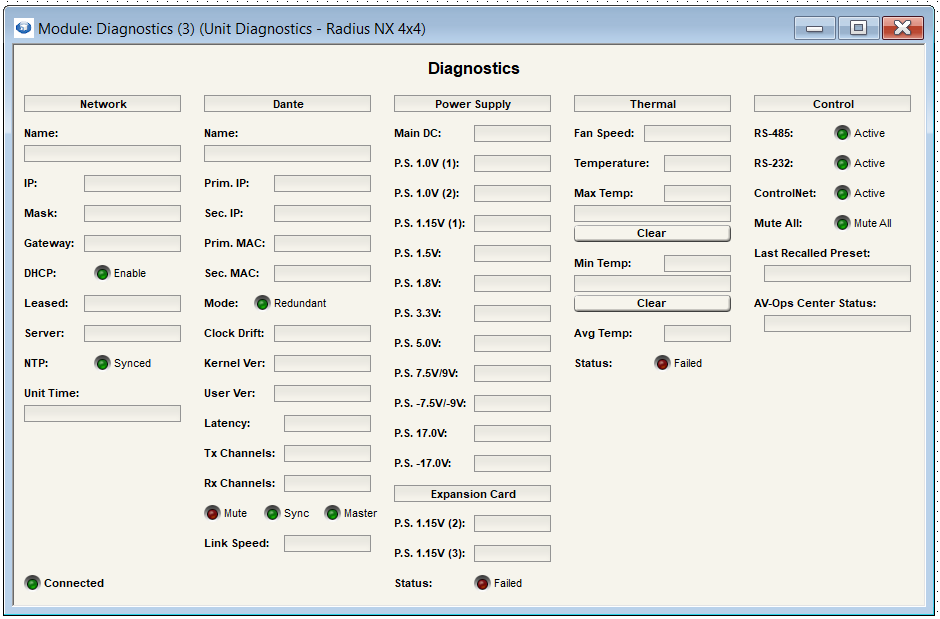
TODO: replace missing screenshot.
Network
Network Name: The name of the unit
IP: The unit's IP Address
Mask: The unit's Subnet Mask
Gateway: The unit's Default Gateway
DHCP: If DHCP is enabled, the LED will be lit green
Leased: Date and time of receiving lease
Server: IP Address of local server
NTP Synced: Shows if NTP is synced
Unit Time: Shows the current time in the unit itself
Dante
This column is not shown for Solus NX devices. For all other DSPs, if no Dante Card is installed, the Dante section will display "\
Name: The Dante network name for the unit
Prim. IP: The IP address for the primary Dante port
Sec. IP: The IP address for the secondary Dante port. This will be 0.0.0.0 if the unit is not in redundant mode.
Prim. MAC: The MAC address for the primary Dante port
Sec. MAC: The MAC address for the secondary Dante port. This will be 00:00:00:00:00:00 if the unit is not in redundant mode.
Mode: (not on Server D100) If Dante is configured in Redundant mode, the LED will be lit green. Otherwise Dante is configured in Switched mode.
SEC Mode: (Only on Server D) This is only set to Disabled or Redundant; there is no Switched mode on Server D100.
Clock Drift: The clock drift consists of 2 values. The first indicates the amount that the network sample clock differs from the internal clock of a device. This may be in the thousands. The second value indicates how much the first value is changing. It should generally be less than 100. If the unit is the clock master, these values aren’t relevant and it will show "MASTER".
Kernel Ver: The version of the Dante firmware provided by Audinate
User Ver: The version of the Dante firmware provided by Symetrix
Latency: The network latency set for Dante traffic
Tx Channels: Number of Dante transmit channels configured for the unit
Rx Channels: Number of Dante receive channels configured for the unit
Mute LED: Indicates the state of the Dante mute due to synchronization errors or other issues. This is not affected by the Composer’s mute features.
Sync LED: Indicates if the Synchronization status is locked
Master LED: Indicates if the unit is set as the master clock for the Dante network
Link Speed: Indicates the speed the Dante card is connected to the network
Power Supply
Main DC: 24V
Aux DC In: 24V when the auxiliary power supply is plugged in (applies to Edge only)
P.S. Values: All power supply rails will display their current voltage. Radius NX will also show a section for the expansion card.
Status: The red LED will be lit if the voltage rails swing beyond the tolerance window. For most voltages, this is+/- 5%.
Thermal
Fan Speed: RPM of the internal fan. The value will increase as the internal temperature rises
Temperature: Temperature of the motherboard
Max Temp: Maximum recorded temperature of the motherboard
Clear: Clears the reported temperature
Min Temp: Minimum recorded temperature of the motherboard
Clear: Clears the reported temperature
Avg Temp: Average recorded temperature of the motherboard
Status: The Failed LED will be lit red if the fan has stopped (0 RPM) or the internal temperature is greater than 158°F/70°C
Control
RS-485: This LED will be lit green when data is sent on the RS-485 port
RS-232: This LED will be lit green when data is sent on the RS-232 port. Not shown for Solus NX or Prism.
ControlNet: This LED will be lit green when data is sent on the ControlNet port
Mute All: This LED will be lit green when all unit outputs are muted
Last Recalled Preset: Shows name of last recalled preset. This will be empty after a power cycle before a preset has been recalled.
AV-Ops Center Status: Displays the current status of the devices communication with AV-Ops Center