Updating a .svx File
Supposing an active, running SymVue Panel needs adjustment to better suit the user’s needs, either by adding/removing/rearranging controls or modifying the way security works or additional Panels are accessed. Changes can be made to a .svx file while it is online and currently active, but the changes must be implemented through Composer. One would return to the Site File containing the appropriate family of Control Screens, make the necessary design changes and run the SymVue Export Wizard to re-export with any changes. Once these changes have been made and the wizard is told to Finish the task, the installer is faced with the following prompt:
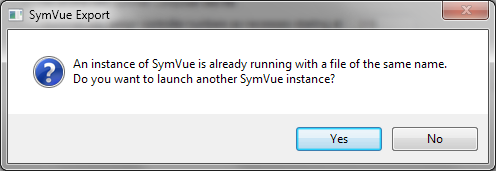
If No is clicked, the changes made to the file are stored on disk and the wizard will close. If Yes is clicked, the wizard will close and the updated version of the file will open in a new instance of SymVue leaving the old version still open and running, so be aware that there is potential for confusion running two identically named Panels. Meanwhile, the original Panel will display the following prompt:
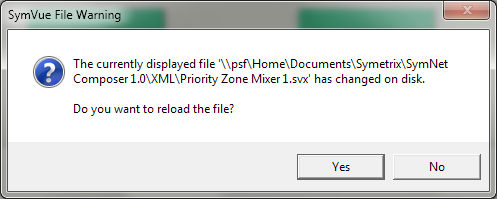
If No is clicked, the Panel will remain as-is and continue to function without any of the changes made. (Note: If the updated version of the file has controls removed, they will be unaffected by any changes made in the original Panel). If Yes is clicked, the new file will be loaded into the existing Panel. Any security precautions will be re-initiated and passwords may need to be entered again.