Paste Special
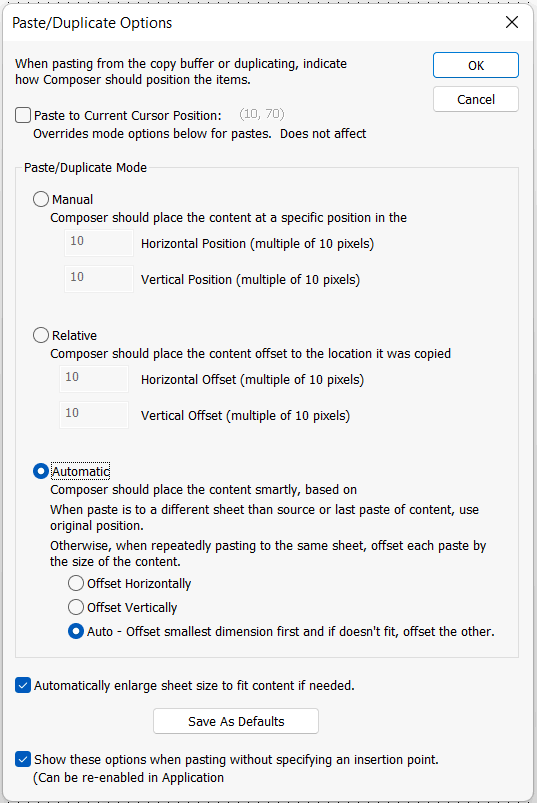
The Paste/Duplicate Options window is shown by choosing Paste Special from the Edit Menu. It can also be accessed from the Application Preferences window. It contains options that configure how pasting will be performed.
-
Paste To Current Cursor Position - When enabled, pastes the copied contents to the current cursor position. The functionality in the Paste/Duplicate Mode section below it does not apply when enabled.
-
Paste/Duplicate Mode
-
- Manual - Pastes the copied contents at a specific position
- Relative - Pastes the copied contents relative to the location from which it was copied
-
Automatic - Composer automatically decides how to place the contents when pasting, choosing to offset the contents Horizontally, Vertically, or Automatically
-
Automatically Enlarge sheet size to fit content if needed - Configures whether, the sheet size will be increased if needed to fit the newly pasted contents
-
Save as Defaults - Click the button to save the current Paste Special options as the default
-
Show these options when pasting without specifying an insertion point - Configures whether the options are shown when pasting without specifying an insertion point