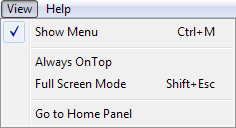
Show Menu: Selecting this item will toggle between showing and not showing the Menu Bar.
Always on Top: This feature will keep the Panel in the forefront of the computer monitor at all times and will not allow any other window to obscure it. Not only does this keep the SymVue Panel in sight at all times, but it ensures pop-up windows cannot steal focus from the Panel thereby temporarily preventing operation. When this feature is in effect, a check mark will appear next to it for easy identification. Keep in mind that other programs including other SymVue instances may use the Always on Top feature as well, in which case the actual top-most window is unpredictable.
Full Screen Mode: As the name might suggest, this will make a Panel cover all of the available space on the monitor. One can toggle between Full Screen Mode and actual Panel size by pressing the Esc key and Shift+Esc, alternatively.
Go to Home Panel: When this item is selected, the user is returned to the designated initial Panel. Think of it as a Control Screen Viewer button that doesn’t take up any Panel real-estate.