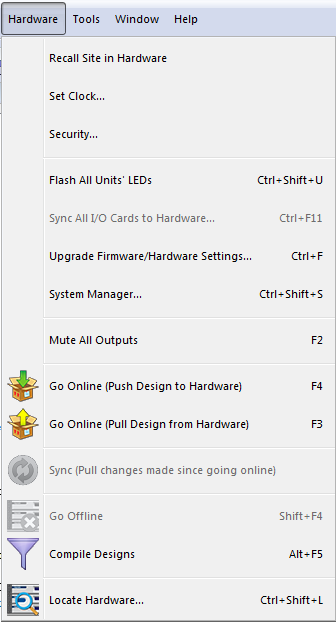
Hardware Menu
The Hardware menu contains items that interact directly with hardware. Hardware must be accessible and/or located for many of these items to function.
- Recall Site in Hardware - Recalls the configuration as last pushed to the hardware. This is similar to power cycling the hardware if your Site is set to power on "As Set in Archived Site File".
- Set Clock...
- Security...
- Flash All Unit's LEDs - Flashes all located units front panel LEDs in the site file.
- Sync All I/O Cards to Hardware... - Will sync all available units that have I/O cards in the site.
- Upgrade Firmware/Hardware Settings...
- System Manager...
- Mute All Outputs - Mutes all of the outputs of all located units.
- Go Online (Push Design to Hardware) - Transfers the currently open Site File to hardware.
- Go Online (Pull Design from Hardware) - Retrieves the site file from an archiving unit and goes online with the site file.
- Sync (Pull changes made since going online) - Pulls all device and channels names and routing for all devices in the design. Only available when online. Network audio modules are not added, deleted, or resized and no wiring changes are made.
- Go Offline - Disconnects from the hardware.
- Compile Designs - Simulates pushing the design to hardware and checks for errors.
- Locate Hardware...