PD-1 Software
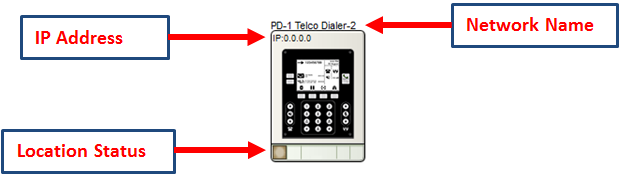
All of the following features, except for the Location Status, are managed in the Unit Properties dialog. To access the Unit Properties, right-click on the unit module in the Site View and choose “Unit Properties...”
-
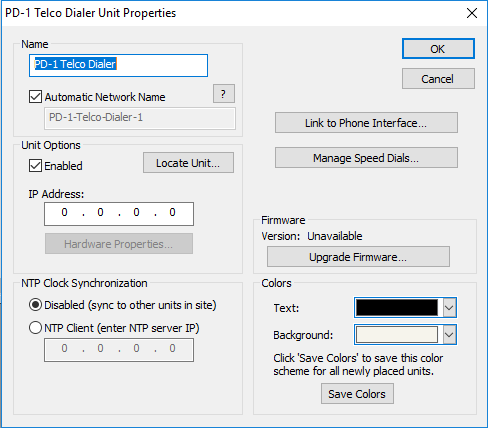
Name- It is recommended to assign a unique unit name for each unit in the design based on the unit's purpose or location. Composer will always append a unique numeric identifier to this name.
-
Network Name- When Automatic Network Name is checked, the network name is auto-generated from the unit name. When unchecked, a custom name may be entered. Network names cannot contain special characters or spaces and must be unique.
-
Enabled- When the enabled box is checked, the unit must be physically present on the network for a Push of the site file to the hardware. When the enabled box is unchecked, an X will appear on the unit module in the Site View, and the unit will not be required to be physically present for the Push of the site file.
-
IP Address- If the unit is assigned to a static IP address, it can entered in the IP Address field and if the unit can located on the network at this address, a green check indicating the unit has been located should appear in the lower left corner of the unit module on the Site View. If the unit’s IP address is unknown, run the location process and the IP address field will be filled in once the unit has located and link to the unit module on the Site View.
-
Hardware Properties...- When the unit is located, this button opens the Hardware Properties dialog. This allows choosing between a dynamic or specific static IP address.
-
NTP Clock Synchronization- The unit’s internal clock has two modes of operation: Disabled means the unit will attempt to sync its time to other units in the site. If it is unable to do so, the unit’s clock is free running and internally derived. NTP Client allows the unit to sync to an NTP server and receive network time.
-
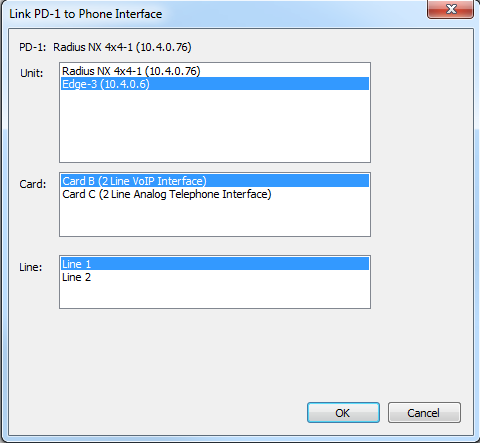
Link to Phone Interface- Opens the Link PD-1 to Phone Interface dialog. This dialog allows the user to link the PD-1 to any line of a telephone interface card available from any located DSP within the site file.
-
Manage Speed Dials- Opens the Manage PD-1 Speed Dials dialog. This is a separate speed dial list from that of the telephone interface card. It can hold up to 100 speed dials independently of the telephone interface card used. Commas may be used to insert a 2 second pause between dialed characters. Multiple commas will extend the pause accordingly (e.g. 91,4257787728,,5).
-
Upgrade Firmware- Opens the Upgrade Firmware/Hardware Settings dialog.
- Colors -The text color and background color for the unit module shown in Composer can be customized. To save custom color settings made here as defaults for future units placed in Composer, click the Save Colors button.