LED Displays
LED Display modules offer a simple way of metering signal levels. Rather than a full continuous meter they offer (5) discrete levels, each with programmable thresholds. This type of metering is often more useful in external control systems and other applications where a full meter would be overkill.
Versions of the LED Display module have 1, 2, 4, 6, 8 and 12 channels available.
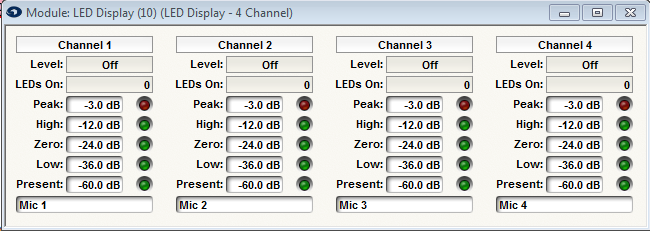
All sizes have the following controls for each channel:
- Level readout. This displays the level of the signal quantized to thresholds set below. Think of it as a rounded off level display. For example, with an input signal level of -20dB and the default settings, it would display -24.0dB since that is the nearest value below the actual level.
- LEDs On. This displays the number of LEDs currently lit ranging from 0 to 5. This provides a simple way to indicate the current signal level.
- Peak level. This sets the level at which the "Peak" LED lights. The default is -3dB. Use this as a clip indication.
- High level. This sets the level at which the "High" LED lights. The default is -12dB. Use this as a warning that the signal is nearing the clip level.
- Zero level. This sets the level at which the "Zero" LED lights. The default is -24dB. Use this as a target to shoot for.
- Low level. This sets the level at which the "Low" LED lights. The default is -36dB. Use this as an indication that the signal is a bit soft.
- Present level. This sets the level at which the signal "Present" LED lights. The default is -60dB. Us this as an indication that audio signal is plugged in and sounding. To indicate that Signal is Present.
To avoid confusion, the threshold values should be in descending order, though we won't force you to arrange them this way.
Remote Control Note: This module was added directly to help with level metering in remote control systems. Due to the coarse steps of the meter, the control system is less likely to be bombarded with constantly changing meter values. Either the level or LEDs On readout can be assigned to a controller and be read by a remote control system, whichever is most convenient. The LEDs On will give you (5) evenly-spaced values from 0 to 65535. The Level will give you values that correspond to the actual thresholds. If you want fewer than (5) levels, set the lowest threshold(s) to the minimum value, which typically forces the LEDs to be always on. It may also be worth investigating the use of the PUI and PUT commands in the 3rd Part Control Protocol to lessen the frequency of pushed control events.