Presets Manager
The Presets Manager contains a tree view of the Presets stored in your Site File.
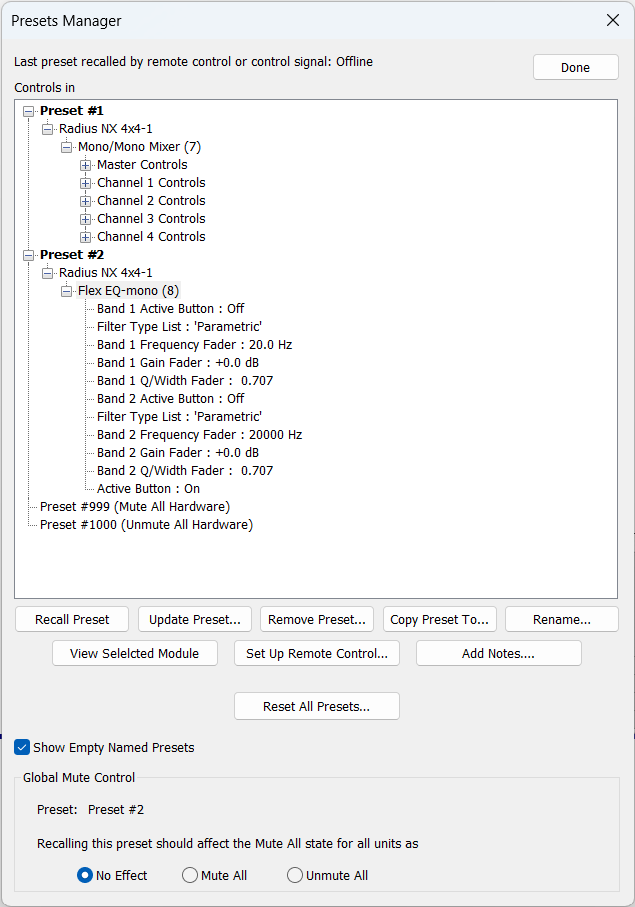
- Recall - Recalls the currently selected Preset. If off-line, it recalls in software only. If on-line the recall happens in hardware and the software updates to reflect.
- Update - Updates the preset value for all controls already included in the selected preset or preset component to the Site's current value. This means that if the site is online, it must also retrieve the current state from the hardware if there is not already a module or control screen view open showing the control. The “Update Preset” button operates only on the controls under the selection in the tree control, down to the individual control leaves. When the Preset Manager dialog closes, presets in the hardware will be updated if online and configured for online preset updating.
- Remove - Deletes the currently selected Preset.
- Copy To... - Copies the currently selected Preset to a designated location.
- Rename... - Renames the currently selected Preset. By default, Presets have no name.
- View Selected (Unit/Module) - Opens the selected Unit or Module if one is selected in an expanded Preset tree.
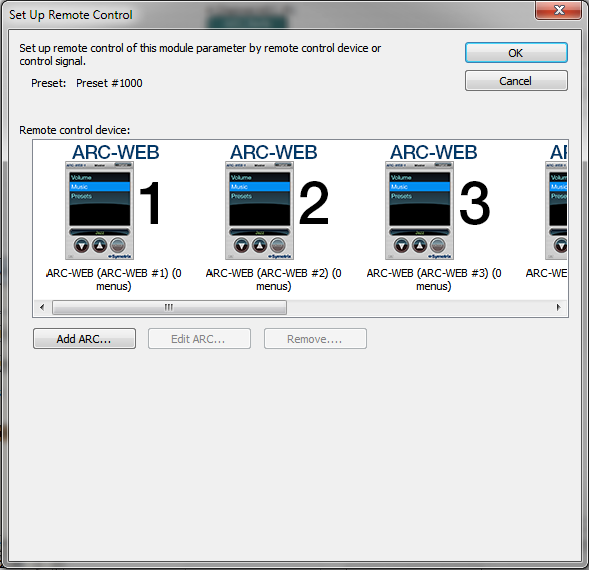
- Set Up Remote Control... - Assigns the currently selected Preset to a new or already defined remote.
 - Add/Edit Notes - Opens the Notes dialog box allowing you to enter or edit notes for the selected Preset.
- Reset All Presets - Clears all created presets, leaving only the default presets 999 and 1000.
- Show Empty Named Presets - Shows all Presets with custom names, even if they have no data stored in them.
- Global Mute Control - Allows for any user defined Preset to globally mute or unmute all hardware in a site file. By default Preset 999 will mute all of the hardware outputs in the site file and Preset 1000 will Unmute all of the hardware outputs in the site file.
- Add/Edit Notes - Opens the Notes dialog box allowing you to enter or edit notes for the selected Preset.
- Reset All Presets - Clears all created presets, leaving only the default presets 999 and 1000.
- Show Empty Named Presets - Shows all Presets with custom names, even if they have no data stored in them.
- Global Mute Control - Allows for any user defined Preset to globally mute or unmute all hardware in a site file. By default Preset 999 will mute all of the hardware outputs in the site file and Preset 1000 will Unmute all of the hardware outputs in the site file.