BGM Combiners
Rules for Resolving Linked Controls
Introduction
In many hotels and convention centers, the ballroom and conference room space is constructed with moveable walls so that the total space may be partitioned into many small rooms for fewer larger rooms. This offers great flexibility in the physical realm to accommodate a wide variety of events. Your audio system needs to offer similar flexibility to deal with the sound-reinforcement needs of such an environment. In Symetrix, room combiner modules offer a convenient solution to this problem. The BGM room combiners handle volume controls and background music source selectors that automatically link when rooms are combined. This allows you to easily offer for example, volume control wall panels in multiple rooms that control either just that room, or all combined rooms.
The BGM Combiner modules integrate well with the ARC-SWK. For more information, see the ARC-SWK with BGM Combiner section of this help file.
Functionality
The Room Combiner modules offer one input for each partitioned room in a larger space. In addition, the BGM Combiner modules offer up to 24 inputs for background music common to all rooms. For each partitioned room, there are two outputs, one for the main room audio and one for the BGM. Typically these two outputs are mixed together to create the audio for the room, but they are left separate to allow flexibility for ducking or other applications. (Where they do need to be mixed, the Summer modules offer a simple low-DSP-usage method for achieving this). In this context, the number of rooms in the module is the number of rooms obtained when all walls are closed. For example, a rectangular space with (2) moveable walls is considered to have (3) rooms.
If two rooms are combined, then the audio inputs for these two rooms are mixed together and set to both room outputs. In addition, the same background music selection and volume settings are used for both rooms. Source selection and volume control remain linked as long as the rooms are combined. If two rooms are separate, then the audio is not mixed and each room receives its respective input signal. In this case, the input is passed through to the output. In addition the BGM source selection and volume controls operate independently.
While you could use also an ordinary matrix mixer for room combining, a dedicated room combiner module offers a much more simple interface. With a matrix, one would have to laboriously figure out how to set up each matrix crosspoint depending on the specific room configuration. Instead, simply indicate which rooms are combined and let Symetrix figure out the rest, including linked volume controls and source selects. Room combiner modules also greatly simplify setting up remote controls.
Controls
There are two groups of controls for the room combiner modules: the combining controls and the room volume/source select control. (see diagram below).
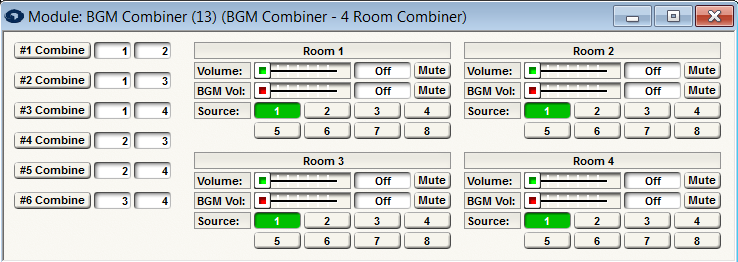
The combining controls consist of push buttons to indicate that a pair of rooms is combined and text boxes to specify the pair. The number of available buttons depends on the size of the module. It ranges from one for a two-room combiner up to (32). In general, use the text boxes to set-up the room pairs that can be physically combined. By default, Symetrix offers useful combinations, but if these don't match your physical set-up, they can easily be changed by clicking in the text box and entering a new room number. If a pair of rooms should function as one, turn on the "#n Combine" button. If the rooms should function independently, turn off the button. You can automate these buttons using external controls. For example, a contact closure can be used to automatically combine or separate two rooms.
In addition, each room has (2) volume controls and a source selection. The (2) volume faders set the levels of the (2) outputs for each room. The fader labeled "Volume" controls the main room signal, that is the signal coming out of the Room. #n output. The fader labeled "BGM" controls the background music level coming out of the BGM #n output. The source select buttons allow choosing the BGM source for the room, which is sent out the BGM #n output. If source selection needs to be controlled externally, assign a single control number to the 8 source buttons.
Indirect Combining
If rooms 1 and 2 are combined and rooms 2 and 3 are combined, then it stands to reason that rooms 1 and 3 must also be combined. This is referred to as indirect combining. Symetrix room combiner modules treat indirectly combined rooms just as if they were directly combined. You do not need to explicitly (directly) combine rooms.
Rules for Resolving Linked Controls
As discussed above, when rooms are combined, their volume and source select controls are linked and operate as one. However, when two rooms are first combined, they may have different settings for these parameters. The following simple rules describe how these discrepancies are resolved.
-
For volume controls, the lowest volume of combined rooms is used for all the rooms. In other words, lowest volume wins.
-
For source select controls, the lowest valued source of all combined rooms is used for all the rooms. In other words,
the lowest source number wins, e.g. source #1 takes priority over source #2.
After the initial linking, the controls will operate in a linked fashion, so that changes to any one will affect all others. If multiple linked controls are being changed at the same time, the last change will win out.
Standard vs. Automix Combiners
Standard combiners are designed to be used in systems that don't employ automixers, that need only one (mono) input per room, and do not require combinable/un-combinable gain controls.
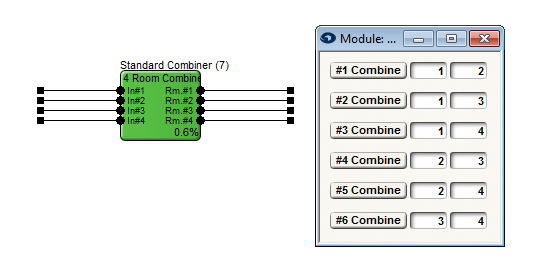
Automix Combiners are designed to be used in systems that use automixers in each room. They can combine individual automixers into a single large automixer, or cause them to act independently. Automix Combiners are designed to be used in systems that employ automixers; however, these systems need only one (mono) input per room, and do not require combinable/un-combinable gain controls.
BGM Automix Combiners and Automix Connections
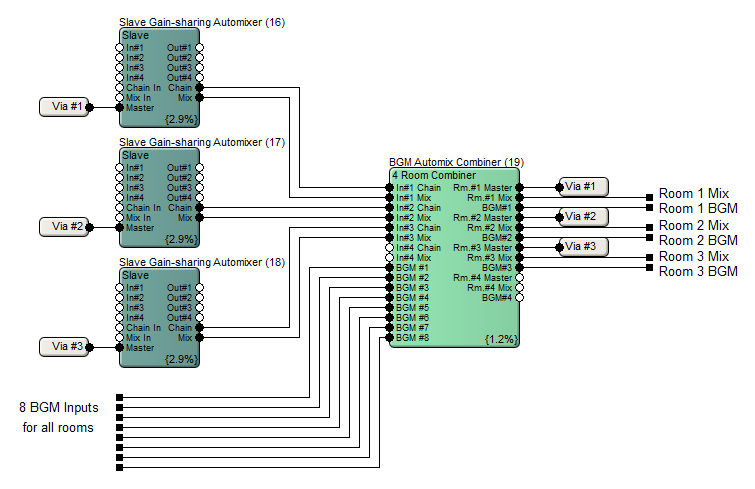
Only connect Slave Automixer modules (not Masters) to a BGM Automixer Combiner and Automix Combiners. Make sure the Stand Alone button in each automixer is not pressed. Connect each automixer's Chain output to a unique Chain input of the BGM Combiner. Connect each automixer's Mix output to the corresponding Mix input of the BGM Combiner. Connect each of the BGM Combiner's Master outputs back around to the Master input of the corresponding automixer (not the Chain inputs as you might expect). Send the BGM Automix Combiner's outputs into the various rooms' PA systems.
The figure below shows the correct connections for a three-room set-up.