Symetrix Fader Control v2.0
Crestron Certified Integrated Partner Module: Symetrix Fader Control
General Information
The Symetrix Certified Integrated Partner Module called Symetrix Fader Control v2.0 is much like the module Fader Control v1.0. The main difference is that the SIMPL + (Fader Processor v1.0) file which must be used to get Fader Control v2.0 to work uses a CS (Controller Set Command) instead of the original Fader Processor file which used a CSG (Controller Set Global) command. There are fields available in the module for the touch panel variable which represents the analog slider as well as increment and decrement volume fields. The integrator may comment these out. There is also a location in which to put the Symetrix Control Number associated with the gain stage.
Category
Mixer, DSP.
Version
2.0
Summary
This module is meant to control any gain stage in any Symetrix DSP. It operates when given the variable from a Crestron touch-panel slider and converts and transmits the analog signal from the slider variable to serial string signal that will operate on a Symetrix Control number through a scale of (0) to (65,535).
General Notes
The Symetrix Fader Control v2.0 module is comprised of a SIMPL + module (Fader Processor v1.0) wrapped in a SIMPL module shell. Be sure to put both files into your directory, save and compile them. The majority of Symetrix gain stages are 84dB; -72dB to +12dB. The Symetrix Control Protocol associates a value scale from (0) to (65,535) with the each Control Number. The Fader Processor v1.0 that comes in this v2.0 download is using a CS (Controller Set) command instead of the CSG (Controller Set Global) command that was used by the v1.0 modules. Be sure to use the 2.0 modules when programming the Composer based DSP; Edge and Radius. Edge and Radius do not respond to Global commands.
It is worth reading the Symetrix Control Protocol document for the Series to which you wish to communicate with using this module. The Symetrix Control Protocol is identical for each series. The factor to consider is whether the Symetrix Control Numbers have already been assigned; as in the case of Jupiter, or Integrator Series, or do you need to assign the Symetrix Control Numbers yourself. Open architecture DSP such as the 8x8 DSP, Express Cobra, Solus, Edge and Radius have an open architecture and thus the Symetrix Control Numbers are assigned by the integrator at the time of design.
Crestron Hardware Required
2 or 3 Series Crestron Processor. RS-232, or UDP card required.
Setup of Crestron Hardware
RS-232. Baud Rate; 38400 to 115200 - Configurable through Symetrix Software Application.
8 Bit, Non-Parity, Stop Bit; 1, Flow Control; None.
Crestron Cable Type. CNSP-121
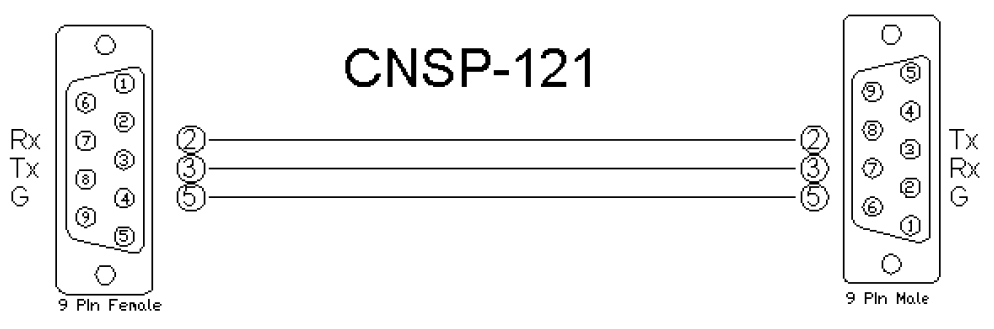
UDP/IP. Port:** 48631**.
Note:It is very important to notice that when Controlling Edge and Radius with the 3rd Party Control Protocol via Ethernet one must use UDP. The UDP Control Port Number has changed to48631. Legacy Symetrix units, those which are programmed with Symetrix Designer used and continue to use port 48630. This is not the case with the DSP which are programmed using Composer; Edge and Radius. Edge and Radius use UDP port48631to communicate when using the 3rd Party Control Protocol.
Application Notes
This Fader Control v2.0 module is compatible with all Symetrix Software and unit Firmware versions. Those DSP which are programmed with Symetrix Designer; 8x8 DSP, Express Cobra, Solus units, used the Legacy architecture of Numbered Rings and Unit Address Numbers within those rings.
Those DSP which are programmed with Composer; Edge and Radius, use Dante to transmit digital audio and control between units. The Edge and Radius DSP will not respond to the Version 1 Crestron Integrated Partner Modules. Use the Version 2 modules when working with Edge and Radius DSP. These units will only respond to the CS Controller Set command used in the Version 2 modules. They do not respond to the CSG Controller Set Global command. This is due to the fact that the concept of the SymLink ring has gone away.
The Integrator will designate the parameter to be controlled in the Symetrix DSP by using the "right-click" menu in Composer and assigning an RS-232/485 Symetrix Control Number to the gain stage they wish to control. There are up to 9,999 Symetrix Control Numbers that can be assigned within the DSP system. The scale of value for each Symetrix Control Number is 0 to 65,535.
Note:Be sure to add, save and compile both Fader Processor v1.0 and Fader Control v2.0 into the SIMPL project directory. The Fader Control v.2.0 makes use of the Fader Processor v1.0 SIMPL + module to generate it's values. Be sure that the analog variable used for the slider input is associated with an analog join that is actually assigned to a slider. The "Slider" is the Crestron fader drawing, not a gauge. The integrator may want to make sure to enable push on the Symetrix Control Number that is assigned to the gain stage. If the gain stage is changed by another controller, you would want its state/level to be reflected on the touch-panel.
Module Graphic
Control
*Fader_Up. Signal Type: Digital. A button press which will cue the raising of the volume gain stage. *
*Fader_Down. Signal Type: Digital. A button press which will cue the lowering of the volume gain stage. *
*Slider_Input. Signal Type: Analog. This will be the touch-panel variable for the slider that is drawn. *
Parameters
*Control_Number. Signal Type: Variable to be entered by the Integrator. This will be the Symetrix Control Number that is assigned to the gain stage. *
*Ramp_Time. Signal Type: Variable to be entered by the Integrator. A ramp time in seconds associated with pressing and holding high the Volume UP and Volume Down stepped controls. *
*Slider Ramp Time. Signal Type: Variable to be entered by the Integrator. A ramp time in seconds associated with the analog slider variable. *
*Fader Type. Signal Type: Variable to be entered by the Integrator. A parameter allowing a pull-down menu which will associate a 48dB, a 72dB, or a 96dB scale. *
Feedback
From_Device. Signal Type: Serial. This is the serial string information coming from the Symetrix DSP into the Crestron system module.
Testing
Symetrix OS. Symetrix Designer v10.06, Symetrix Composer v1.1, Jupiter Software v 2.0.1.12, Integrator Series 761 Software v2.01.
SIMPL OS. 4.01
Crestron DB. 35.00.004.00
Sample Program. Symetrix 761 Demo for MC3 and TPS6