Symetrix Load Preset v2.0
Crestron Certified Integrated Partner Module: Symetrix Load Preset v2.0
Models: Symetrix Integrator Series; 722, 760, 761, 780, 788. Jupiter Series; J4, J8, J12. Symetrix; 8x8 DSP, Express Cobra DSP, Solus DSP, Edge DSP, Radius DSP.
Device Type: Audio Mixer, DSP.
General Information
The Certified Crestron Module Symetrix Load Preset v2.0 is used to recall a preset within any Symetrix DSP device. It produces an LP # statement which is recognized by the Symetrix DSP's 3rd Party Control Protocol as a Load Preset command. This module is a SIMPL + file and should be added saved and compiled in your Crestron project folder, or SIMPL User + directory and brought into your project file.
Category
Mixer, DSP
Version
2.0
Summary
This Load preset module simply accepts the preset number from the integrator and transmits LP #. The number that is put into the module is the number of the Symetrix Preset. It acts as a momentary button and each button press will send the command out once.
General Notes
This module is different from the Load Preset v1.0 that is available in that it uses the LP command and not the LPG (Load Preset Global) command that the v1.0 modules used. The "G" in the LPG command referred to Globally recalling the preset across a SymLink ring, or across a CobraNet network. The Edge and Radius product, those DSP which are programmed by Composer, use Dante to transmit and receive digital audio and control. SymLink and CobraNet are not being used in Edge and Radius. Thus, the idea of the SymLink Ring and CobraNet connection has gone away. The Edge and Radius will not respond to the LPG command which comes from the v1.0 Load Preset module. The Legacy Symetrix Crestron Integrated Partner Modules, can be found by clicking on the previous hyperlink.
Crestron Hardware Required
2 or 3 Series Crestron Processor. RS-232, or UDP card required.
Setup of Crestron Hardware
RS-232. Baud Rate; 38400 to 115200 - Configurable through Symetrix Software Application.
8 Bit, Non-Parity, Stop Bit; 1, Flow Control; None.
Crestron Cable Type. CNSP-121
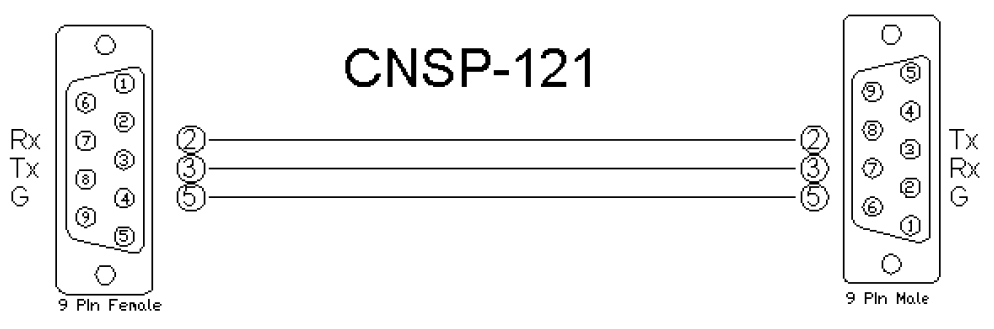
UDP/IP. Port:** 48631**.
Note: It is very important to notice that when Controlling Edge and Radius with the 3rd Party Control Protocol via Ethernet one must use UDP. The UDP Control Port Number has changed to48631. Legacy Symetrix units, those which are programmed with Symetrix Designer used and continue to use port 48630. This is not the case with the DSP which are programmed using Composer; Edge and Radius. Edge and Radius use UDP port48631to communicate when using the 3rd Party Control Protocol.
Application Notes
This Load Preset v2 module is compatible with all Symetrix Software and unit Firmware versions. Those DSP which are programmed with Symetrix Designer; 8x8 DSP, Express Cobra, Solus units, used the Legacy architecture of Numbered Rings and Unit Address Numbers within those rings.
Those DSP which are programmed with Composer; Edge and Radius, use Dante to transmit digital audio and control between units. The Edge and Radius DSP will not respond to the Version 1 Crestron Integrated Partner Modules. Use the Version 2 modules when working with Edge and Radius DSP. These units will only respond to the LP Load Preset command used in the Version 2 modules. They do not respond to the LPG Load Preset Global command. This is due to the fact that the concept of the SymLink ring has gone away.
The integrator first needs to devise the preset within the Symetrix DSP. Make sure to note whether you are creating a global vs. a custom preset. Once the preset is stored the integrator will enter the number of the preset into the control field labeled Preset_Number. A variable should be devised to come from the press of the touch-panel and a reference name should be entered.
A Load Preset v2.0 module should be placed in the design from the SIMPL + Project Modules directory for every preset that needs to be recalled. It is likely that v2.1 will bring with it a GPR (Get Preset) command to show which preset is currently loaded as well as the ability to expand the module so that only one Symetrix Load Preset module needs to be brought into the Crestron project file. Please standby for future releases and updates.
Module Graphic
Control
Load. Signal Type: Digital. This is the location where the integrator will place the variable which relates to the press in the touch-panel module. This is the variable coming from the touch-panel which will cue the preset load.
Symetrix_TX. Signal Type: Serial. This is the serial string transmission from the Crestron module(s)/project into the Symetrix DSP.
Parameters
Preset_Number. Signal Type: Variable to be entered by the Integrator. Enter a digit into this Parameter field that is the number of the preset to be loaded.
Feedback
N/A.There is not any feedback necessarily coming from the Symetrix device into this module. In order to have the buttons actually appear to engage on the touch panel, put the same variable that is the button press into the feedback portion of the touch-panel module in SIMPL. This will give the buttons the appearance of going into their active state for the moment when pressed.
Testing
Symetrix OS. Symetrix Designer v10.06, Symetrix Composer v1.1, Jupiter Software v 2.0.1.12, Integrator Series 761 Software v2.01.
SIMPL OS. 4.01
Crestron DB. 35.00.004.00
Sample Program. Symetrix 761 Demo for MC3 and TPS6