Programmable Filters
Programmable filter modules allow for the greatest flexibility in filtering signals. Use them to construct your own fully custom crossovers, or for more demanding filtering applications. Highpass, lowpass, and bandpass filters are available with slpes up to 48dB/octave. Mono and stereo versions are provided, with the stereo version applying the same filtering to both channels.
Highpass and Lowpass
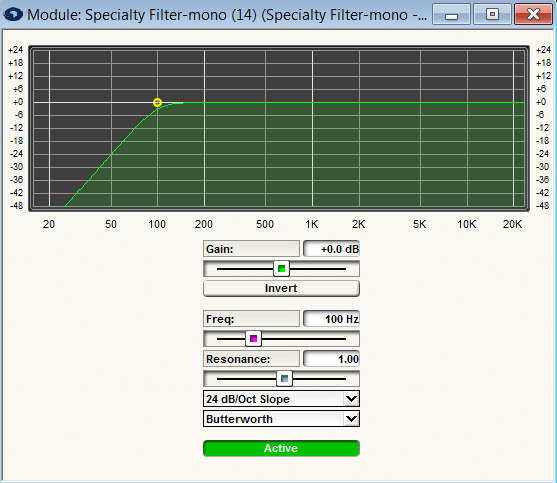
The highpass and lowpass filters provide identical controls:
-
Gain. The gain adjustment provides an overall volume control for the filter.
-
Invert. This button inverts the polarity of the audio output signal from the filter. It is equivalent to reversing the hot and cold wires of a balanced connection, or the two terminals on a loudspeaker. This setting may be useful for some crossover settings that require one band to be inverted vs. the other.
-
Frequency. Controls the cutoff frequency for the filter. For Butterworth and Bessel type crossovers, this frequency is the 3dB down point for L-R filters, it is the 6dB down point. (This assumes Resonance is set to 1.0).
-
Resonance. This control adjusts the frequency response near the cut-off point. The default resonance value of 1.0 yields "standard" filters that match the other filter and crossover modules in Symetrix. Increasing the resonance causes the filter response to peak before rolling off. Decreasing it causes the filter to droop. The effect is more pronounced with steeper filters. (Note: Technically speaking, the Q value of each biquad is multiplied by the resonance factor.)
-
Slope (6, 12, 18, 24, 30, 36, 42, 48). This setting controls the crossover slope in dB/octave for the filter. With L-R filters, only "even order" (12, 24, 36, 48) (12, 24, 36, 48) filters are available.
-
Butterworth, Bessel, and Linkwitz-Riley (filter type). Each of these filter types creates a slightly different response. See the Crossovers section for more information.
-
Bypass. Pressing this button bypasses the filter so that no filtering is done and the output is identical to the input.
A graph is provided so you can view the frequency response of the filter. You can modify the filter parameters either by using the sliders and buttons, or by clicking and dragging on the graph. Drag the yellow box horizontally to adjust the frequency or vertically to adjust the gain.
Bandpass
The bandpass filter consists of a highpass filter section and a lowpass filter section in series, each independently adjustable.
The controls are:
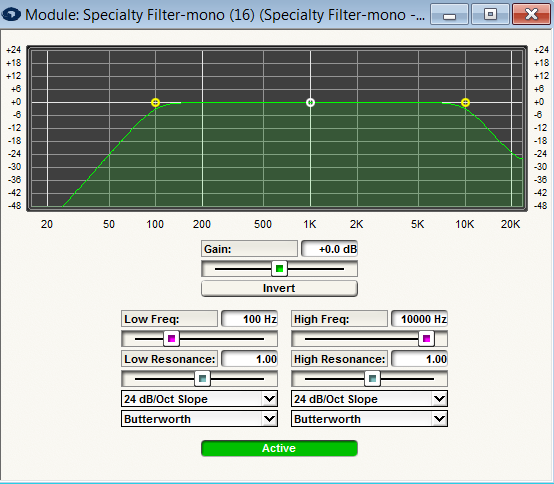
- Gain. The gain adjustment provides an overall volume control for the filter.
- Invert. This button inverts the polarity of the output audio signal from the filter module. It is equivalent to reversing the hot and cold wires of a balanced connection, or the two terminals on a loudspeaker. This setting may be useful for some crossover settings that require one band to be inverted vs. the other.
- Frequency. Controls the cutoff frequency for each filter section. For Butterworth and Bessel type crossovers, this frequency is the 3dB down point. For L-R filters, it is the 6dB down point. (This assumes REsonance is set to 1.0).
- Resonance. This control adjusts the frequency response near the cut-off point for each filter section. The default resonance value of 1.0 yields "standard" filters that much the other filter and crossover modules in Symetrix. Increasing the resonance causes the filter response to peak before rolling off. Decreasing it causes the filter to droop. The effect is more pronounced with steeper filters. (Note: Technically speaking, the Q value of each biquad is multiplied by the resonance factor.)
- Slope (6, 12, 18, 24, 30, 36, 42, 48). This setting controls the crossover slope in dB/octave for each filter section. With L-R filters, only "even order" (12, 24, 36, 48) filters are available.
- Butterworth, Bessel, and Linkwitz-Riley (filter type). Each of these filter types creates a slightly different response. The type can be set independently for each filter section. See the Crossovers section for more information.
- B**ypass. Pressing this button bypasses the filter so that no filtering is done and the output is identical to the input.