Graphic EQ
This module adjusts the frequency of a signal in the familiar graphic manner, with "constant Q" filters and symmetrical boost/cut of the frequencies provided.
Mono and stereo versions of the Graphic EQs are available with 10, 15, or 31 bands. The stereo module processes both inputs with identical filters.
Both mono, dual-mono and stereo versions have the following controls:
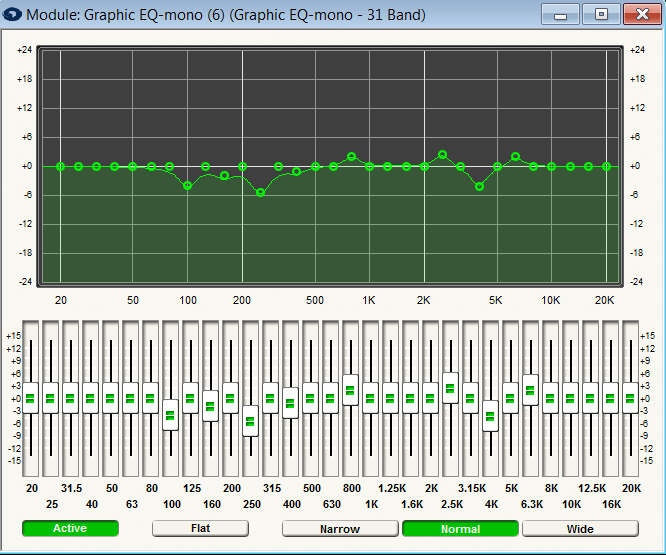
- Frequency gain (cut/boost). Determines the amount of cut or boost applied to a specific frequency band.
- Flat. A switch that resets (destructively) all of the gain controls in the equalizer to 0dB. This is a momentary button.
- Narrow/Normal/Wide. These switches set the bandwidth for the EQ bands.
- Bypass. Pressing this button bypasses the filter so that no filtering is done and the output is identical to the input.
If the bandwidth button is set to Normal, the bands are the mathematically ideal bandwidth, i.e. (1) octave for the (10) band module, 2/3 octave for the (15) band and 1/3rd octave for the (31) band. The Narrow and Wide bandwidth settings are provided to allow controlling the way that adjacent bands combine, e.g. (2) adjacent faders set to +6. Using the Wide bandwidth setting, the combined response is smoother with little or no dip between the bands, but the total boost is large than the boost of each individual band. Using the Narrow setting, there is increased dip between the bands, but the total boost is closer to value specified for each individual band. If this seems confusing, try it out and you should be able to observe the results on the graph. Basically, you can trade off how selective (narrow) the bands are vs. how well they combine with nearby bands.
Example: 31 band module with the 1k and 1.25k bands set to +6dB.
- Narrow bandwidth = ~7.5dB boost, ~1dB dip (ripple) between bands
- Normal bandwidth = ~8dB boost, ~0.25dB dip (ripple) between bands
- Wide bandwidth = ~8.5dB boost, essentially 0 dip (ripple) between bands.
A graph is provided so that you can view the frequency response of the filter.