Output Distributors
The output distributors route a single input to some, all, or none of a group of outputs. (2), (4), (8), and (16) output versions both Mono and Stereo versions of the output distributor module are provided. When an output setting changes, a quick fade out, and/or fade in occurs to ensure a smooth transition without any clicks or pops.
Mono and stereo versions have the same controls. The only difference is that with stereo versions, a stereo pair input is routed to selected stereo pairs of outputs.
Controls:
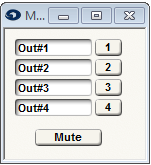
- Output buttons. One button per output is provided. Pushing the button routes the input to the corresponding output. Any number of buttons including all or none can be pushed at once.
- Mute. This button smoothly mutes all outputs of the distributor.
A space is provided to name the outputs. Click in the box adjacent to the button and enter a name. The name entered will also appear on the module's output labels.
Note: If you want to route an input to exactly one output at once, use an output selector module instead.