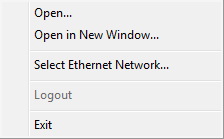
Open... and Open in New Window...: At any time during operation, one can open another .svx file by choosing Open or Open in New Window. Both bring up the standard Windows File Open dialog that will allow one to browse for and select a file. The difference between the two is that Open will replace the Panel currently in use with the new one while Open in New Window will launch a new instance of SymVue, allowing the files to be run concurrently. Up to eight separate instances of SymVue can be run simultaneously from the same machine, feasibly controlling a multitude of hardware.
Select Ethernet Network...: This feature allows the user to select which network interface will be designated for operation of a particular .svx file. When selected, a window will appear listing all available interfaces and their related IP addresses for the machine. Highlight the interface for desired use and click OK. Only one interface at a time can be used by each instance of the application. In certain cases, when the PC has multiple Ethernet interfaces (for example a wireless and wired connection), one may need to specify the proper one to use. Once a selection has been made, SymVue will use that network in all future sessions and in all instances if that network is available. The dialog will also appear automatically on opening if the chosen network is not available or a network interface has never been chosen on that machine.
Logout: Selecting this item will sever any secure connection to a Panel and return the user to the main Login Panel. This can be used in lieu of, or in addition to, a Logout button. This feature will only affect a security-enabled Panel and has no bearing on any that are not password protected.
Exit: This choice will close the currently open Panel immediately, whether secure or not, and does not ask the user for confirmation.