Symetrix Controller Divider
Crestron Certified Integrated Partner Module: Controller Divider
Models: Symetrix Integrator Series; 722, 760, 761, 780, 788. Jupiter Series; J4, J8, J12. Symetrix; 8x8 DSP, Express Cobra DSP, Solus DSP, Edge DSP, Radius DSP.
Device Type: Audio Mixer, DSP.
General Information
The Certified Crestron Module Symetrix Controller Divider is used to divide a single Symetrix Control Number's value into a user determined number of divisions. In the Symetrix DSP this functionality is useful when triggering input, or output selectors, as well as other control switches with multiple triggers. Essentially, this module is used to control any Symetrix Control Number which can have more than two values. It is a SIMPL+ module which must be compiled in theUser+directory and brought into your SIMPL Program.
Category
Audio Mixer, DSP
Version
2.0
Summary
The Symetrix Controller Divider Crestron Module is a SIMPL + module which communicates with a single Symetrix Control Number and divides its value of 65,535 into an integrator specified number of divisions.
General Notes
Input Selectors created in Composer are "Custom", meaning that the integrator can choose how large, or small the selection index will be. If a 4 input, or 5 input, or 17 input selector is desired, the integrator can put this number into the Composer dialogue after dragging the custom input selector into the Composer configuration view. An input selector with that number of inputs will appear. In order to accommodate this scheme with Crestron control it is necessary to have a Symetrix Controller Divider Crestron module that will allow the Integrator to choose a custom number of divisions for the Symetrix Controller Value, which is from (0) to (65,535).
It is worth reading the Symetrix Control Protocol document for the Series to which you wish to communicate with using this module. The Symetrix Control Protocol is identical for each series. The factor to consider is whether the Symetrix Control Numbers have already been assigned; as in the case of Jupiter, and Integrator Series. With Symetrix open architecture DSP you need to assign the Symetrix Control Numbers yourself. Open architecture DSP such as the 8x8 DSP, Express Cobra, Solus, Edge and Radius have open architecture and thus the Symetrix Control Numbers are assigned by the integrator at the time of design.
Note:It is important when assigning the Symetrix Control Number to the input, or output selector in Composer to assign the Symetrix Control Number to the selection fader of the module, not to the individual buttons. The selection control only needs (1) Symetrix Control Number. The Number should be assigned to the selection fader.
Crestron Hardware Required
2 or 3 Series Crestron Processor. RS-232, or UDP card required.
Setup of Crestron Hardware
RS-232. Baud Rate; 38400 to 115200 - Configurable through Symetrix Software Application.
8 Bit, Non-Parity, Stop Bit; 1, Flow Control; None.
Crestron Cable Type. CNSP-121
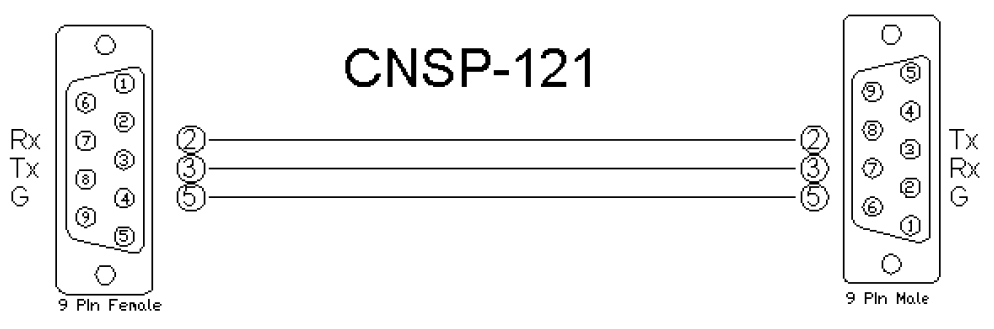
UDP/IP. Port:** 48631**.
Note:It is very important to notice that when Controlling Edge and Radius with the 3rd Party Control Protocol via Ethernet one must use UDP. The UDP Control Port Number has changed to48631. Legacy Symetrix units, those which are programmed with Symetrix Designer used and continue to use port 48630. This is not the case with the DSP which are programmed using Composer; Edge and Radius. Edge and Radius use UDP port48631to communicate when using the 3rd Party Control Protocol.
Application Notes
The number of divisions which are desired should be entered into the designated module field in the Crestron SIMPL Windows project. Also, when configuring the Controller Divider module, the Symetrix Control Number which is assigned to the parameter you're interested in should be entered. Extra variable fields for the divisions will have to be added manually by the programmer. This can be done in SIMPL Windows using the ALT +, or ALT- command to create (add), or remove the desired number of lines. For instance, if there is a Symetrix (4) input Controller that is due to be controlled, enter the Symetrix Control Number, enter the Number of Divisions (4), and then add the number of necessary lines for the touch-panel variables associated with the inputs. For Example; A Symetrix (4) input selector will have (4) touch panel variables associated with the choices. We can assign the Symetrix Control Number #1 to the selection fader. Add (4) fields to the SIMPL + Controller Divider module. The first press will send the string CS 1 0. The Second press will send CS 1 11141. The Third press will send CS 1 33442. and the fourth press will send CS 1 55704. Any value between 55704 and 65535 which is sent will select the fourth (4th) input.
Note:Below is a helpful table which illustrates the values associated with a (4), (8) and (16) input selector. You can see how the division is based upon a percentage value of 65535. As soon at the value of the Symetrix Control Number is (1) count above the division, the next level will be triggered.
4 input or output %:
1% = 0
17% = 11141
51% = 33422
85% = 55704
8 input or Output %:
1% = 0
8% = 5242
22% = 14417
36% = 23592
51% = 33422
65% = 42597
79% = 51772
93% = 60947
16 input values
1% = 655.35
6.7% = 4390.85
13.3% = 8716.16
20.0% = 13,107
26.7% = 17,497.85
33.3% = 21823.16
40.0% = 26,214
46.7% = 30,604.85
53.3% = 34,930.16
60.0% = 39,321
66.7% = 43,711.85
73.3% = 48,037.16
80.0% = 52,428
86.7% = 56,818.85
93.3% = 61,144.16
100% = 65,535
Module Graphic
Control
Select [#]. Signal Type: Digital. Field for the placement of the selection touch-panel variables. If you have (4) inputs to select, hit Alt + to create (4) lines. Put the touch panel variable which represents the selection into these fields.
Parameters
Control_Number. Signal Type: Variable to be entered by the integrator. This is the Symetrix Control Number.
Number_of_Divisions. Signal Type: Variable to be entered by the integrator. This is the number of input selections that are associated with the parameter. It is the number of times that 65,535 is going to be divided.
Feedback
Symetrix_TX. Signal Type: Serial. Serial signal to be routed to a 2-way serial COM port or UDP/IP symbol.
Testing
Symetrix OS. Symetrix Designer v10.06, Symetrix Composer v1.1, Jupiter Software v 2.0.1.12, Integrator Series 761 Software v2.01.
SIMPL OS. 4.01
Crestron DB. 35.00.004.00
Sample Program. Symetrix 761 Demo for MC3 and TPS6