Window Menu
The Window Menu formats the way that open windows are displayed.
-
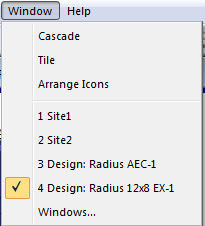
Cascade - Cascades the open windows in a card fan fashion.
-
Tile - Tiles open windows attempting to display all open windows in the work area.
-
Arrange Icons - Neatly organizes all minimized windows along the bottom of the application frame.
-
List of Open Windows - A listing of all open (both minimized and maximized) windows. Selecting a number from 1 to n opens the selected window (if it has been minimized) and places it on top of all other open windows.
-
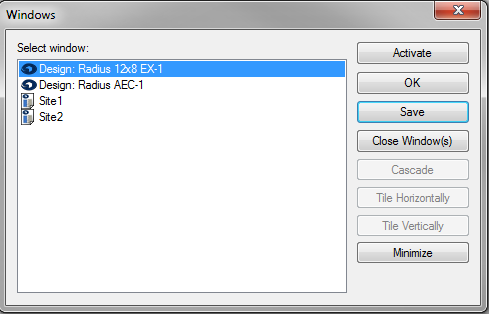
Windows... - Manages all of the open windows and site files inside of Composer.
-
- Activate - Brings the selected window to the front.
- OK - Closes the Windows window.
- Save - Saves the selected site file or the selected window's site file.
- Close Window(s) - Closes the selected window(s).
- Cascade - Cascades the selected window(s).
- Title Horizontally - Tiles the selected window(s) horizontally.
- Tile Vertically - Tiles the selected window(s) vertically.
- Minimize - Minimizes the selected window(s).