Network I/O Manager
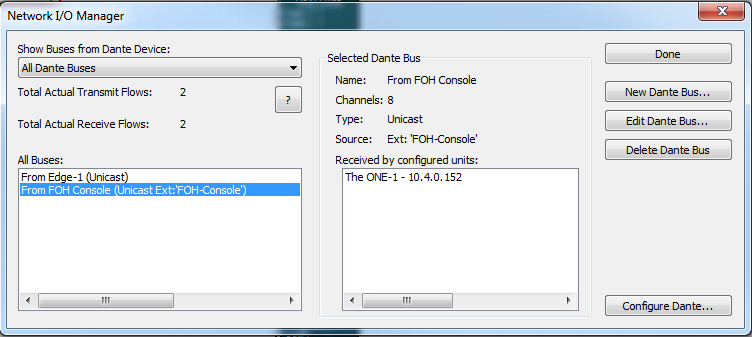
The Network I/O Manager configures the Dante network audio buses and sets the operating mode of the Dante ports.
- Show Buses from Dante Device: - Drop down list allows the display of all Dante buses defined in the Site File, all external buses, all buses with AES67 streams, or only those being transmitted or received from a specific unit.
- New Dante Bus... - Creates a new Dante Bus. Buses created here are not designated as Transmit or Receive as they are when dropped directly into a Design from the Toolkit unless the External Dante Device Network Name: option is checked. Then the bus will automatically become a receive bus. You can Browse for External Devices on the network once your units have been located. The Dante Bus Name, Dante Bus Channels (1-64), and Channel Names can be defined. If the bus is intended to receive from a 3rd party device, be sure to check the External Device Network Name: option and fill in the appropriate External Device Network Name and Channel Names. Both must match the 3rd party device in order to be received. Buses may be Unicast or Multicast and can include an AES67 stream. A unicast bus goes from one unit to exactly one other unit. A multicast bus goes from one unit to one or more units. Multicast buses send the Dante audio to all connected units and for this reason, unicast buses should be used when possible to eliminate unnecessary network traffic.
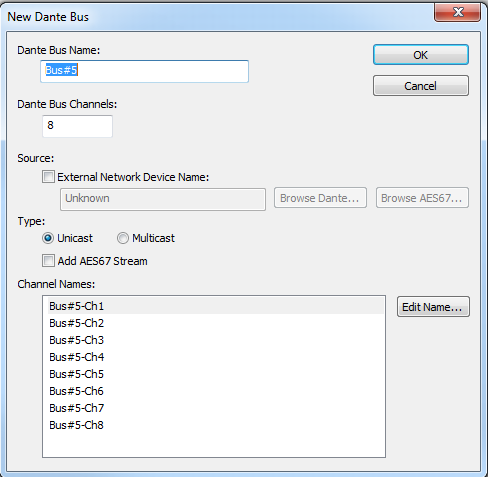 - Edit Dante Bus... - Edits the currently selected Dante bus allowing you to change the Dante Bus Name, Dante Bus Channels (1-64), and Channel Names, Type and Source (if received from an external device).
- Delete Dante Bus - Deletes the currently selected Dante bus.
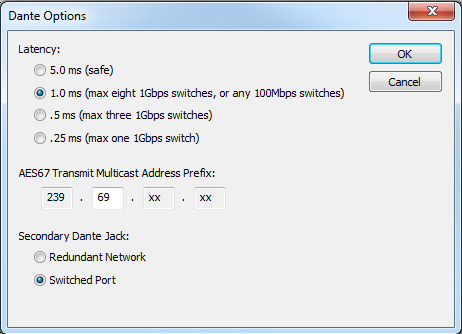
- Configure Dante... - Opens the Dante Options dialog allowing you to set the Latency, AES67 Transmit Multicast Address Prefix, and Secondary Dante Jack function. For more information, visit the Dante networking topics.
- Edit Dante Bus... - Edits the currently selected Dante bus allowing you to change the Dante Bus Name, Dante Bus Channels (1-64), and Channel Names, Type and Source (if received from an external device).
- Delete Dante Bus - Deletes the currently selected Dante bus.
- Configure Dante... - Opens the Dante Options dialog allowing you to set the Latency, AES67 Transmit Multicast Address Prefix, and Secondary Dante Jack function. For more information, visit the Dante networking topics.
Click here to access instructions on how to program Network Transmit and Receive Buses.