Flex EQ
This module allows for maximum flexibility when designing an equalization module. A variety of filter types can be employed with multiple slopes, as well as a variable Q, or bandwidth, gain and frequency selection.
Mono, Dual-Mono and Stereo versions of the Flex EQ are available and they possess the following controls:
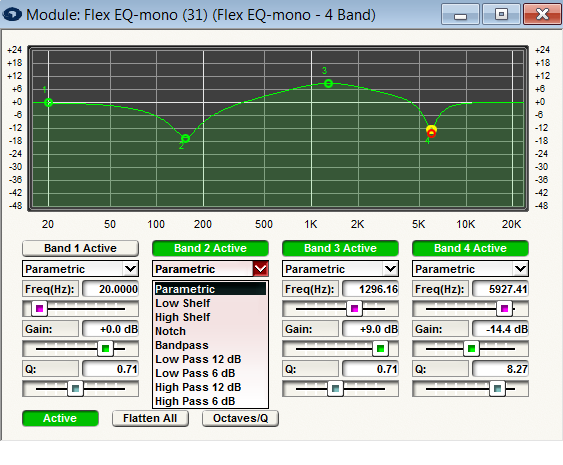
- Band # Active. Essentially, an inverse bypass button. When the button is engaged (green) the filter on that band is engaged in the audio signal path.
- Filter Type. Through this pull down menu; Parametric, Low and High Shelf, Notch, Bandpass, as well as Low and High Pass (1st and 2nd order) filters are available.
- Frequency. The center frequency of the equalizer band/filter.
- Gain. The amount of gain or attenuation (boost or cut) applied at the center frequency.
- Width; Octaves/(Q). The bandwidth of the peak or dip applied to the signal, measured in fractions of an octave.
- Active. The inverse of a Bypass button. When engaged (green) the filter is inserted into the path of the audio signal. When disengaged the audio signal passes through the module unaffected.
- Flatten All. This switch destructively resets all of the gain controls in the equalizer to 0dB. This is a momentary button.
- Octaves/Q. This switch changes the units used by the "Q" controls between fractional octaves and Q.
A graph is provided so that you can view the frequency response of the filter. You can modify the frequency centers and gain either by using the sliders, or by clicking and ragging on the graph. Drag the green box horizontally to adjust the frequency of the filter, or vertically to adjust the amount of boost.